InfiniBand 400G: What It Is and How to Choose
By Peter Lin, HENGXANG Firm · Published on November 21, 2026
By the HENGXANG fiber optic engineering team. We manufacture MPO/MTP patch cords, trunk cables, and ODF hardware at our own factory in Zhejiang, China.
InfiniBand 400G is the NDR (Next Data Rate) generation of InfiniBand: NVIDIA's 400 Gb/s per-port networking technology, built from ConnectX-7 adapters and Quantum-2 switches, that connects GPUs inside H200-class AI and HPC clusters. It is the fabric that lets thousands of GPUs swap data with almost no waiting, which is why it sits under most large AI training builds today.
This guide answers the questions buyers actually ask about InfiniBand 400G: how it compares with 400G Ethernet, which cables a 400G port accepts, whether to buy OM4 or OS2 fiber, why NVIDIA requires MPO-12/APC connectors, whether 2×400G equals 800G, and how to order and troubleshoot the passive layer without wasting a commissioning week.
A sense of scale first: one published B300-class deployment plan counts around 9,216 MPO cables for a large cluster, and any single cable can decide whether training runs or stalls. We have built the fiber side of these links for 25 years at HENGXANG, and the failures we hear about almost never involve one bad part. They involve five conditions that quietly disagree: port generation, optical spec, fiber type, connector structure, and loss budget.
The sections below walk through all five in plain language, with the distances, part numbers, and ordering sequence that keep 400G links up from day one.
| Quick question | Quick answer |
|---|---|
| What is InfiniBand 400G? | The NDR generation: 400 Gb/s on every port |
| Which hardware runs it? | ConnectX-7 adapters with Quantum-2 switches |
| How far does the fiber go? | SR4: up to 50 m on OM4; DR4: 100 to 500 m on OS2 |
| Is there a copper option? | DAC inside the rack, ACC/AEC a few meters further |
| What breaks 400G links? | Wrong media, polish, polarity, or loss budget |
| What comes next? | XDR 800G on Quantum-X800; note 2×400G is not 800G |
What Is InfiniBand 400G and Why Does It Matter for AI Clusters?
InfiniBand 400G is the NDR (Next Data Rate) generation of InfiniBand: 400 gigabits per second on every port. It pairs NVIDIA ConnectX-7 adapters with Quantum-2 switches, and it exists because thousands of GPUs in an AI cluster need to share data without waiting on the CPUs that feed them.
InfiniBand is not a cable type. It is a networking standard, defined by the InfiniBand Trade Association, that gives every server a dedicated, managed path through the switch fabric. The feature that makes it special is RDMA, short for remote direct memory access. With RDMA, one server reads another server's memory straight across the network, so the GPU gets its data with almost no delay and almost no CPU work.
NVIDIA bought the technology's longtime champion, Mellanox, in 2020, and has pushed a new speed generation every few years since (Wikipedia keeps the full timeline). The company now positions the fabric for AI and cloud data centers as much as for classic supercomputers.
| Generation | Speed per port | Where you meet it |
|---|---|---|
| HDR | 200 Gb/s | The previous AI generation, A100-class clusters |
| NDR | 400 Gb/s | H200-class clusters on Quantum-2 switches |
| XDR | 800 Gb/s | B300-class clusters on Quantum-X800 switches |
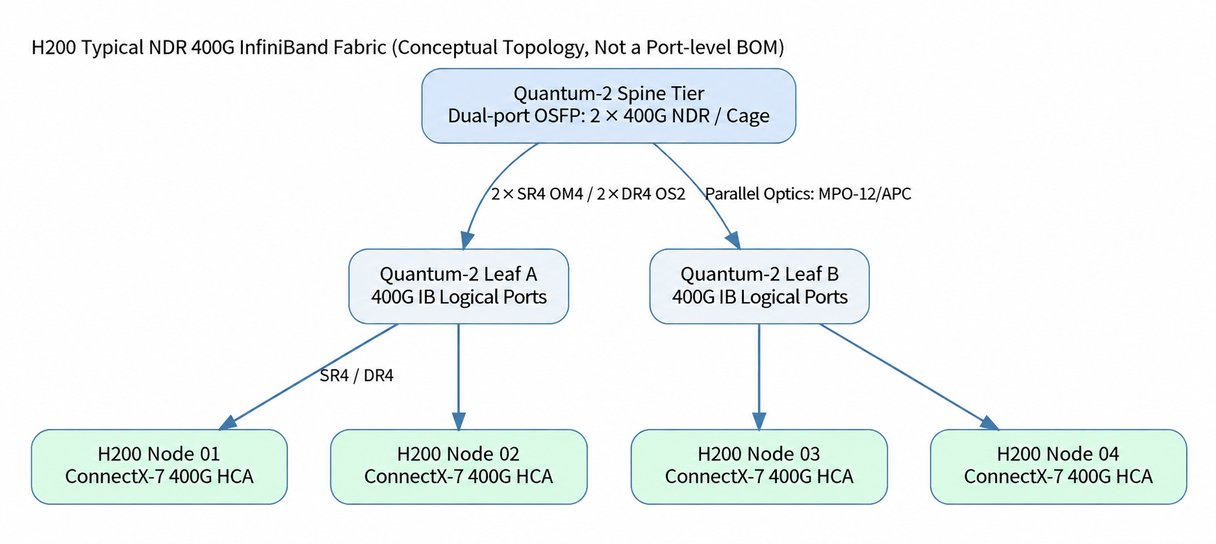
When NVIDIA launched NDR in late 2020, it claimed 3x the switch port density and a 32x jump in AI acceleration over the previous generation. A Quantum-2 switch packs 64 ports of 400G into one box, for 51.2 terabits per second of switching capacity.
The market has noticed. One recent forecast puts the InfiniBand market at USD 35.07 billion in 2026, on its way to USD 164.4 billion by 2031, growing about 36 percent a year.
Why does the fabric deserve its own line in the AI budget? Because training a large model is a team sport. Thousands of GPUs each compute their piece of the puzzle, then swap answers with the rest of the group, many times per second. When the fabric adds delay, every GPU waits, every step, every day. That is why the network choice shows up in training time, not just in hardware quotes.
Here is the counterintuitive part, and the reason this guide exists. The network that moves petabytes of GPU data still depends on plugs, polish, and pin patterns. The faster the generation, the less forgiving the passive layer becomes.

Video: Inside a NEW AI Cluster, a tour with NVIDIA B200 by ServeTheHome (15 minutes). A walk-through of a real, running AI cluster: the NDR InfiniBand fabric, the cabling at scale, and the power and cooling that turn port speeds into training capacity.
InfiniBand 400G vs 400G Ethernet: Which Should You Actually Buy?
Choose InfiniBand 400G when you are building a dedicated GPU training fabric and want the lowest latency plus RDMA and in-network computing built into the switches. Choose 400G Ethernet when one network must carry everything, when you want multi-vendor pricing power, or when your team already runs Ethernet at scale.
Both technologies run 400 gigabits per second on a port, so the spec sheets look like twins. The difference is what the network is built to do all day.
InfiniBand was born as a compute fabric. 400G Ethernet grew up carrying websites, backups, and video, then learned RDMA later through a mode called RoCEv2, short for RDMA over Converged Ethernet. RoCEv2 works, but it asks more of your switch configuration and your team, and a 2025 explainer on InfiniBand architecture walks through that history well.
| What matters | InfiniBand 400G | 400G Ethernet (RoCEv2) |
|---|---|---|
| Reason it exists | HPC and AI fabric from day one | General networking that added RDMA |
| In-network computing | Built in: switches run SHARP reductions | Not standard, handled in software |
| Vendor landscape | One dominant supplier (NVIDIA) | Many competing vendors |
| Skills needed | A separate fabric language to learn | Your existing network team |
| Typical cost per port | Higher | Lower, with constant price pressure |
| Best fit | Dedicated training clusters | Mixed-use networks |
Now the answer most vendor pages will not say out loud. If port price decides your project, you will often end up happier on 400G Ethernet, and no honest cable supplier should pretend otherwise. Multi-vendor Ethernet puts constant pressure on pricing, and the performance gap keeps narrowing as Ethernet pushes 400G and 800G across AI data centers.
InfiniBand earns its premium in one specific situation: a fabric dedicated to GPU training, where latency and congestion control are the whole game and the switches themselves do part of the math. The comparison for AI clusters from DCS Global frames this split cleanly, and it matches what we see from the cabling side of real builds.
One more truth from the field. InfiniBand means a second fabric to learn, staff, and stock spares for. If your organization cannot support two networks well, that operational cost deserves as much weight as the hardware quote.
What Cables Can a 400G InfiniBand Port Actually Use?
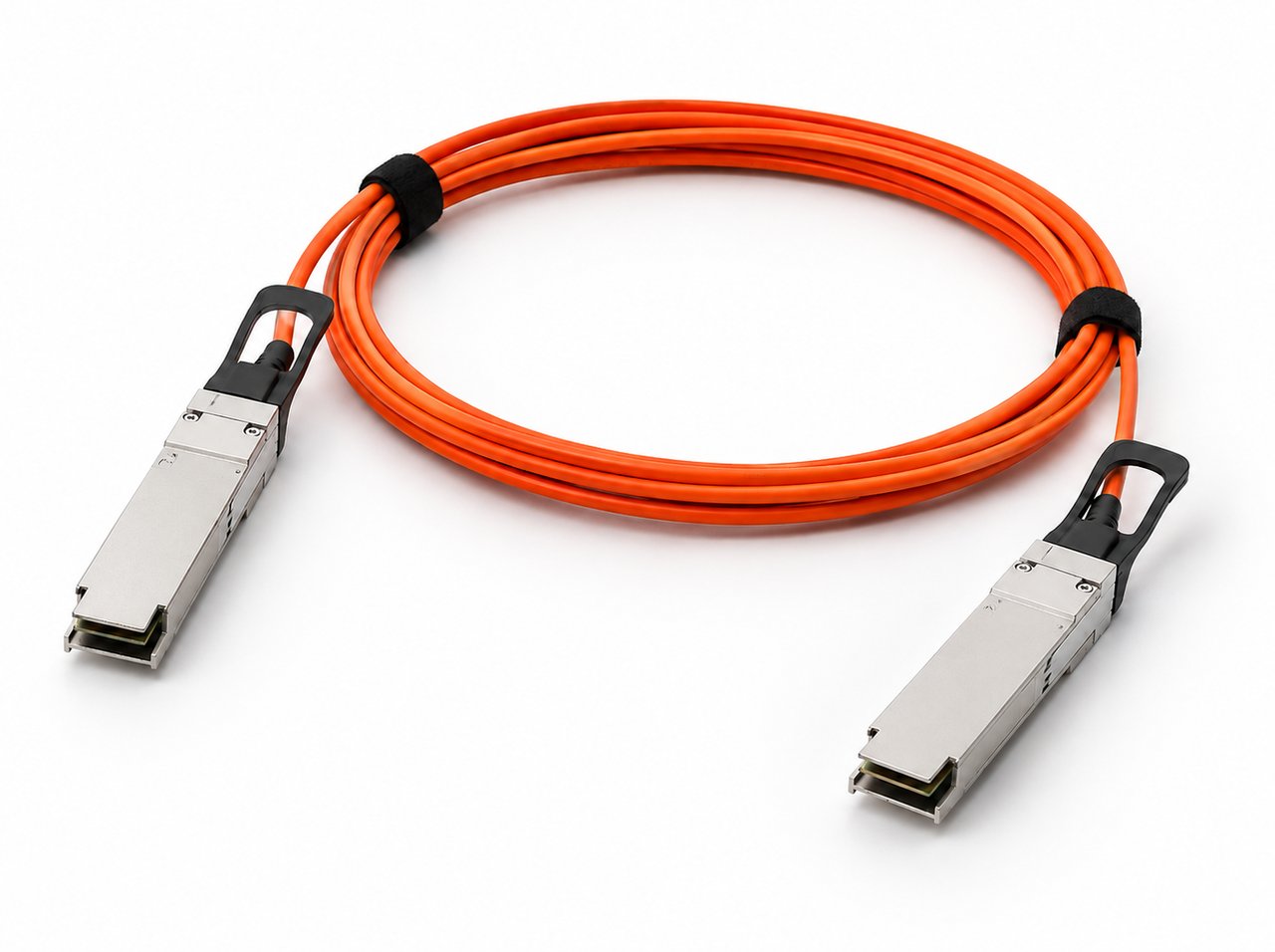
A 400G InfiniBand port accepts four cable families: passive DAC copper for short in-rack jumps, active ACC or AEC copper for a few extra meters, AOC for clean fixed runs between racks, and pluggable SR4 or DR4 optics over MPO fiber when the link passes panels or needs real distance.
The word "InfiniBand" on a jacket says nothing about what is inside. Inside, a 400G link can run on plain copper, boosted copper, or glass. Your job is matching the family to the distance and the path.
| Cable type | What it is | Best for | Watch out for |
|---|---|---|---|
| DAC (passive copper) | Twinax cable, no electronics | Inside one rack, certified lengths only | Thick, heavy, very short reach |
| ACC / AEC (active copper) | Copper with signal-boosting electronics | A few extra meters on certified builds | Power draw, stricter compatibility lists |
| AOC (active optical) | Fiber with built-in optics at both ends | Fixed rack-to-rack runs | Failure means replacing the whole cable |
| OM4 + SR4 optics | MPO-12/APC multimode fiber | Same-room links up to 50 m | Tight loss budget, panels eat margin |
| OS2 + DR4 optics | MPO-12/APC single-mode fiber | 100 to 500 m, cross-room trunks | Higher cost per module SKU |
A few field notes on each family.
Passive DAC is the cheapest and thickest option. It draws no power and works only over short certified lengths, so it shines inside one rack and fails as a general solution. It also has a near-zero failure rate, which is why switch vendors certify specific lengths and expect you to stay on that list.
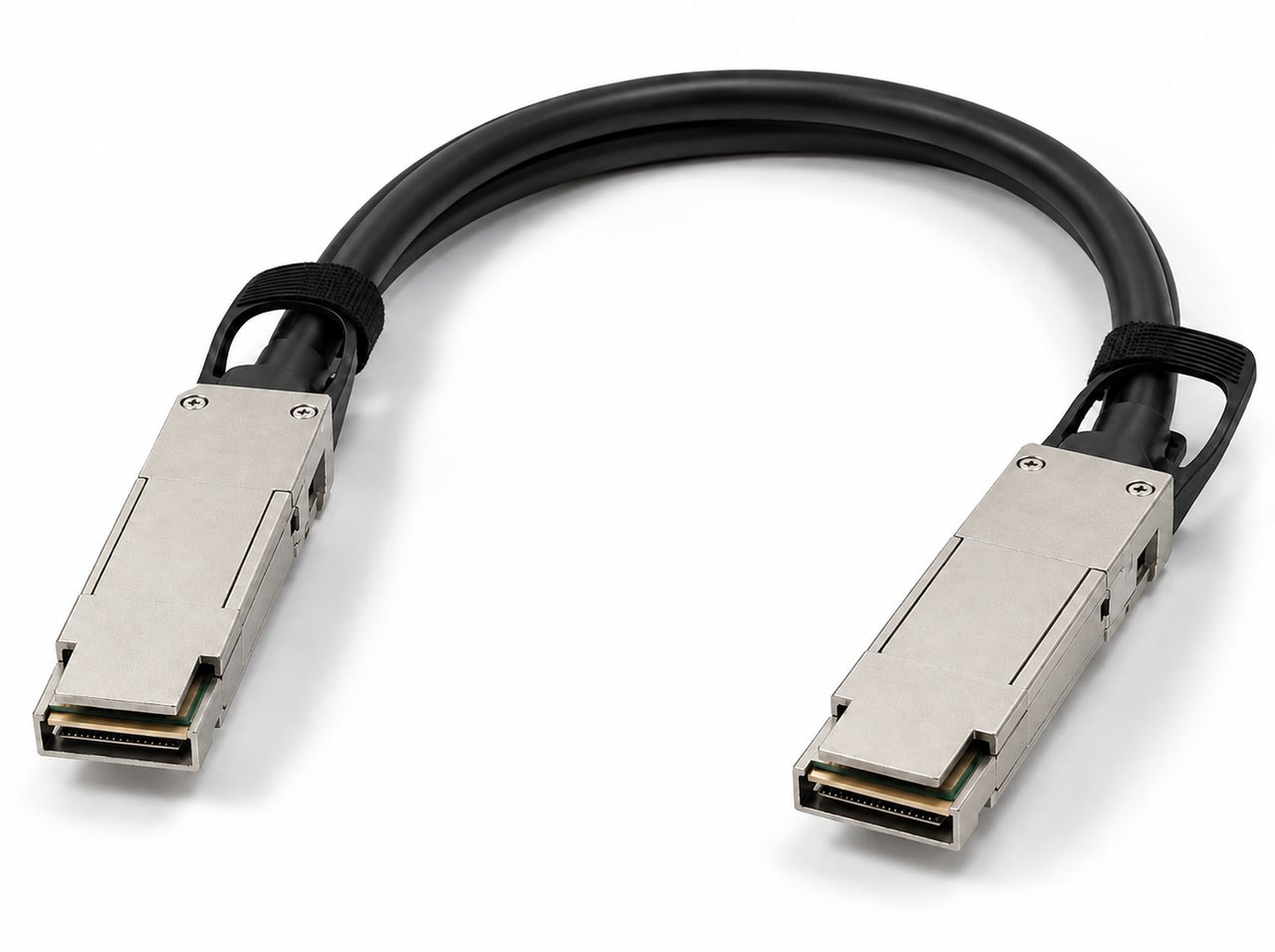
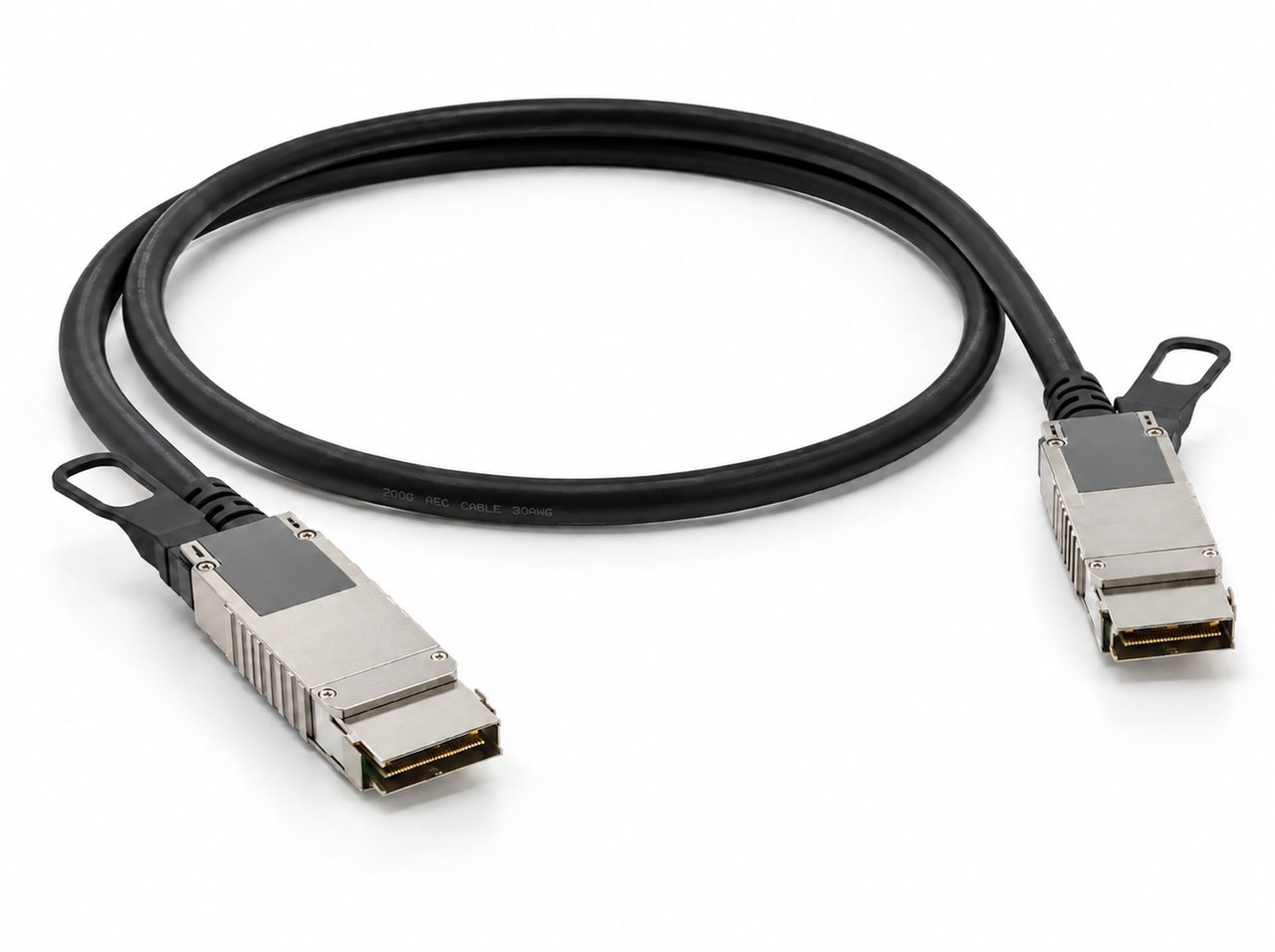
Active copper, ACC and AEC, adds electronics inside the connectors to push copper a bit further. The trade is power draw and a stricter compatibility list, and some AECs retime the signal, which is why you must order by part number, not by looks. How the plug-in side of AI data centers is being rethought is a live topic, and our EBO connectors post covers one direction it is heading.
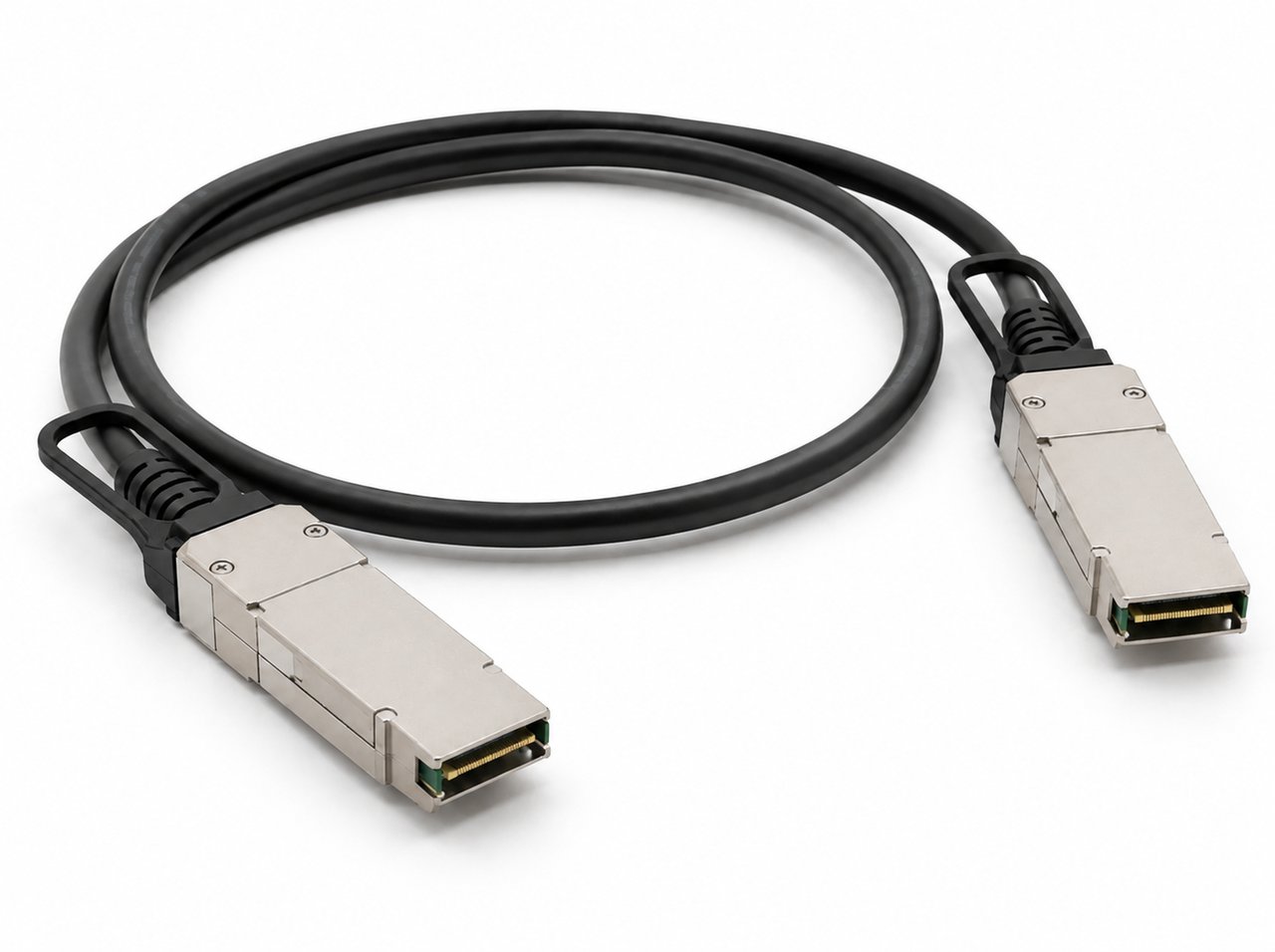
AOC runs light through a factory-attached fiber. It is light, thin, and easy to pull, but when it fails you replace the whole assembly. That is why we recommend it for fixed, protected runs rather than areas you re-patch often.
Pluggable optics plus fiber is the only family that goes through patch panels and ODFs, which is what real buildings demand. It is also the family where our own products live: the MPO patch cord range, OM3 MPO trunk cable for large builds, and MPO to LC fanout breakouts for mixed equipment.
One naming warning before you shop. A "400G breakout" can mean one 400G link splitting to two 200G links, or to four 100G links, and those are different products for different equipment generations. Breakout exists so one fast port can feed slower gear. Order by what sits on the other end, not by the biggest number on the box.
OM4 or OS2: Which Fiber Should You Buy for 400G InfiniBand?
Buy OM4 multimode fiber with MPO-12/APC connectors for same-room SR4 links up to 50 meters. Buy OS2 single-mode for DR4 links that run 100 to 500 meters, and for any backbone trunk you want to survive the next switch generation.
Start with the physics, because it decides everything else. Single-mode OS2 fiber carries light down a core about 9 microns wide. Multimode OM3, OM4, and OM5 use a 50-micron core, and Wikipedia's multimode fiber page explains why the wider core limits distance at high speeds. Wider core means more paths for light to bounce, more smear, shorter reach, and cheaper modules. Narrower core means longer reach and costlier optics.
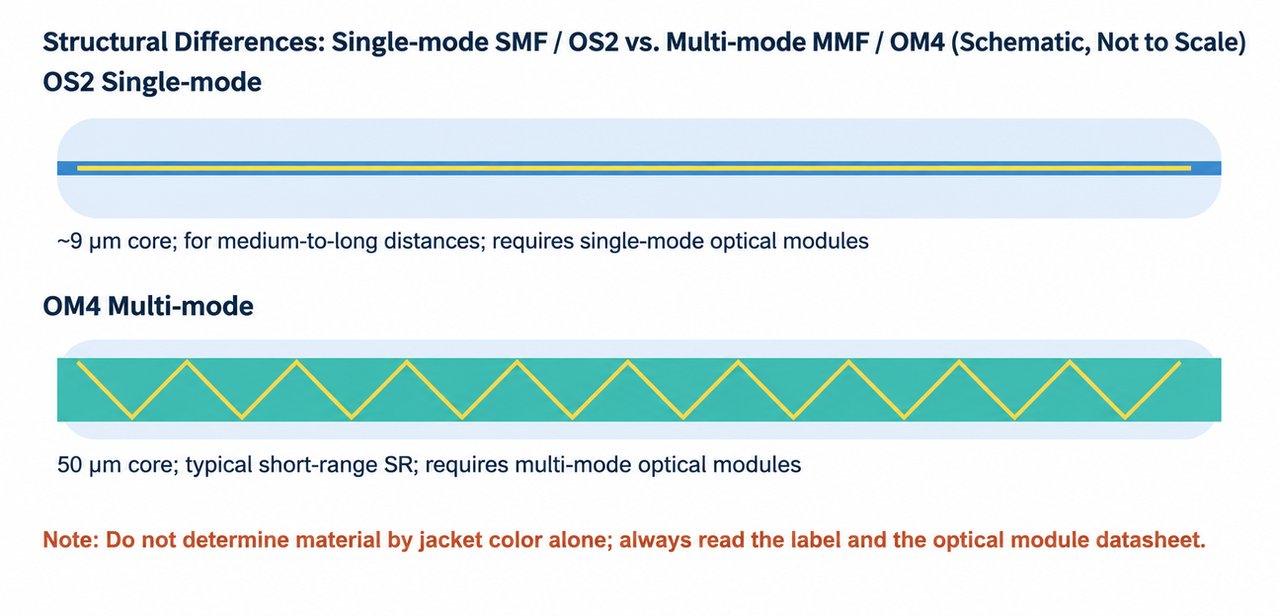
For the NDR generation the practical split looks like this.
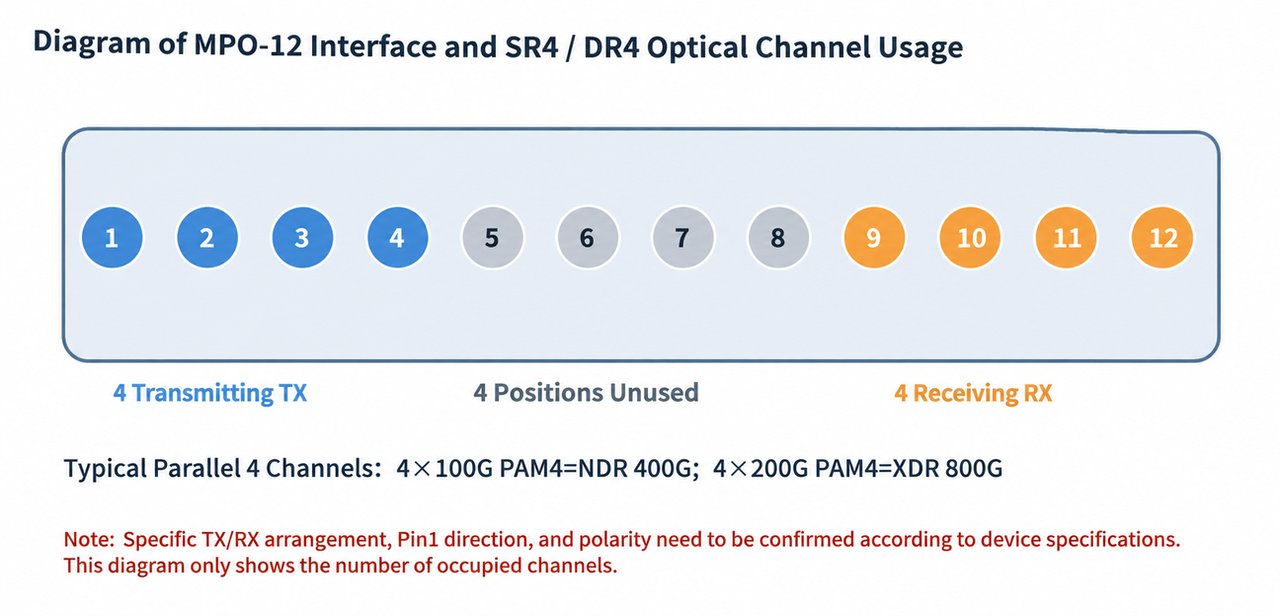
SR4 optics run four 100 Gb/s channels in parallel over multimode fiber. NVIDIA rates its SR4 module at 50 meters on OM4, about 30 meters on the older OM3, per the SR4 datasheet. DR4 optics run the same parallel trick over OS2 single-mode: standard parts reach 100 meters, with variants pushing to 500 meters, per the DR4 datasheet. Plan roughly 8 watts of switch power for each DR4 port as well, per the same datasheet. Both families use MPO-12/APC connectors, which matters so much it gets its own section below.
One more planning note for anyone reusing existing plant. Multimode SR4 assumes short, clean paths, and every extra patch panel between the two ends steals margin from that 50-meter rating. A link that crosses three panels can fail at 20 meters while a clean direct run passes at 45, so count the connections before you trust the length.
| Scenario | Pick this | Why |
|---|---|---|
| Same rack or adjacent racks, under 50 m | OM4 + SR4 | Cheaper optics, short certified runs |
| Across the room or to another room | OS2 + DR4 | Reach, panel-friendly loss margin |
| Backbone you plan to keep for years | OS2 | Survives the next generation after verification |
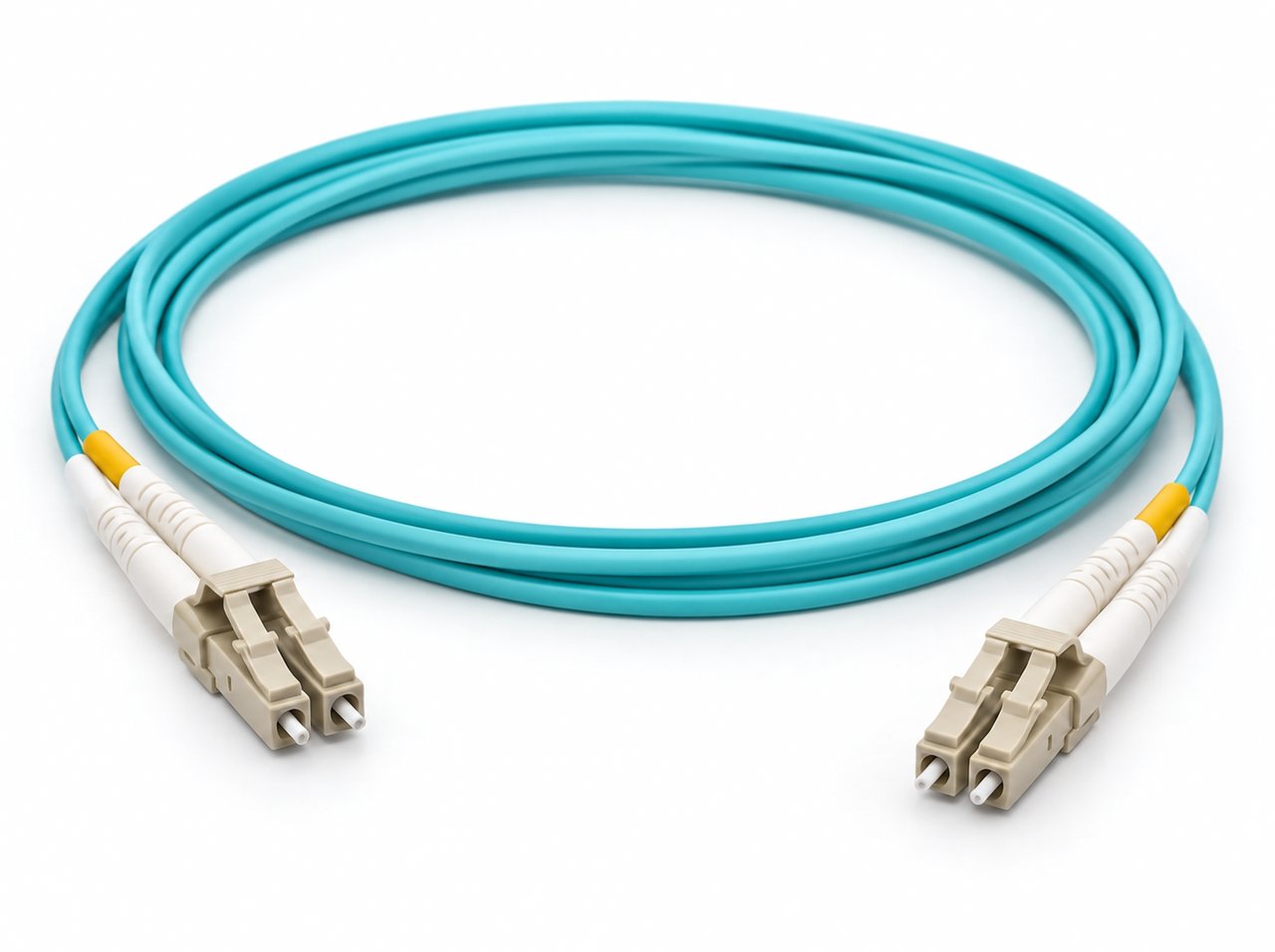
Now the trap that costs real money: jacket color. Yellow usually means OS2, and aqua or violet usually means OM4, but color is only a hint. The reliable identification is the print on the cable and the part number on the box, never the shade of the jacket.
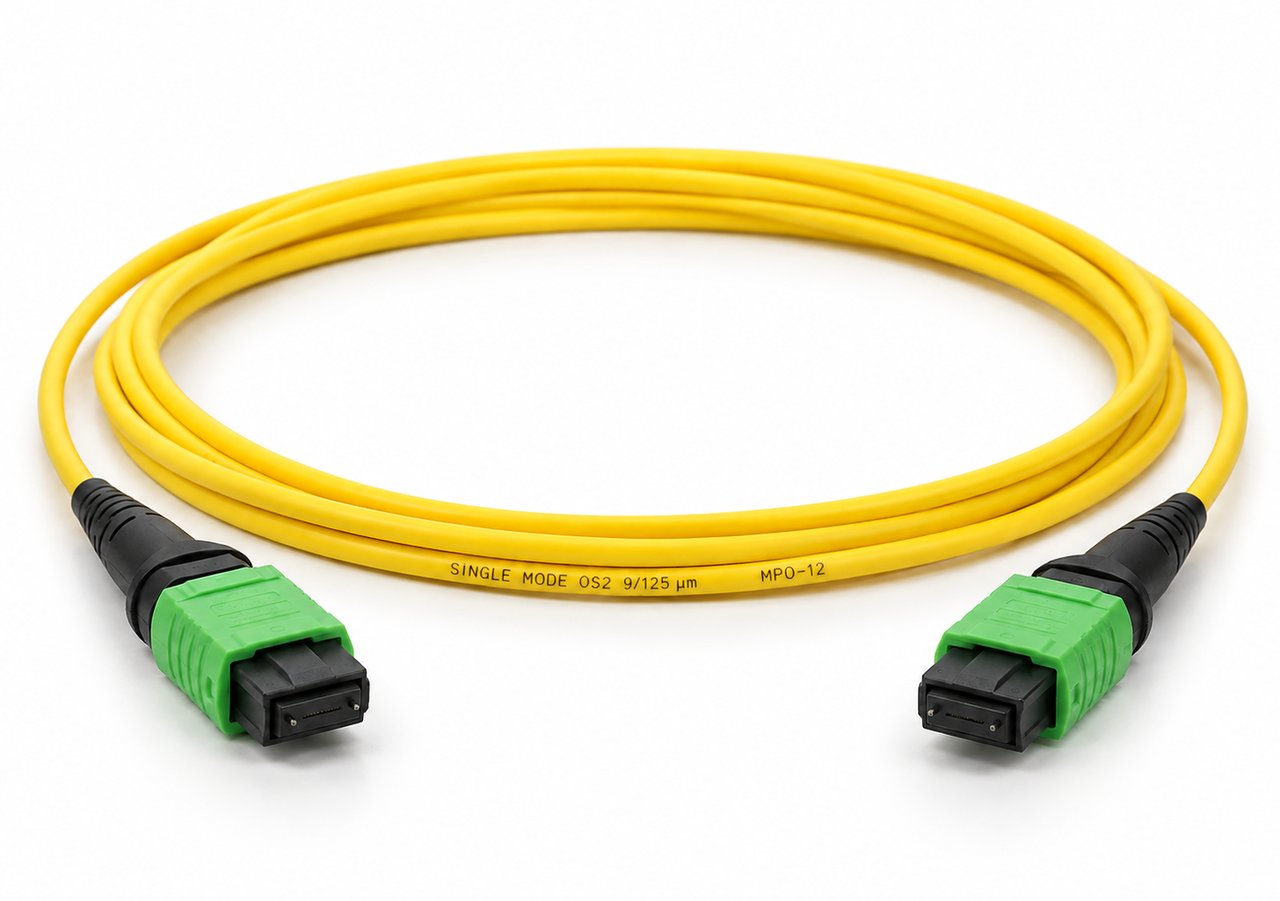
And one myth to bury right here. A green MPO plug tells you the polish is APC. It does not tell you the fiber is single-mode, because multimode 400G modules use APC connectors too.
The counterintuitive economics are worth slowing down for. OM4 wins on price per meter, yet OS2 often wins on price per project. A single-mode backbone that is properly built and documented can carry the next speed generation after verification, while multimode runs tend to be rebuilt each time reach shrinks. We price for the port, the link, and the project, not the sticker, and fiber media is exactly where that philosophy pays.
If you want to see what we ship for each side: an OM4 MPO data center patch cord for the short SR4 side, a single-mode MPO trunk for the DR4 side, or indoor fiber optic cable if you are pulling your own backbone.
Why Does NVIDIA Require MPO-12/APC Even on Multimode 400G SR4?
Because the 400G SR4 module is designed around an angled-polish MPO-12 connector. A UPC cable will plug in but leak light back toward the laser, and at 100 gigabits per lane the loss budget cannot absorb that. APC is a hard requirement here, and it applies to multimode too.
What MPO-12 actually carries
MPO is the multi-fiber push-on connector, and MPO-12 means the ferrule holds 12 fiber positions. Here is the first surprise: only 8 of them carry data. Four fibers send your 400G, four channels at 100 Gb/s each, and four fibers receive it. The middle positions sit idle. That is also why a 400G SR4 link is called full-duplex 400G: 400 out and 400 in, not 800 added together.
APC versus UPC at 100 gigabits per lane
So why APC on multimode? APC stands for angled physical contact, a polish that tilts the fiber end face so reflected light bounces into the connector wall instead of straight back into the laser (the difference between polish types). UPC, ultra physical contact, is a flat polish. Mixing them is worse than having one bad cable, because the geometry mismatch feeds reflection into a laser running 100 Gb/s per lane, where the error budget has almost no slack. Most of us learned "APC equals single-mode" years ago. At 400G that rule is dead, and NVIDIA's own SR4 module datasheet specifies MPO-12/APC for a multimode part.
Five conditions every purchase order must match
This is why "MPO 400G fiber" is not a purchase description. It is a wish. Five conditions have to match before a cable and a module are the same product:
| Condition | Question it answers | What a mismatch looks like |
|---|---|---|
| Port generation | NDR, XDR, or older HDR? | Wrong speed, port never trains |
| Optical spec | SR4, DR4, or a duplex FR/LR? | Link down, or an error storm |
| Fiber media | OS2 single-mode or OM3/OM4 multimode? | No light, or heavy bit errors |
| Connector structure | APC or UPC, polarity, gender, key | Plugs fit, TX lands on TX, link down |
| Loss budget | End-to-end loss including every panel | Flapping and unstable traffic |
Polarity: count the whole path, not one label
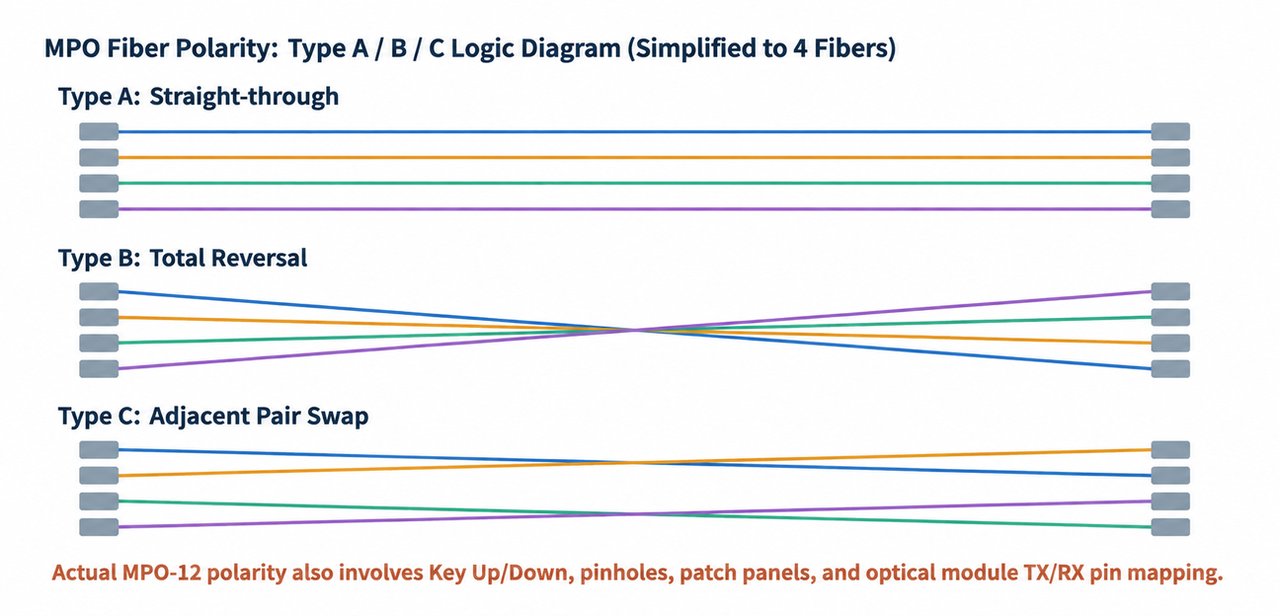
Polarity is the quiet killer. TIA-568 defines three MPO wiring methods, Type A, B, and C polarity: A is straight-through, B flips the fiber array end to end, and C swaps neighboring pairs. None of the three is "better". The only question that matters is whether the transmitter on one end lands on the receiver on the other, through every trunk, cassette, and patch cord in between.
That is where the classic mistake lives. Someone sees a Type B label on one segment and assumes the link is fine. If your path runs module, trunk, ODF cassette, and cord, you must count the full mapping end to end. One label proves nothing about a path. This is exactly why optical distribution frames and cassettes deserve their own planning pass, and why we wrote what an ODF actually does for teams designing these paths.
Gender, pins, and key direction
Two smaller checks fail silently, so make them explicit.
Gender and pins: a male MPO carries the guide pins, a female does not. What plugs into a transceiver socket and what plugs into a cassette need different pin patterns, and the key direction has to match the overall plan.
Path design: a direct module-to-module link and a link that crosses a panel often need different polarity schemes. We ask about your full path for this reason, not just the two ends.
If connector fundamentals feel new, our fiber connector basics post covers the LC, SC, FC, and ST world that sits next to all of this.

Video: Lecture 44, MPO Connector Fiber Polarity by the Fiber Optic Association (10 minutes). The clearest visual walk-through of the Type A, B, and C mappings behind the five-condition table above, from the industry's own training body.
Is 2×400G the Same as an 800G Port?
No. An NDR twin-port OSFP cage delivers two independent 400G links, while an XDR port runs one native 800G link. They belong to different switch generations with different adapters, modules, and cabling rules, so an 800G sticker alone never proves that a part will work in your fabric.
The confusion starts with a cage. Quantum-2 era hardware offers twin-port OSFP designs: one physical cage, two independent 400G links, sometimes labeled "800G" because of the total. Quantum-X800 era hardware runs one native 800G link per port, 144 of them per switch, for 115.2 terabits per second in one chassis. Two different things, one marketing word.
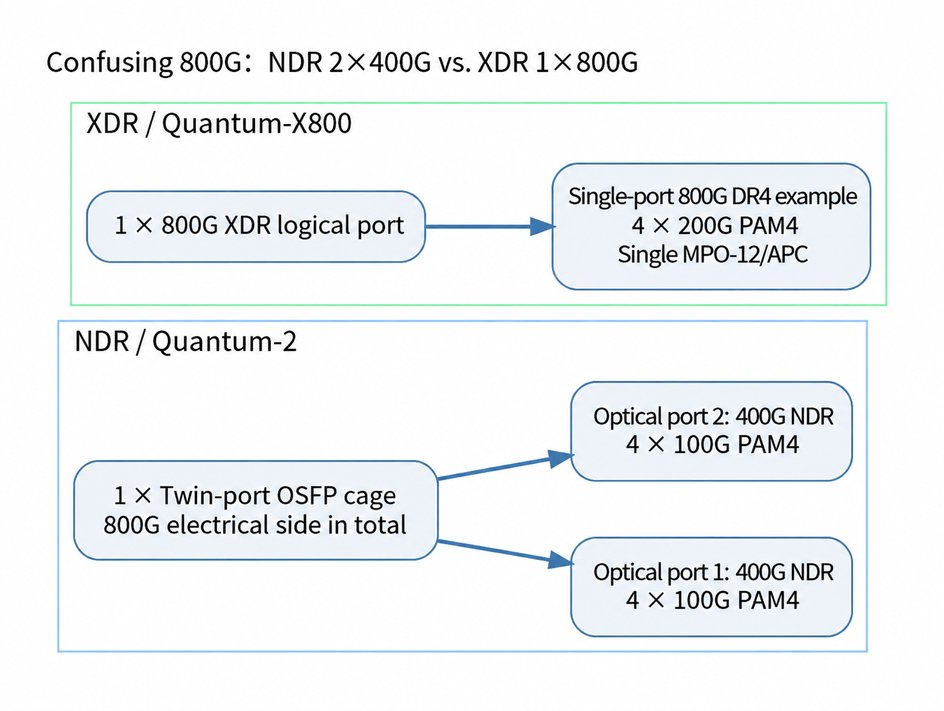
| Label you see | What it actually is | What it needs |
|---|---|---|
| 800G (twin-port NDR) | Two independent 400G links | Quantum-2 ports, twin-port module, two MPO-12/APC cords |
| 800G (XDR native) | One 800G link | Quantum-X800 ports, ConnectX-8 class adapters, XDR modules |
The adapter mismatch kills plans quietly. ConnectX-7 speaks NDR 400G and ConnectX-8 speaks XDR 800G, and the fabric around them must agree. The Quantum-X800 platform is a new port capability and optical channel system, not a sticker upgrade.
XDR also changes the fiber conversation again. XDR 800G DR4-class modules push 200 gigabits per lane over OS2 single-mode, back on MPO-12/APC hardware. That makes your single-mode plant the natural survivor, while every module, cassette, and loss budget in the path needs re-verification before anyone calls a link "reused".
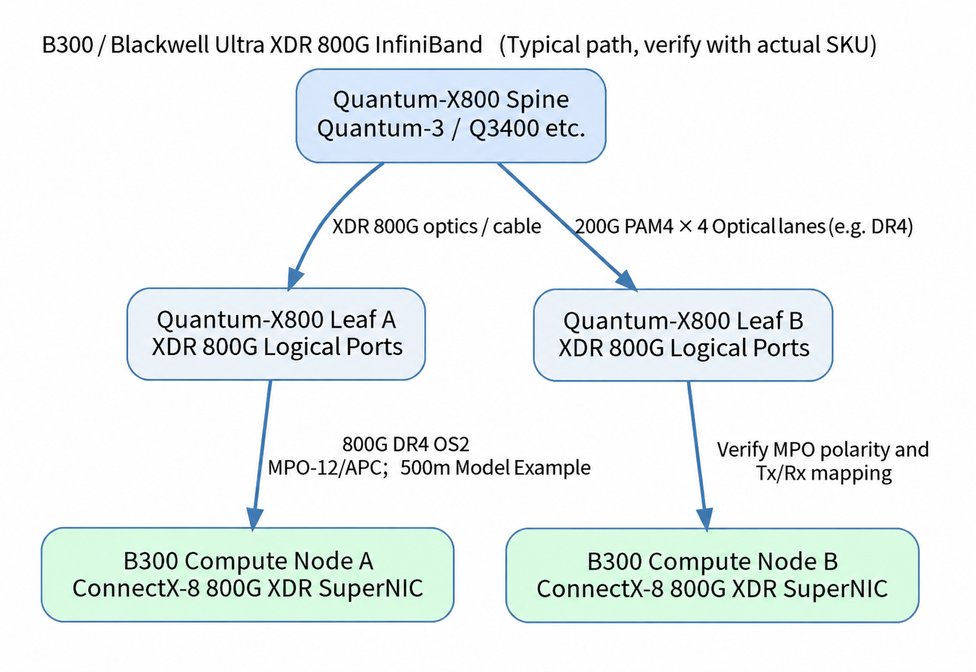
Three traps from the field are worth pinning to your planning wall.
First, port generation lock. Free ports on a Quantum-2 switch do not equal XDR readiness. Moving from NDR to XDR usually touches switches, adapters, modules, and cabling design together, so spare capacity today is not an upgrade path tomorrow.
Second, cable reuse myth. OS2 fiber plant may survive, but "the fiber is still good" is not the same as "the link is still good". Every panel and cord in the path gets re-measured against the new budget.
Third, spare parts drift. A room with both NDR and XDR gear needs two certified parts lists. Mix them up and you get spares that look identical and replace nothing. The most expensive 800G cable is the one you buy twice.
If you are pricing either generation, our optical transceivers category shows where our passive assemblies sit next to the module side of the link.
The Ordering Sequence That Avoids a Dead Port
Every failed 400G purchase order we have seen skipped the same six steps, in the same order. Follow the sequence and the port works on day one. Skip a step and you discover the problem during commissioning week, when every hour has a GPU attached to it.
- HCA and switch model first. ConnectX-7 on one end and Quantum-2 on the other? That fixes the generation before anything else gets discussed.
- Port speed and generation. NDR 400G native, twin-port 2×400G, or XDR 800G. Write it down explicitly, because "800G" alone means two different things.
- Certified module part number. Take the exact PN from NVIDIA's cabling planning guidelines or your vendor's certified list. A model family is not a part number.
- Media and distance. OM4 up to 50 m for SR4, OS2 for DR4 from 100 to 500 m. Measure the real path, not the floor plan.
- MPO structure. Fiber count (12), polish (APC), polarity (A, B, or C for the whole path), gender, and key direction.
- Loss budget and spares. Every panel, splice, and bend counts against the budget, and spares belong on the same order as the install.
A purchase-order line that survives this sequence looks like this: "MPO-12/APC, 12-fiber, Type B polarity, male, OM4, 15 m, PN per approved list". Every field exists because someone, somewhere, once ordered without it.
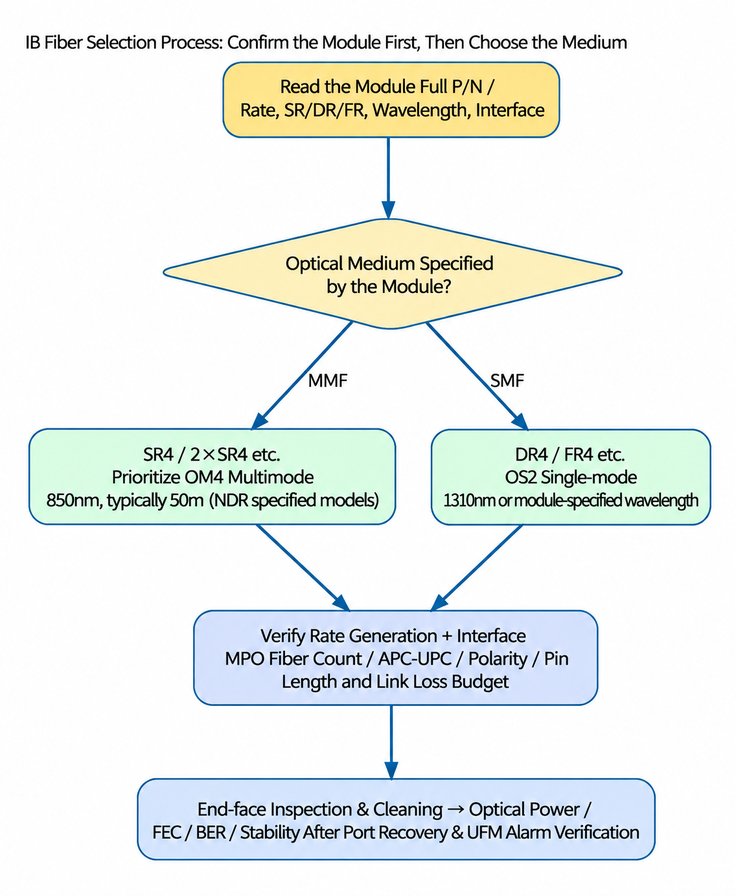
Two honest warnings from the factory floor.
"The module supports 50 m" does not mean "your 50 m passes". Connector dirt, cable bends, and panel hops each eat loss margin, and only an end-to-end measurement settles the question.
And a supplier test worth more than any certificate: if a quote for InfiniBand cabling arrives without a question about your switch model and module part numbers, walk away. We ask because we build the passive side of these links in our connector factory, and because the questions are cheap while the wrong shipment is not.
When you are ready, the inquiry form at the bottom of this page is built around exactly these six steps, so the reply you get is a spec-matched list rather than a brochure.
Ethernet Cables on InfiniBand Ports: What Actually Works
The cable never knew about protocols in the first place. Glass and copper carry bits; modules and switches set the rules. NVIDIA's own 400G SR4 module lists InfiniBand and Ethernet modes on the same datasheet, which tells you where the real boundary sits: in the module and its certified list, not in the jacket.
So the practical answer has three layers.
The cable itself: a compliant MPO-12/APC OM4 assembly works for either protocol, as long as the media and structure match the module. The fiber does not care what rides on it.
The module: many NDR-class parts are dual-mode, but each SKU decides. The datasheet, not the label, is the truth, and the Ethernet-only or InfiniBand-only variants of the same family prove the point.
The fabric: switches maintain certified module lists and firmware gates. A module that works happily on Ethernet gear can still be refused by an InfiniBand switch until the list says otherwise.
Here is the heresy. "InfiniBand cable" is mostly a marketing word. Nothing inside the cable says InfiniBand. What you are really buying is correct media, correct polish, correct polarity, and a length that fits the loss budget, for the module part number you actually run. Get those four right and the protocol takes care of itself. Get them wrong and no amount of branding on the jacket will save the commissioning day.
Why Does My InfiniBand Link Keep Flapping, and Why Not Restart OpenSM First?
Flapping almost always means a physical-layer fault: mismatched media, wrong polish, bad polarity, dirt, or loss above budget. Check cables, modules, and optical counters first. Restarting the subnet manager only reshuffles traffic on a fabric whose hardware is still failing underneath.
OpenSM is the subnet manager, the software traffic cop that assigns addresses and routes inside the InfiniBand fabric. When a port flips up and down, the cop keeps redrawing routes around a pothole it did not create. The pothole is physical. Fix the road, and the cop has nothing to react to.
The sequence that works, learned the hard way across many commissioning weeks:
- Build the link's identity first. Fabric and rail, switch and server ports, adapter PCI address, when it started, what changed last. Decide whether you are chasing a true physical link drop or a logical state wobble.
- Audit the parts. Both module part numbers, SR4 or DR4, OS2 or OM4, APC or UPC, polarity plan, panel routing. Most root causes die right here.
- Read the optics and counters. Compare Tx and Rx power, module temperature, FEC corrections, uncorrectable errors, and bit error rate against a healthy port of the same model. Some modules expose only a few counters, and no data is not the same as no fault.
- Swap one variable at a time. Approved window, one certified spare cord, then one module, then one port. Change two things at once and you have rebuilt the mystery instead of solving it.
- Prove it under load. Link Up is not the finish line. Run your bandwidth and NCCL checks and compare counters again, because a link that trains cleanly can still strangle training traffic.
On a Linux host, the read-only starting kit is already installed: `ibstat` for port states, `ibdev2netdev` to map adapters to network names, and `mlxlink` for the deep counters on Mellanox hardware.
A quick example of the method in action. Suppose a leaf switch port flaps every few hours. Step one shows it is one rail, one port, no recent changes. Step two finds both ends are MPO-12/APC on OM4, polarity Type B, gender correct. Step three finds Rx power sits about 2 dB below the healthy neighbor port. Step four swaps only the cord, and the counters settle. Root cause: a dirty ferrule on one end, not a failing HCA, and certainly not an OpenSM problem.
One more distinction saves whole shifts. There are four different "downs" in a cluster. The physical port can be up while the InfiniBand logical state, the host driver, or the GPU job each have their own separate problems. An idle GPU on the other end does not push a switch port down. Judge the hardware by the adapter, the module, and real port counters, not by what the job queue claims.
And the honest psychology: no one ever gets blamed for restarting the fabric manager. That is exactly why the same fault survives three shifts and one very long weekend.
How Do You Keep a 10,000-Cable Fabric Maintainable?
Give every link a record: where it runs, which generation it serves, which module part numbers it mates with, its fiber type, its MPO parameters, and its measured acceptance baseline. A fabric of thousands of cables becomes maintainable the day that table exists, not the day a fault appears.
A big build makes this real. One published B300-class deployment plan counts around 9,216 MPO cables for a large cluster. At that scale, "which cord is this?" is not a joke question. It is the difference between a ten-minute fix and a three-day hunt.
The answer is a ledger, and it is boring on purpose:
| Record | What to write down |
|---|---|
| Location and topology | Hall, cabinet, fabric and rail, both devices and ports |
| Generation | NDR 400G or XDR 800G, port split mode |
| Modules | Both ends: vendor, model, part number, firmware needs |
| Fiber | OS2 or OM4, length, fiber count, ODF route |
| MPO parameters | Fiber count, APC or UPC, polarity, gender, key |
| Acceptance baseline | End-face, insertion loss, optical power, FEC/BER at handover |
| Maintenance | Cable ID, spare part number, alarm history, change log |
Fill it in at handover, not at the first alarm. The acceptance row deserves special respect: end-face inspection, measured insertion loss, optical power, and a FEC and BER baseline captured while everything is new. Those numbers become your "healthy" reference, so the next fault gets diagnosed against evidence instead of hope.
The ledger also closes a loop that operations teams learn to love: alarm, to physical path, to parts list, to test result, to replacement record. Every step feeds the next, and each new incident takes less time than the last.
Keep the spare kit honest too. A spare cord that matches last year's build is worthless against this year's XDR ports, and a drawer of unlabeled leftovers is how one bad swap turns into two faults. The ledger already holds the spare part numbers, so order spares from the same table and label every bag before it hits the shelf.
Physical organization carries its share too. Network cabinets and racks with sane labeling, fiber termination boxes that protect splice and panel points, and the practices in our data center cable management guide all feed the same goal: a fabric you can read like a book.
This is also where our own standard lives. Quality in fiber optics is decided at the micron level, in a cleanroom, under ISO 9001 and SGS testing. That is why we can put an acceptance baseline behind every assembly we ship. A cable with a traceable record is not a cost line. It is the part of the fabric that tells you the truth when everything else is guessing.
Three things to carry out of this guide.
First, InfiniBand 400G is an end-to-end system from adapter to fiber, so buying "a cable" without the five matching conditions is how commissioning weeks get ruined. Second, the NDR generation rewards precision: OM4 or OS2, APC not UPC, polarity counted through every panel, and one variable changed at a time in the field. Third, judge every part by total cost over unit price, because the cheapest cable in the cluster is the one that has to be replaced.
If you are ordering for an H200-class or B300-class build, send us the details through the inquiry form at the bottom of this page: switch model, module part numbers, media, lengths, and polarity plan. Our engineers will reply with a spec-matched MPO and trunk list, priced factory-direct. And if some of the answers are still open, send the questions anyway. We would rather grow a project over years than win a one-off purchase.
About the author
This guide comes from the HENGXANG fiber optic engineering team. HENGXANG has built fiber optic connectors and cable assemblies at its own factory in Zhejiang, China since December 2000: cleanroom connector production, in-line interferometry inspection, and SGS-verified testing. Planning a 400G or 800G build? Send your module list through the inquiry form and we will respond with a spec-matched cable list.
Frequently Asked Questions
Is InfiniBand copper or optical?
Both. Short links inside a rack often run on passive DAC copper or active ACC/AEC copper, while anything longer, or anything crossing a patch panel, runs on fiber through SR4 or DR4 optics with MPO-12/APC connectors. The fabric decides per link based on distance, path, and the certified parts list.
How far can a 400G InfiniBand signal go on fiber?
For the NDR generation, NVIDIA's SR4 module is rated at 50 meters on OM4 multimode, about 30 meters on OM3, per the SR4 datasheet. DR4 modules on OS2 single-mode reach 100 meters as the standard rating, with variants extending to 500 meters per the DR4 datasheet. Whatever the rating says, the end-to-end loss budget makes the final call.
Can I reuse my 400G NDR cables when we upgrade to 800G XDR?
Not by default. XDR is a new generation of ports, adapters, and modules, so every part in the path needs re-verification against the new loss budget. Well-built OS2 single-mode backbone has the best chance of surviving the upgrade once measured, while most multimode SR4 runs get rebuilt for the new reach.
Which 400G InfiniBand cable should I buy for a 20-meter run between racks?
Start from the module part number on both ends, then match the media. If those ports are NDR SR4, an OM4 MPO-12/APC assembly rated to 50 meters fits a clean 20-meter run with margin. If the path crosses two or more panels, or you expect an XDR upgrade later, quote OS2 DR4 instead and measure the real loss before ordering.
Do you supply NVIDIA-certified 400G transceivers and cables?
We do not supply the NVIDIA-certified modules themselves, and we will not pretend otherwise; those belong with the certified optics vendors. What we manufacture is the passive fiber layer: MPO/MTP patch cords, single-mode and multimode trunks, fanout and breakout assemblies, ODFs, and termination hardware, built to the exact polish, polarity, and length your module list requires. Send your switch model and module part numbers through the form and we will match the passive side precisely.
Interested in our products?
Get a Quote