What is a SFP transceiver and how to choose
By Peter Lin, HENGXANG Firm · Published on November 13, 2026 · Updated on November 15, 2026
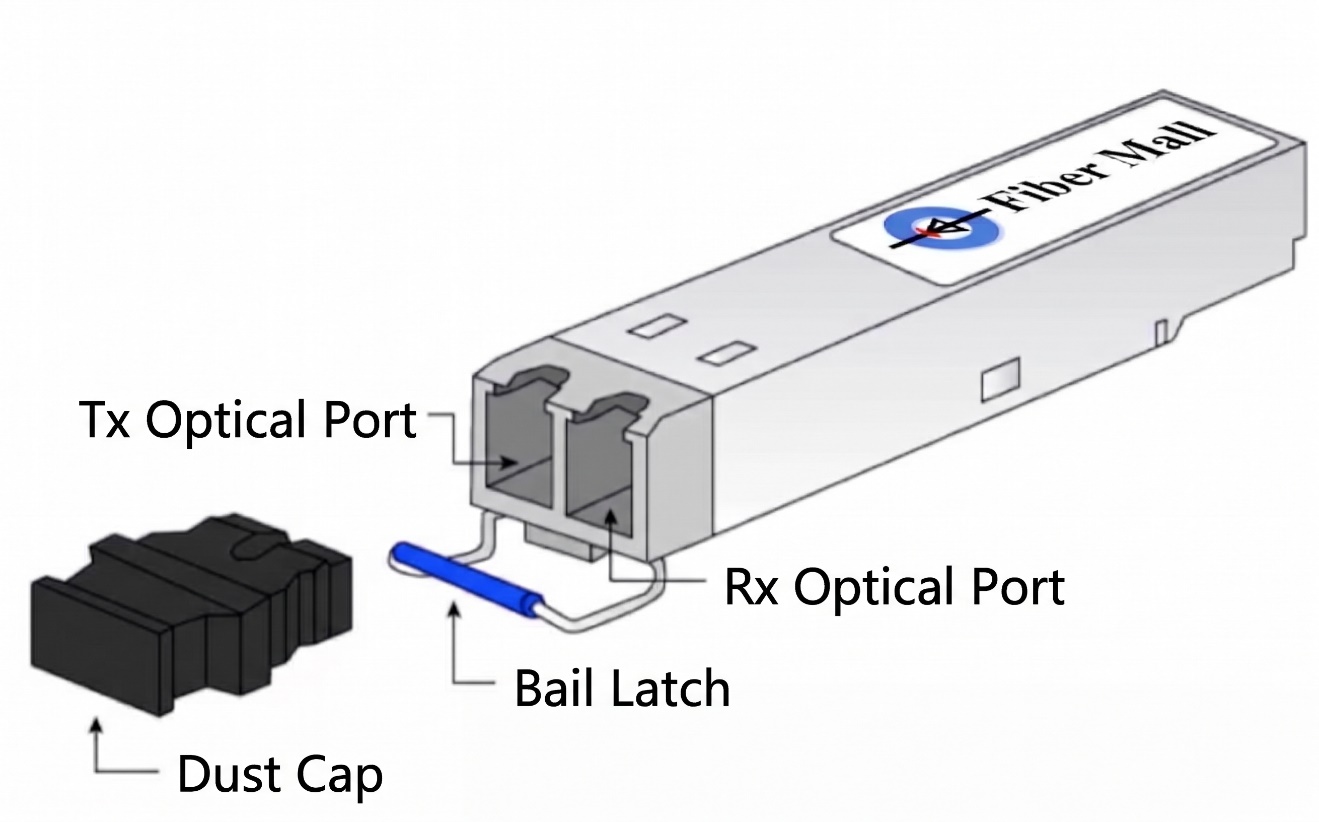
What is a SFP transceiver? A SFP transceiver is a small, hot-swappable module that plugs into a switch, router, or server port. It converts the electrical signals inside the device into light for fiber cable, or into electrical signals for copper cable. SFP stands for small form-factor pluggable. One module covers speeds up to 1 Gbps and reaches from 100 meters over copper to more than 100 kilometers over single mode fiber.
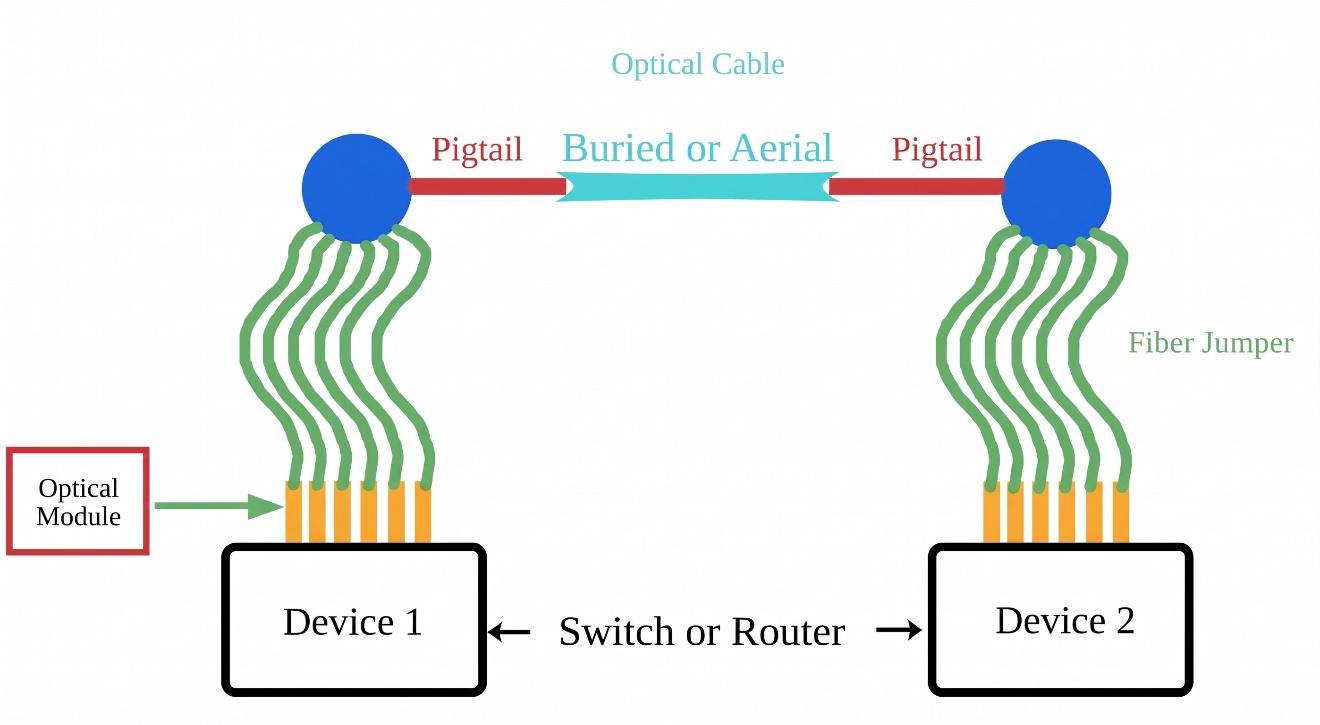
That is the short answer. The rest of this guide covers how the module works, how the SFP family grew out of the old GBIC standard, and a five-step method for choosing the right one. It ends with the question buyers ask us most: original brand or compatible module?
If you have ever stared at a dark link light with both ends plugged in, a wrong SFP pairing is one of the most common causes. This guide helps you catch that mistake before the order is placed, not after the install crew is on site.
We have manufactured fiber optic products in Jinhua, China since December 2000. Our production lines test every module for insertion loss and return loss before it ships, and we code transceivers for OEM brands sold in more than 50 countries. What follows is what 25 years on the factory floor has taught us about these fingernail-sized parts.
What Is a SFP Transceiver?
A SFP transceiver (small form-factor pluggable) is a compact, hot-swappable module that plugs into a port on a switch, router, firewall, or server. It converts the electrical signals inside the device into light for fiber cable, or into electrical signals for copper cable. SFPs support common networking standards such as Ethernet, SONET/SDH, and Fibre Channel.
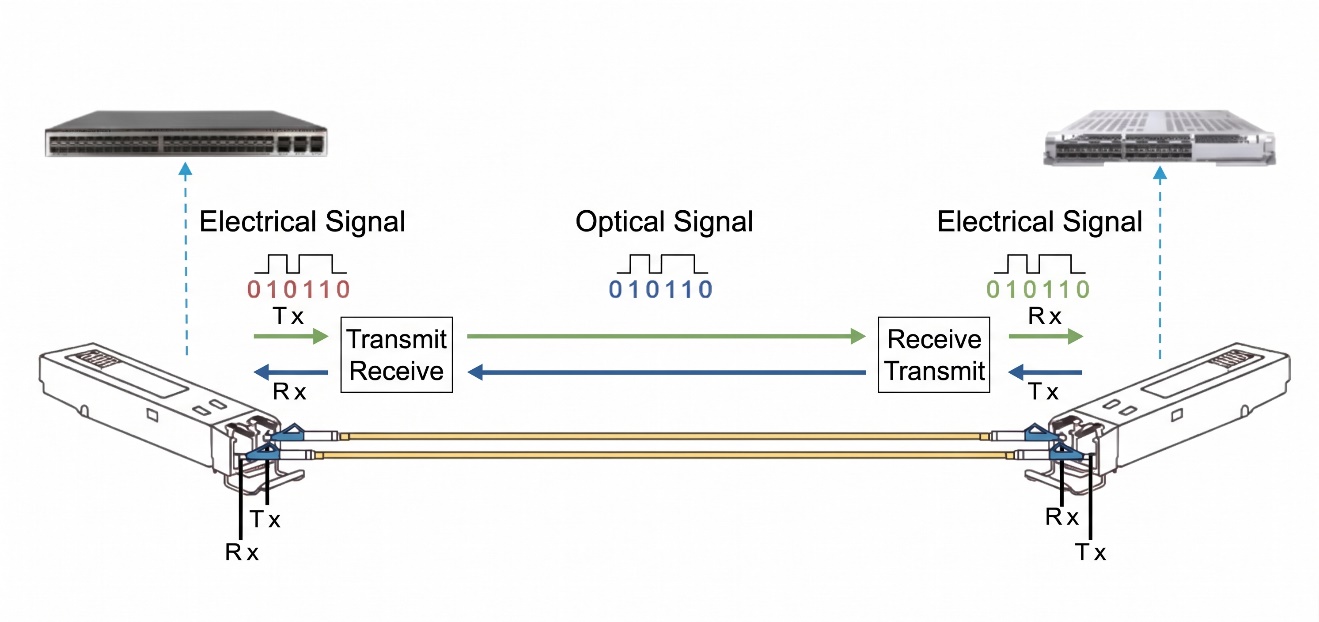
The name tells you most of what you need to know. "Transceiver" is a mashup of transmitter and receiver: the module both sends and receives data. "Pluggable" means you can insert or remove it while the equipment is running. That hot-swap ability is the whole selling point, because you can change cable types or distances without powering down the switch, as hot-swappable SFP modules let network teams adapt a port instead of replacing the whole device.
Here is the part people miss: SFP is not an official IEEE standard. It is a multi-source agreement (MSA), which is a deal between many manufacturers to build modules the same way. The Small Form-factor Pluggable standard was defined by an industry committee and first published in 2001, and the MSA approach is why a module from one vendor fits a switch from another.
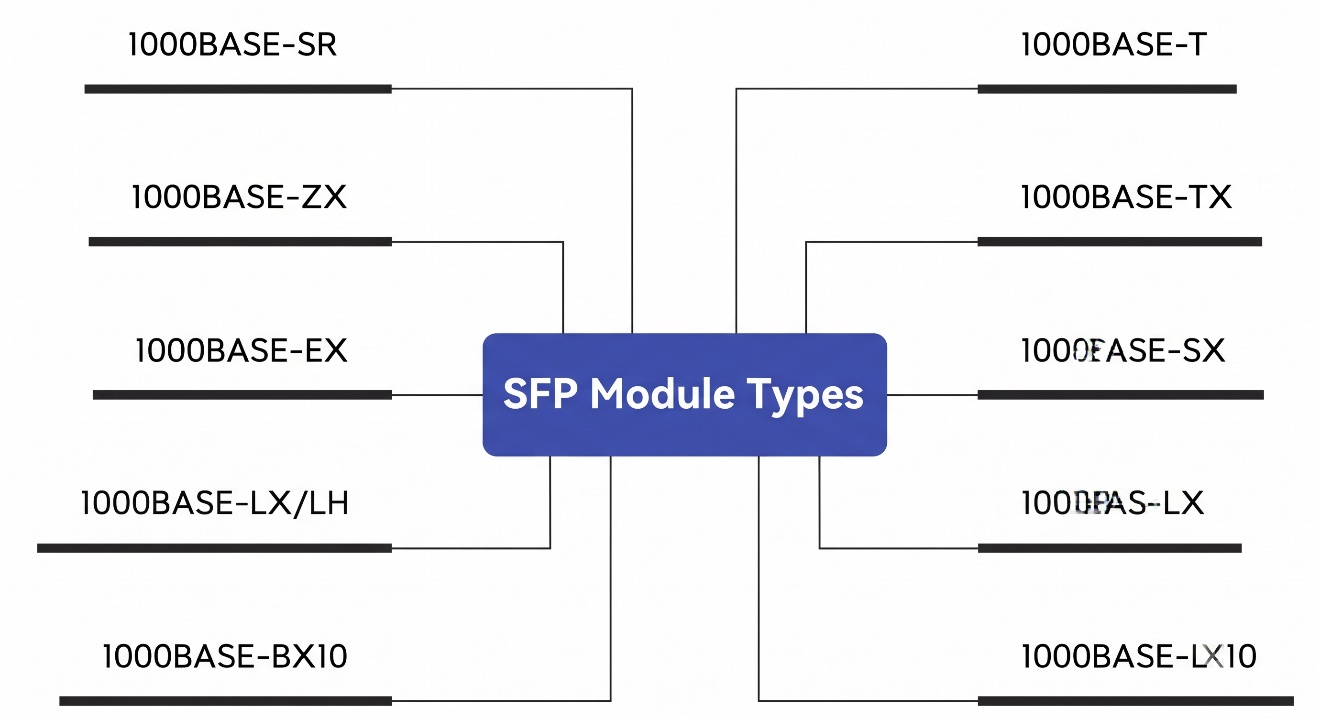
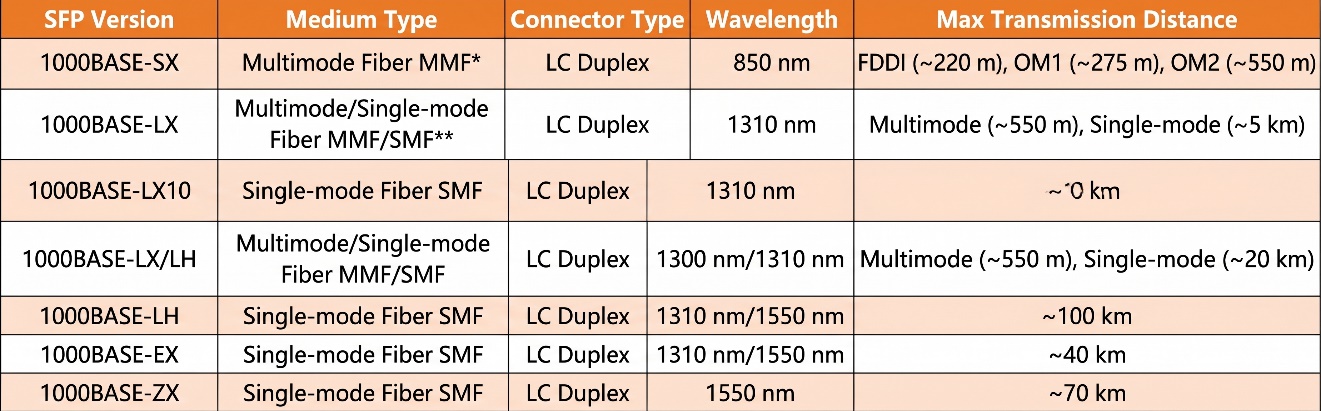
Because the footprint is standardized, the same slot can accept modules built for very different jobs. The 1G family alone includes 1000BASE-T (copper), 1000BASE-SX (short-reach multimode), 1000BASE-LX and 1000BASE-LX10 (long-haul single mode), 1000BASE-BX10 (single-fiber), plus industry variants like 1000BASE-LX/LH, 1000BASE-EX, and 1000BASE-ZX for extra distance. If you want to see how wide that catalog gets, our SFP transceiver modules range from 1G copper to 100G QSFP28.
What Does a SFP Transceiver Do Inside a Network?
A SFP transceiver changes digital signals into light on the way out, and light back into digital signals on the way in. On copper modules, it works as a digital-to-analog and analog-to-digital converter instead. Modern modules also include DDM/DOM sensors that report transmit power, receive power, temperature, laser bias current, and supply voltage in real time.
Machines only understand digital data, ones and zeros. Fiber carries light, and copper carries analog electrical signals. So at the sending end, the SFP laser turns bits into light pulses. At the receiving end, a photodetector turns those pulses back into bits. Nothing in the network path does this job except the module, which is why a bad or mismatched SFP takes a whole link down.
Newer modules add a feature called digital diagnostic monitoring (DDM), which some brands call digital optical monitoring (DOM). Cisco's GLC-BX series, for example, exposes live readings for optical output power, optical input power, temperature, laser bias current, and supply voltage. You can pull these numbers from the switch command line while the link is running.
Most guides stop there and treat DDM as a checkbox on a datasheet. Don't. That data is an early-warning system. Optical receive power drifts down for weeks before a link fails, and the usual culprit is a dirty connector end face. Fluke Networks' fiber contamination white paper calls contaminated connections the number one cause of fiber-related problems and test failures, and field studies attribute roughly 80% of fiber network problems to dirty end faces. The Fiber Optic Association says the same: dirty connectors cause high loss, high reflectance, and they drag contamination into the transceiver itself.
The fix costs almost nothing. Inspect and clean both end faces before every mate, and keep spare fiber patch cords on the shelf. If you log DDM numbers monthly, you will often spot a degrading link and swap a $5 patch cord instead of losing the link at 2 a.m.
How Did We Get From GBIC to SFP, SFP+, and SFP28?
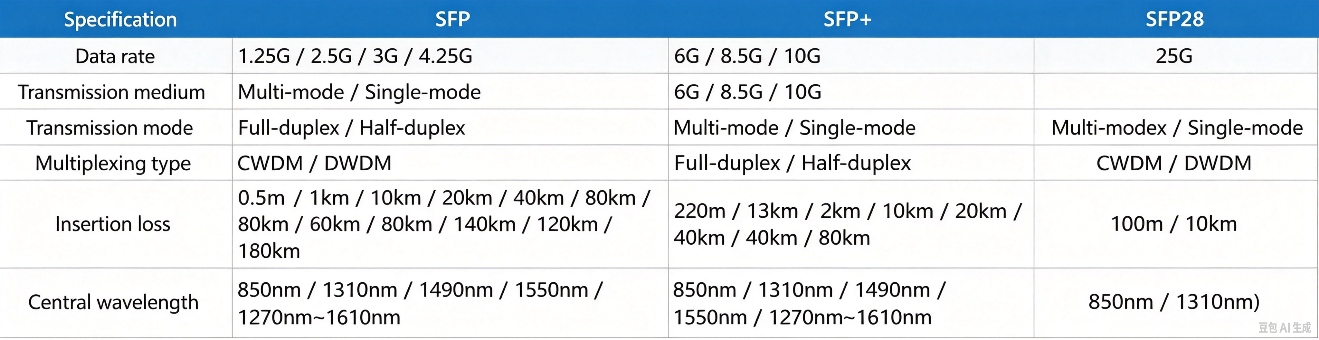
The SFP replaced the matchbox-sized GBIC around 2001, and the same little package then grew into faster versions: SFP+ for 10G, SFP28 for 25G, and the QSFP family for 40G and beyond. The footprint stayed the same, so a 1G SFP usually runs in a 10G SFP+ port, but a 10G module never runs in a 1G port.
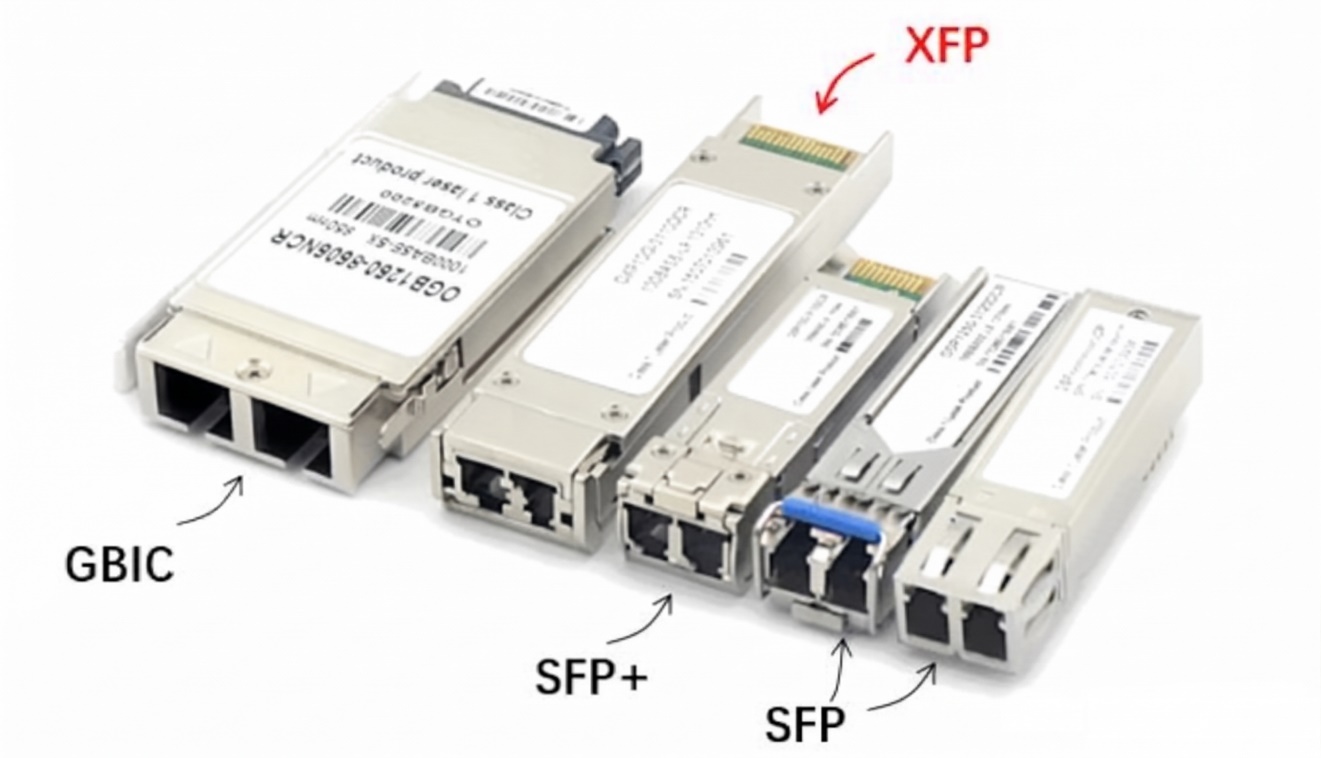
The history matters less than the rule it produced. GBIC was the first hot-pluggable transceiver, developed around 2000, and it served the industry well. It was also big, power-hungry, and it ate panel space. A committee of equipment makers then defined a "mini GBIC," and SFP became the name that stuck. Each later generation kept the same physical size while pushing more data through it, which is why the modules in a 2026 data center still look like the ones from 2005.
| Form factor | Typical speed | Common use |
|---|---|---|
| SFP (mini-GBIC) | 1G | access switch uplinks, server NICs, FTTH |
| SFP+ | 10G | aggregation and core links |
| SFP28 | 25G | server access, 5G fronthaul |
| QSFP+ | 40G | older data center cores |
| QSFP28 | 100G | modern data center and carrier backbones |
One practical trick from the table: QSFP28 ports often connect down to servers through a "100G to 4x25G" breakout cable. One 100G port behaves like four 25G ports, which saves switch ports and fiber at the same time. Our QSFP28 100G modules follow the same MSA footprint, so they slot into standard switches without adapters.
Before you mix generations in a live switch, check two things. First, the SFP compatibility rules from module vendors boil down to this: same footprint means physically compatible, but the link runs at the lowest speed both ends support, and some switch firmware blocks 1G on SFP+ ports entirely. Second, vendor selection guides recommend verifying each port's supported speed list, because a port that accepts the module is not the same as a port that will pass traffic on it.
Now for the counter-consensus take. The industry narrative says SFP is legacy and everything is moving to 400G and 800G. The money is moving there, no argument: LightCounting market data shows Ethernet optical transceiver sales grew about 93% in 2024 with another strong year estimated for 2025, and its AI cluster optics forecast projects roughly $26 billion in AI cluster transceivers for 2026. But unit counts tell a different story for ordinary buyers. Grand View Research values the whole optical transceiver market at $15.4 billion in 2025, growing to $36.2 billion by 2033, and a huge share of that volume is still 1G and 10G modules for enterprise access, campus, and FTTH networks. Your 1G SFP is not dead. It is the module most of the world actually runs on.
That matters for another reason: even high-speed AI data centers are rethinking the plug itself. We covered newer connector formats like EBO in an earlier post, and the same pressure for density is what pushed GBIC into SFP twenty years ago. History repeats.
Copper or Fiber: Which SFP Do You Need?
Copper SFPs (1000BASE-T with an RJ45 jack) solve short runs up to 100 meters, the physical limit of twisted-pair cable. Fiber SFPs cover everything beyond that, from about 550 meters over multimode fiber to 100 kilometers and more over single mode.
The copper limit comes from the cable, not the module. Unshielded and shielded twisted pair (UTP/STP) is rated for 100 meters, and it picks up electrical noise on longer runs. Fiber has neither problem, which is why every distance rating beyond 100 meters assumes fiber.
Copper SFPs earn their keep in two specific cases. First, connecting "the last cabinet to the old device": a server or legacy switch with no fiber ports, a few meters away. A 1000BASE-T module turns the switch's fiber slot into an ordinary RJ45 jack. Second, reusing existing copper cabling during a phased upgrade, which is exactly why 1000BASE-T (defined in IEEE 802.3ab) exists.
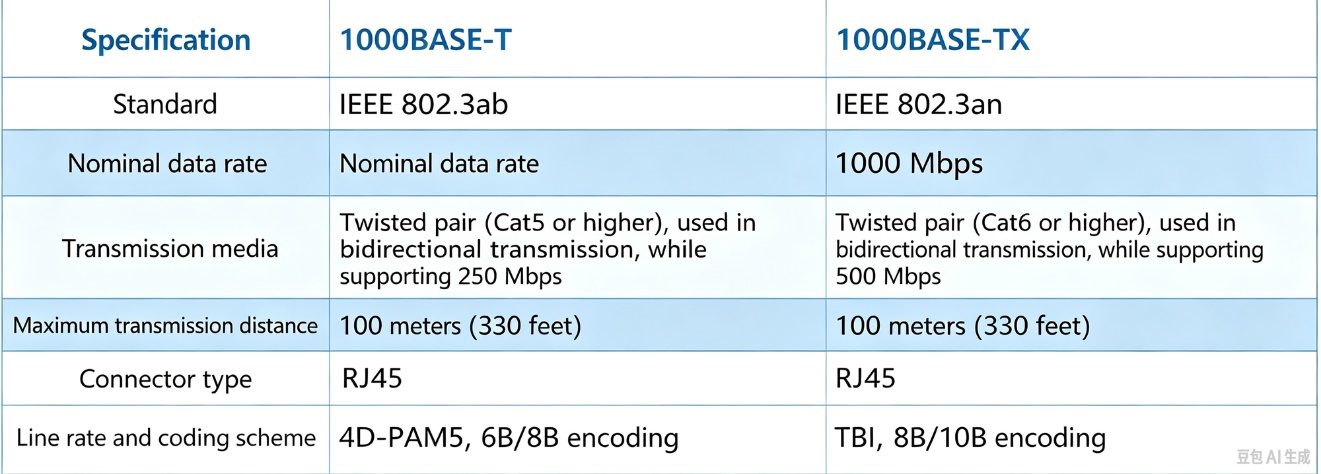
Two quirks to know before you order copper modules. First, 1000BASE-T and its cousin 1000BASE-TX are not interchangeable. 1000BASE-TX (TIA/EIA-854) uses only two wire pairs but demands pricier Cat6 cable, so 1000BASE-T won the market and TX mostly disappeared. They also use different encoding, so they cannot talk to each other unless the switch has dual physical layer (PHY) chips, and most don't. Second, when you use a copper SFP, set the switch port to gigabit auto-negotiation; some ports refuse to negotiate with the module's PHY if you force settings.
One honest warning from our support desk: copper SFPs run hot. The RJ45 PHY chip inside that tiny housing dissipates real power, so check your switch's thermal ratings before filling all 48 ports with them. For anything past 100 meters, stop buying copper and go single mode.
Single Mode or Multimode SFP Module?
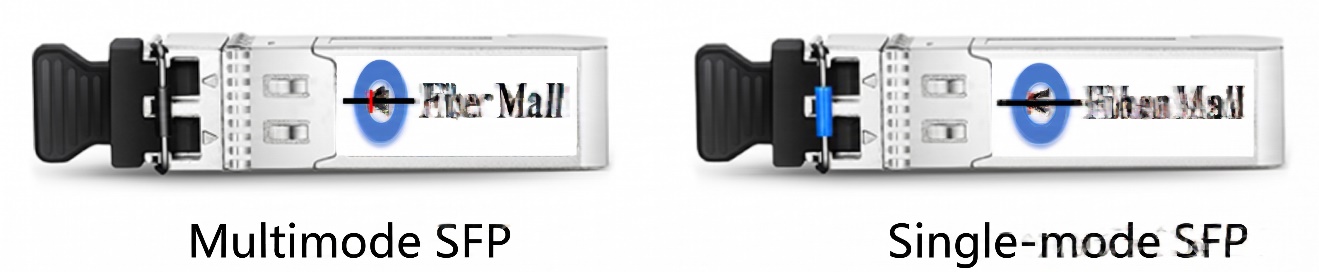
Match the module to the fiber you already have, not the other way around. Multimode SFPs run at 850 nm over OM2/OM3/OM4 cable for distances up to about 550 meters (some reach 2 km). Single mode SFPs run at 1310 nm or 1550 nm for 10 to 80 kilometers or more. Both ends of a link must use the same fiber type, or the link will not come up at all.
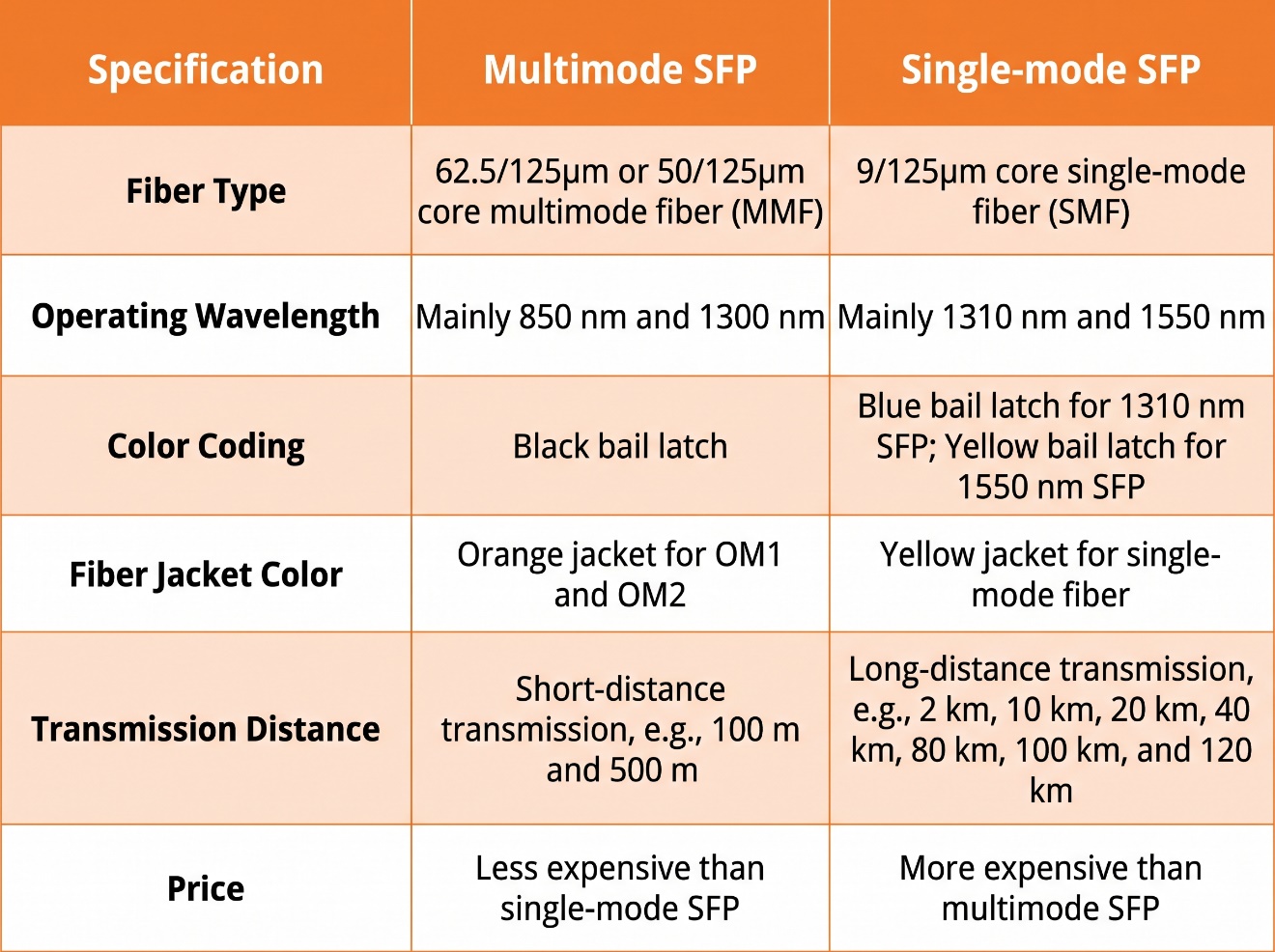
This is the first thing to check when a link refuses to light up, and it is the mistake we see most from first-time buyers: a multimode module patched onto single mode fiber, or the reverse. The optical power levels do not match, so the receiver sees nothing. No amount of rebooting fixes physics.
| Wavelength | Fiber type | Typical reach | Typical use |
|---|---|---|---|
| 850 nm | multimode (OM2/OM3/OM4) | up to 550 m | in-building, rack to rack |
| 1310 nm | single mode | up to 10 km | between buildings, campuses |
| 1550 nm | single mode | up to 80 km+ | between sites, carriers |
Why two fiber types at all? Multimode fiber has a fat core (50 or 62.5 microns) that cheap LEDs and VCSEL lasers can fill, so the modules cost less but light spreads and shortens the reach. Single mode fiber has a core around 9 microns that keeps light on one path, so it carries farther at the cost of tighter lasers. Wavelength selection guidance from module makers puts it simply: 850 nm for short multimode runs, 1310/1550 nm for longer single mode runs.
Practical rules from the field. Rack-to-rack and in-building runs are multimode territory; campus and city runs belong to single mode fiber cable. Note that some single mode SFPs are dual-rate and tolerate multimode over short distances, but treat that as a datasheet exception, not a plan. And mind the connector: most 1G modules use duplex LC connectors, but FTTH modules often use SC/APC, and the two do not mate.
How Far Will an SFP Transceiver Reach?
The suffix tells you the reach: SR covers roughly 100 to 550 meters, LR covers 10 km, ER (also sold as LH40) covers 40 km, and ZX/ZR covers 80 km or more. In real projects, plan your runs at no more than 80 to 90 percent of the rated distance.
| Rating | Meaning | Real module example | Max reach | Fiber |
|---|---|---|---|---|
| SR | short reach, multimode | QSFP-100G-SR4-MM850 / GE-SX-MM850 | 100-550 m | multimode |
| LR / PSM4 | 10 km class, single mode | QSFP-100G-PSM4-SM1310 / MINI-GBIC-LX-SM1310 | 10 km | single mode |
| ER / LH40 | 40 km class | MINI-GBIC-LH40-SM1310 | 40 km | single mode |
| ZX / ZR | 80 km class | MINI-GBIC-ZX80-SM1550 | 80 km | single mode |
Datasheet distance is a best case measured on fresh fiber with clean connectors. Real links have splices, patch panels, aged cable, and at least one connector someone wiped with a shirt instead of a lint-free wipe. That is where the margin rule comes from: a module rated 10 km should be deployed at 8 to 9 km, leaving roughly 20% headroom for optical power loss. If a run crosses 40 km, go straight to ZX/ZR class or step up to wavelength-division systems.
If you want to go one level deeper, learn the phrase "link budget." Every module datasheet lists transmit power and receiver sensitivity; the difference between them is the total loss the link can absorb. Add up your splice losses (about 0.05 dB each with fusion splicing), connector losses (about 0.3 dB each), and fiber attenuation (about 0.35 dB per km at 1310 nm), and you will know exactly why the margin rule exists. When a short link runs too hot and overloads the receiver, optical attenuators knock the power down to a safe level. Installers forget this because "too much light" sounds like a good problem, and then wonder why a 300-meter link on a 10 km module flaps.
What Is a BiDi SFP and When Does It Save You Money?
A BiDi (single-fiber, or "simplex") SFP transmits and receives over one fiber strand by using two different wavelengths, such as 1310 nm and 1550 nm. BiDi modules only work in reversed pairs: one end transmits 1310 nm and receives 1550 nm, the other end does the exact opposite. Buy two of the same module and the link will never come up.
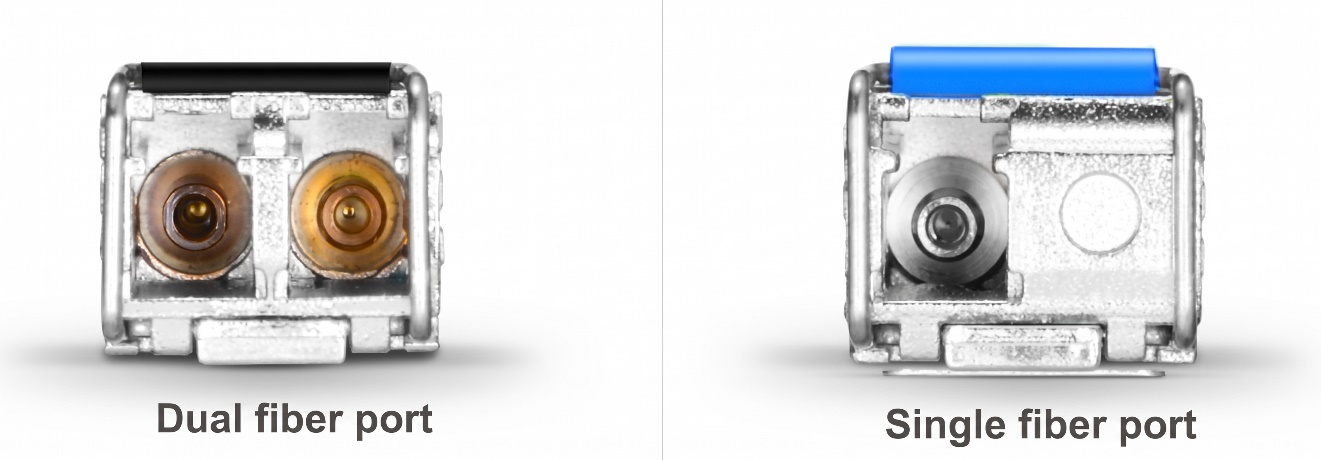
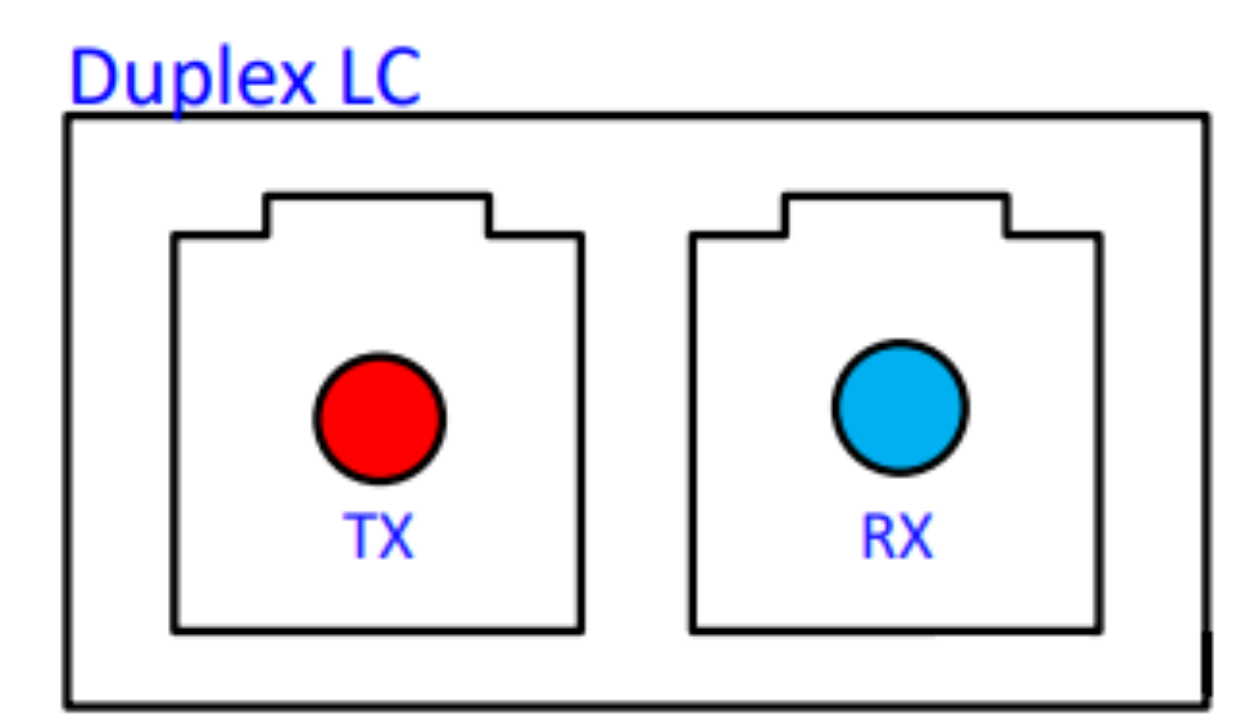
Normal "duplex" SFPs use two fibers, one dedicated to sending and one to receiving. BiDi modules build a wavelength-division multiplexing (WDM) coupler inside, so both directions share a single strand. You can spot them instantly by the connector: BiDi has one LC port, duplex has two. Common wavelength pairs are 1310/1550 nm, 1310/1490 nm, and 1510/1590 nm, with reaches from 10 km up to 160 km depending on the pair.
When is that worth it? When fiber is the scarce resource. In old buildings, leased ducts, and along routes where pulling new outdoor fiber cable costs more than the electronics, one fiber doing two jobs is real money saved. FTTH drop networks use the same single-fiber idea every day. But the pairing rule is strict: end A transmits 1310 and receives 1550, so end B must transmit 1550 and receive 1310. Order them as a matched pair from your supplier and label both ends on installation day, because six months later nobody remembers which box is which.
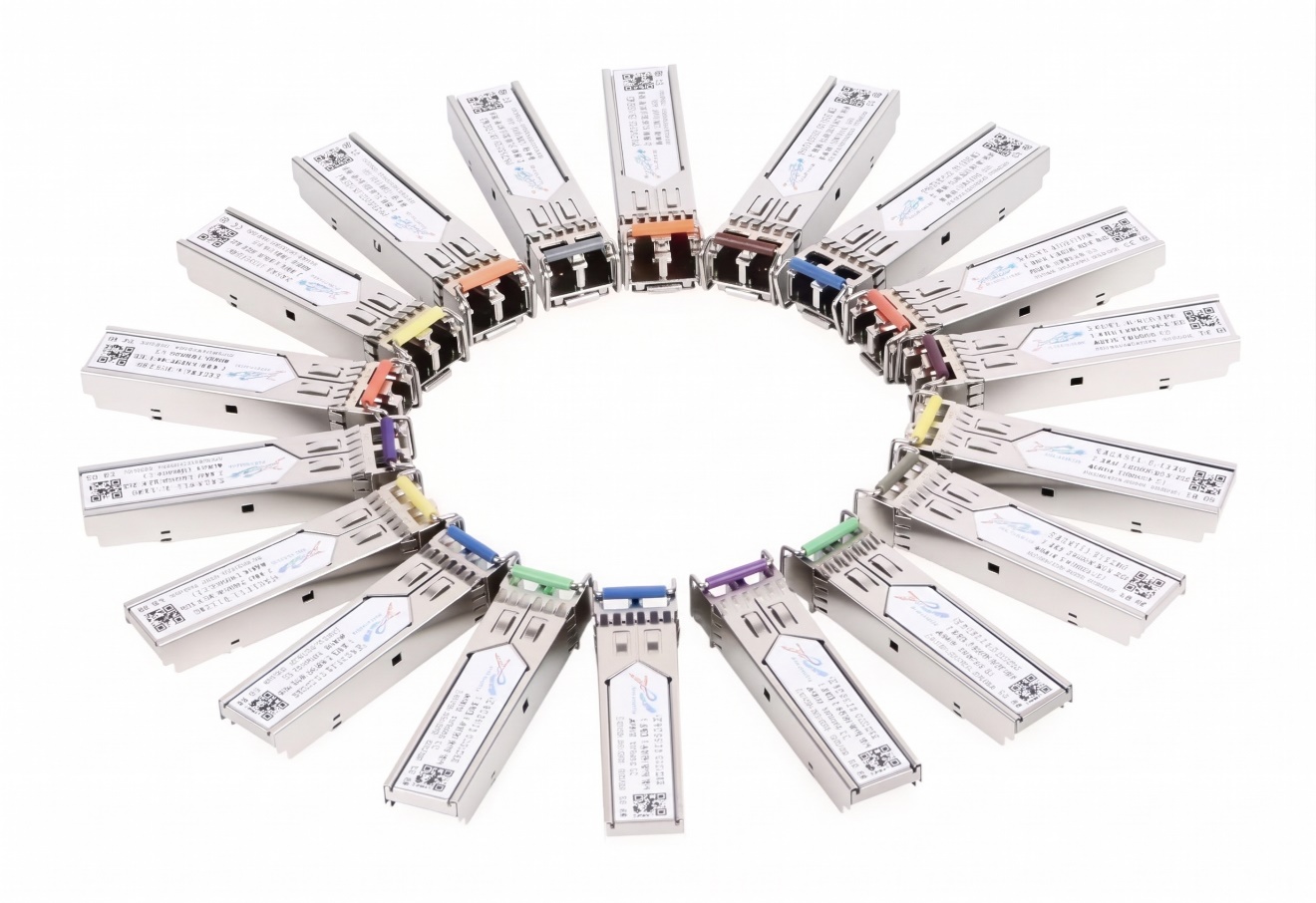
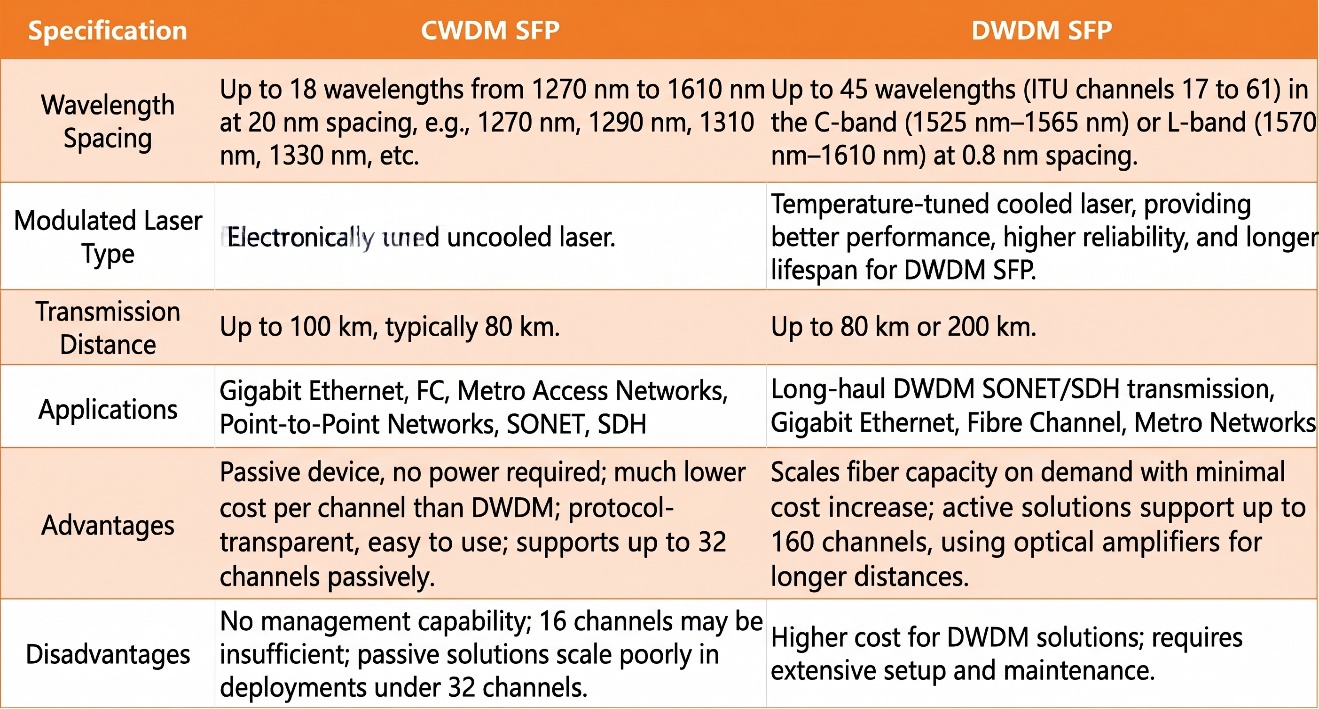
BiDi is also your entry point to the wider world of wavelength-division multiplexing. CWDM and DWDM systems put many wavelengths with tightly spaced colors onto one fiber pair, and telecom carriers run them across whole metros. Both use duplex LC interfaces on single mode fiber, but the economics differ: when a customer needs 16 channels or fewer, CWDM SFPs are usually the more cost-effective choice, while DWDM earns its much higher price in dense carrier systems. If you are not a carrier, you almost certainly want CWDM, or plain BiDi, not DWDM.
What Is a PON SFP and Who Needs One?
A PON SFP is built for fiber-to-the-home access networks. The OLT module at the operator's central office serves up to 32 or 64 ONT modules at subscriber premises over passive splitters, with no powered equipment between them. GPON modules come in Class B+ and Class C+ power budgets, where C+ supports higher split ratios and longer reaches.
PON stands for passive optical network, and "passive" is the key word: between the operator and the subscriber there are only splitters and fiber, nothing that needs electricity. That asymmetry changes the rules. Ordinary SFPs work in simple pairs, but one OLT SFP talks to 32 or 64 ONT SFPs at once, each ONT on its own schedule assigned by the OLT. FTTH deployments use SC/APC connectors on this side of the network, the angled green polish that reflects signal back into the glass instead of into the air.
If you run or build FTTH networks, the shopping list extends beyond modules: PLC splitters divide the signal 1:32 or 1:64, fiber termination boxes protect the splice and split points, and rack space for the OLT frames follows the same discipline as what an optical distribution frame does in larger central offices. Our own FTTH line covers OLT and ONU side modules in SC/APC, built for exactly this split-ratio math.
The Original-vs-Compatible Question No Vendor Answers Honestly
Here is the answer most vendors won't give you: the brand printed on a transceiver is usually not the factory that made it. Branded modules come off the same contract manufacturing lines as compatible ones, and you pay 10 to 30 times more for the label. The real decision is not "original versus cheap." It is whether your specific switch needs vendor coding, and whether your support contract demands genuine parts.
Start with what "compatible" actually means. A compatible module is built to the same MSA specification and programmed with a vendor-specific code in its EEPROM, the small memory chip the switch reads on insertion. Cisco switches read that code and may show the dreaded "unsupported module" message or refuse the port if the code is missing; Cisco's own transceiver documentation describes the quality identifier and vendor-locking behavior. Reputable compatible-module makers flash the correct vendor code so the switch treats the module as native. That is not hacking. It is how the third-party optics market has worked for two decades.
Now the price, with real numbers. One network engineer shared quotes network engineers post comparing $1,100 per module for Cisco originals against $35 for functionally identical generics, on the same project. Independent analyses of compatible module pricing put third-party SFP+ at roughly one tenth of the original list price, and large campuses report six-figure differences on full builds. When a 48-port switch needs 48 modules, that gap buys another switch.
What about warranty? This surprises people: under US warranty law (the Magnuson-Moss Warranty Act) and similar rules elsewhere, using third-party optics generally does not void your switch warranty, though a failure actually caused by the module can be denied as a claim. Many compatible vendors back their modules with lifetime warranties, something original vendors rarely match at module level.
So when is original genuinely the right call? Three cases, in our experience. First, if you run a Cisco TAC support contract, engineers may ask you to swap in genuine optics during troubleshooting, so keep a few on hand for the machines under contract. Second, some locked-down platforms (certain Meraki and Catalyst firmware builds) enforce vendor checks harder than others, so verify before you order at volume. Third, regulated or safety-critical networks sometimes have procurement policies that require genuine parts regardless of engineering reality.
Everything else, in our experience, is budget you can spend better elsewhere. We say this as a manufacturer with skin in the game: on the same factory floor where our OEM customers' branded modules are coded, tested for insertion loss and return loss, and packed, compatible modules go through the identical process. The chips come from the same small pool of component makers. The difference on the label is a business decision, not an engineering one.
How Do You Choose a SFP Transceiver?
Choosing a SFP transceiver takes five steps: pick the speed your ports support (SFP, SFP+, SFP28), pick the distance rating with 20% headroom, match the fiber type and wavelength, decide whether single-fiber BiDi saves you cable, and confirm the coding works with your switch. Get those five right and the link comes up the first time.
| Your scenario | Form factor | Wavelength / fiber | Distance rating | Notes |
|---|---|---|---|---|
| In-building gigabit uplink | SFP 1G | 850 nm multimode | SR, up to 550 m | cheapest per port, buy in volume |
| Between buildings, 10G | SFP+ 10G | 1310 nm single mode | LR, 10 km | the most common workhorse |
| 25G server access | SFP28 25G | 850 or 1310 nm | SR or LR | pairs with QSFP28 breakouts |
| Data center 100G core | QSFP28 100G | multimode or single mode | SR4 / LR | breakout to 4x25G saves fiber |
| Old building, no spare fiber | SFP 1G BiDi | 1310/1550 nm pair | 3-40 km | order as reversed pair |
| Cross-campus, far | SFP 1G | 1550 nm single mode | ZX/ZR, 80 km | or move up to CWDM |
Run the five steps against that table and most orders write themselves. Current 2026 buying guides walk the same sequence, speed first, then reach, then fiber and compatibility, which tells you the industry has converged on this checklist. Then close the loop with these habits from our support desk:
- Check wavelength and fiber type first. This is troubleshooting rule number one, because a mismatched pair produces a link that never lights up.
- Leave 20% distance margin. A module rated 10 km should not be asked to carry an honest 10 km.
- Order BiDi in reversed pairs and label both ends.
- Confirm compatibility coding against your switch model before ordering volume, not after.
- Specify DDM support. The monitoring data pays for itself the first time it flags a failing link before users notice.
- Ask for the current price sheet. Transceiver prices move with component markets, so a quote older than a quarter is a stale quote.
When the list is settled, browse our full product catalog for matching patch cords, splitters, and enclosures, or browse the SFP lineup directly to see reach and wavelength options side by side.
Conclusion: Five Checks, One Link That Comes Up
A SFP transceiver is a small module doing a big job: it converts between your equipment's digital signals and the light or electricity that moves through cable. Everything else follows from five checks. Match the speed to the port. Match the distance rating with 20% headroom. Match fiber type and wavelength on both ends. Use BiDi pairs correctly when fiber is scarce. And confirm coding compatibility before you order at volume.
The dark-link failures we watch customers chase are almost always one of those five checks skipped. The good news is that all five are decisions you make at ordering time, for free.
If you are planning an upgrade or a rollout, send us your port speeds, distances, and fiber types through the inquiry form below, or request a quote directly. Our engineers reply within one business day with a bill of materials and a quote, and paid samples ship within days so you can test the exact modules before you commit. Twenty-five years of manufacturing says the same thing: judge the product in hand.
Ready to pick modules? The live lineup with MOQ and lead times sits in our optical transceiver category.
Frequently Asked Questions
Can I use a 1G SFP module in a 10G SFP+ port?
Usually yes. A 1G SFP module physically fits a 10G SFP+ slot and most platforms run it at the reduced 1G speed, following standard SFP compatibility rules. The reverse does not work: a 10G module will not run in a 1G port. Some switch models disable 1G on certain SFP+ ports, so check your switch's supported speed list before ordering.
Can I mix single mode and multimode SFP modules on the same link?
No. A multimode SFP (850 nm) and a single mode SFP (1310/1550 nm) use different fiber cores and optical power levels, so the receiver never sees a usable signal and the link stays dark. Both ends of a link must use modules built for the same fiber type. This mismatch is the number one thing to check when a new link will not come up.
Will a third-party SFP module void my switch warranty?
Generally no. In the United States, the Magnuson-Moss Warranty Act prevents vendors from voiding a whole-device warranty just because you installed third-party optics, as explained in this US warranty law discussion. A failure actually caused by the module can still be denied as a specific claim. If you run vendor support contracts like Cisco TAC, keep some genuine optics on hand for troubleshooting sessions.
What does DDM/DOM on an SFP module actually do?
DDM (digital diagnostic monitoring) reports live readings from inside the module: optical transmit power, optical receive power, temperature, laser bias current, and supply voltage. You can read these values from the switch while the link runs. In practice, DDM is a predictive maintenance tool: receive power that drifts down over weeks usually means a dirty or damaged connector, and you can clean or replace a patch cord before the link fails.
How do I match an SFP module to the fiber I already have?
Check three things in order. First, fiber type: 850 nm modules for multimode (OM2/OM3/OM4), 1310/1550 nm modules for single mode. Second, distance: pick the rating (SR, LR, ER, ZX) just above your real run length, keeping 20% headroom. Third, connector: duplex LC on most data modules, single LC on BiDi, SC/APC on FTTH modules. The module must match the installed single mode fiber cable or multimode cable you already have, not the module you wish you had.
Interested in our products?
Get a Quote