How to Scrape Google Jobs: Step-by-Step Free Guide
By Peter Lin, HENGXANG Firm · Published on November 5, 2026 · Updated on November 5, 2026
The fastest way to scrape google jobs is to send a job keyword and a location to a SERP scraping API, which returns the postings Google shows as structured data: job title, company, location, posted date, salary estimate and the apply link. That route costs about $1.30 to $4 per 1,000 job results on ready-made scrapers, needs no coding, and takes minutes to set up. Below we walk through exactly how to do that step by step, and then show the step most guides miss: turning those company names into employer contacts you can actually reach.
The whole postings method fits in four steps:
- Pick a ready-made Google Jobs scraper and start on its free trial credits.
- Build a keyword and location list, one job title per row ("warehouse associate" + "Dallas TX").
- Run the extraction and get structured rows back: title, company, location, posted date, salary and the apply link.
- Export to CSV or Excel and spot-check 20 rows against Google before you scale.
Every step gets a full walkthrough in the sections below, plus the employer-data step most guides skip.
Quick answers to the three questions most searchers bring: a scraped job posting gives you the role and the apply link but almost never a human contact; scraping public results sits on firm US court precedent even though it breaks Google's terms of service; and the whole workflow can run on free tools if you accept daily limits. Every one of these gets its own section below, with sources.
A word on who we are: we run a fiber optic manufacturing business, and our sales team lives on scraped and enriched Google Maps data every day. We built the free Google Business Scraper for our own lead lists, and when we hire sales engineers in a new region, our recruiters work from the same kind of sheet. Everything below is the workflow we use ourselves, not theory.
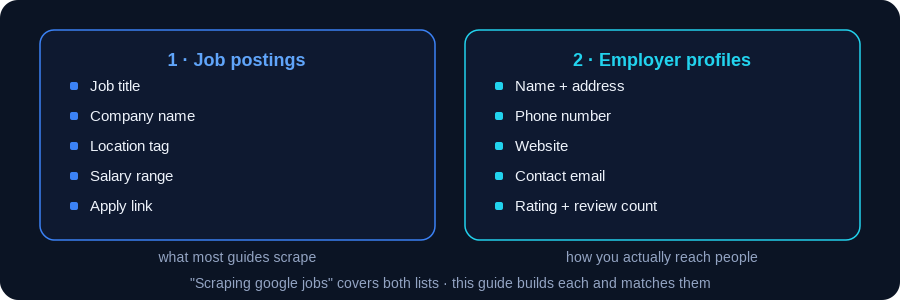
What Do People Actually Mean by "Scraping Google Jobs"?
Google has folded job postings straight into its search results since it launched the Google for Jobs feature in 2017. Search "warehouse jobs near me" and a rich panel appears with roles from many companies, filters for title and date, and apply buttons. Each card in that panel is a "job posting" in data terms, and scraping it means collecting those cards at scale.
The second meaning trips people up. A job posting tells you a company is hiring, but it says very little about the company. It rarely includes a phone number, a real email address, the office location, or any sign of how the business is run. That employer-side data lives on a different Google product: Google Maps business profiles. We have a separate step-by-step Google Maps scraping guide for that side, and this article shows how the two lists click together.
Why does the split matter? Because your goal decides your tool. If you want to monitor the job market, the postings are the product, and a SERP API is the right tool. If you want to reach the companies behind the postings, for recruiting outreach, sales, or a smarter job application, the postings are only the trigger, and employer data is the prize. Keep both meanings in mind as we go.
How Does Google Get All Those Job Listings?
Google's own job posting structured data documentation explains the deal. Employers and job boards add a standard block of code (the schema.org JobPosting type) to each listing page. Google reads that block, indexes the role, and shows it in the jobs panel with the posting's title, date, location and requirements. The scraper market exists because that panel is convenient: one search surfaces many companies at once.
One more fact worth knowing before you pick a tool: Google has never released an official public API for these job results. As ScrapingBee's FAQ states, there is no official Google Jobs API; the jobs panel is a search feature, not a developer product. Every scraper on the market, from free scripts to paid services, works by fetching and parsing Google's results pages, which is why vendors charge for blocking and parsing work you would otherwise do yourself.
Here's the hidden insight almost nobody mentions: Google is a middleman, not the source. If you can identify the companies you care about, you can often go to their career pages directly, where the same JobPosting data sits in the open without Google's protections in the middle. This is why our preferred workflow collects employer profiles first (company names, websites, contact details) and uses scraped job postings as the trigger that says "this company is hiring right now".
There's also a practical consequence for data quality. Google's panel shows a compressed view: title, company, a location tag, sometimes a salary estimate. Fields like the full description, the hiring team, or benefits usually live behind the apply link on the employer's site. If your project needs rich posting data, expect to fetch the source page anyway, and budget for that second request.
Is It Legal to Scrape Google Jobs?
That's the honest, two-sided answer, and the courts back it up. In the hiQ Labs v. LinkedIn ruling, US courts held that scraping public web pages doesn't violate the CFAA, the country's main anti-hacking law, because viewing a public page isn't "unauthorized access". The logic got reinforced in January 2024, when a federal judge granted Bright Data a major victory against Meta, ruling that a website's terms don't even bind visitors who browse while logged out. Public job results sit squarely in that logged-out category.
Google's contract says something different. The Google Maps Platform terms include a no-scraping clause for Maps content, and Google's general terms restrict automated access to its services too. Breaking a term of service is a contract dispute. In practice, the enforcement you'll actually meet is technical: Google blocks scrapers with 403 forbidden errors quickly, which is exactly why the paid SERP API market exists (the API vendor eats the blocking problem for you).
Three practical rules we follow, same as in our Maps guide:
- Collect public data only. Never log in to scrape, and never touch data behind a login wall.
- Treat recruiter names and emails as personal data. In the EU, GDPR rules govern how you store and message people, and US anti-spam law (CAN-SPAM) still applies to cold email.
- Don't republish Google's content as your own. Extract facts (title, company, link), build your own product on them, and keep the extraction running quietly in the background.
Four Ways To Scrape Google Jobs (And What Each One Really Costs)
Here's the comparison we wish someone had shown us before we started.
| Method | What you get | Skill needed | Real cost | Best for |
|---|---|---|---|---|
| Ready-made SERP scrapers (Apify's Google Jobs scraper, Outscraper, SerpApi) | Postings: title, company, location, apply link | None to low | ~$1.30-$4 per 1,000 job results; free trial credits | Job-market monitoring, boards, research |
| DIY Python script (Oxylabs' walkthrough) | Same, but you maintain it | Comfortable with code | Your time + proxies; breaks when Google changes markup | Tech teams with custom needs |
| Employer career pages (via JobPosting schema) | Full posting detail, straight from the source | Low to medium | Your crawl time; no Google in the middle | Rich posting data, ToS-cleanest route |
| No-code Google Maps extraction (ours and similar) | Employers: names, phones, emails, ratings | None | Free tier with daily limits | Turning hiring companies into contact lists |
The ready-made scrapers deserve a note on pricing, because page-one guides usually hide it. The most popular Google Jobs scraper on Apify charges about $2 per 1,000 job results, with cheaper and pricier actors alongside it, and platform credits on top. At that rate, a 10,000-posting project runs roughly $13 to $40 in tool fees. That's honest money for clean data; just do the multiplication before you start, because big job-market studies scale fast.
The DIY route looks free and isn't. A working script needs proxies or a rotating gateway, because Google blocks datacenter IPs with those 403 errors scrapers complain about. When Google adjusts the jobs panel markup, your parser breaks silently, and you find out from an empty spreadsheet. Budget maintenance time, not just setup time.
The employer-side route is the sleeper. Since Google itself reads postings from structured data on career pages, a small crawler over the companies you care about can pull richer data than the jobs panel shows, with Google entirely out of the loop. And when you don't yet know which companies to crawl, that's the gap the free Google Business Scraper fills, in the walkthrough below.
How To Scrape Google Jobs Results With a SERP API, Step By Step
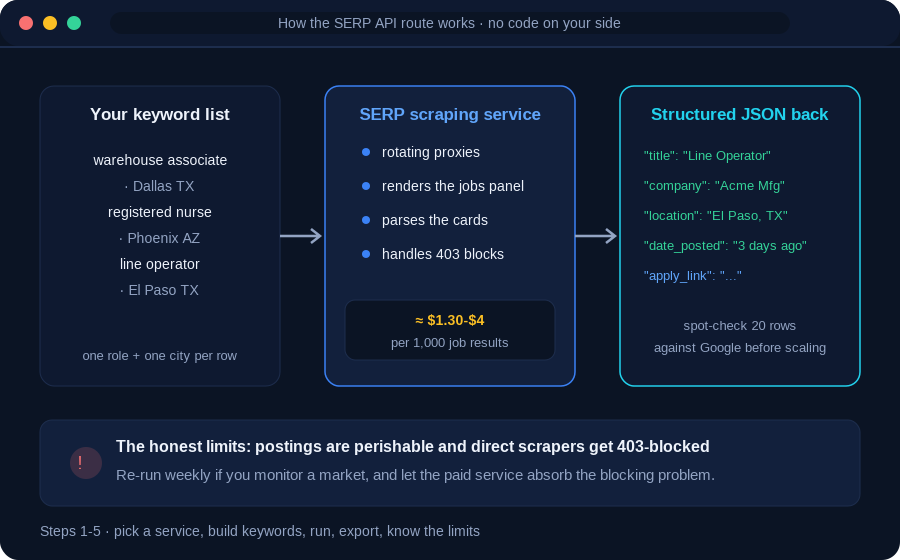
Under the hood, every tool in this category requests the same thing: a Google search URL such as `https://www.google.com/search?q=warehouse+associate+jobs+near+dallas&udm=8`, where the q parameter carries your keyword and location, and the `udm=8` parameter tells Google to render the jobs panel instead of the standard results page. The panel loads only about 10 postings on first paint and serves more as you scroll, so the scraper has to render JavaScript and scroll for you. That mechanical work, the rendering, scrolling and proxy rotation, is exactly what the vendor's fee buys.
Here's the literal step-by-step for the postings side, using the tools the SERP is built around.
Step 1: Pick a scraping service
Choose a ready-made Google Jobs scraper. The big names are Apify's Google Jobs scraper (marketplace actor, about $2 per 1,000 results), Outscraper's no-code Google Jobs scraper (web form, CSV/XLSX export), and SerpApi's Google Jobs API (returns titles, companies and locations as JSON). All three offer free trial credits; start there and confirm the data fields fit your project before paying.
Step 2: Build your keyword and location list
Job searches on Google only make sense with a location, so each row of your list needs two parts: a role keyword and a place, like "warehouse associate" + "Dallas TX" or "registered nurse" + "Phoenix". Keep one job title per keyword and let the location vary; that mirrors how the jobs panel actually works and keeps your results comparable across cities.
Step 3: Run the extraction and check the output
Submit the list and let the service fetch. For API-style tools you'll get JSON with fields like title, company, location and apply link; for form-style tools you'll get a spreadsheet download. Spot-check 20 rows against Google in your browser. If titles or company names look mangled, fix your keyword phrasing before scaling, not after.
Step 4: Export and store
Export to CSV or Excel and keep the apply URL column even if you don't need it yet; it's your bridge back to the source posting. Expect to re-run scrapes weekly or monthly if you're monitoring a market, since postings appear and vanish within days. Schedule the budget accordingly: a weekly refresh of 10,000 postings at $2 per 1,000 runs about $80 per month.
Step 5: Know the limits before you scale
Two honest limits. First, freshness: postings are perishable, and a scrape older than a week is already partly stale. Second, blocking: if you outgrow the ready-made tools and go DIY, the 403-blocking problem becomes your problem, and the usual fixes (slower request rates, rotating user agents, browser automation) are exactly what the step-by-step tutorials from Oxylabs walk through.
Why a Jobs List Alone Rarely Gets You Hired (or Gets You Hires)
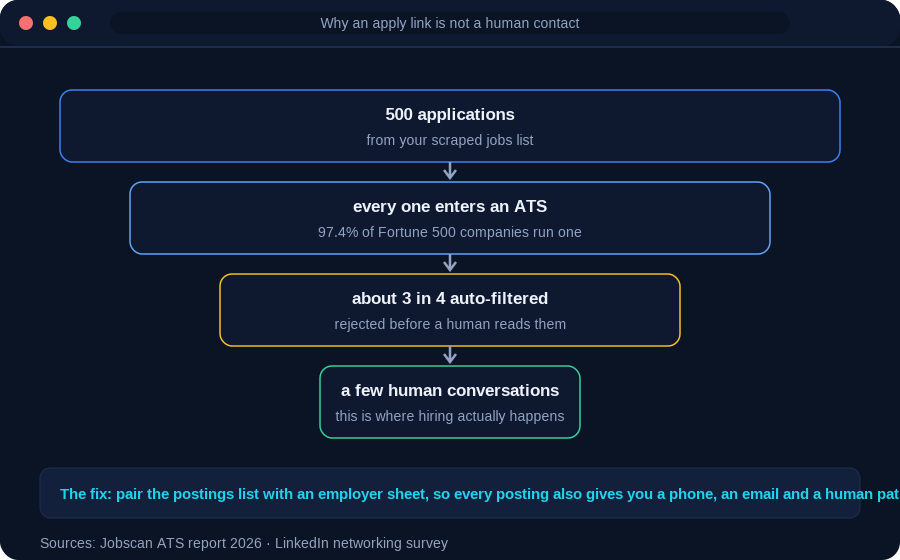
Here's the part the tool vendors don't put on their landing pages. Jobscan's 2026 report detected an applicant tracking system at 97.4 percent of Fortune 500 companies, and some estimates put roughly 75 percent of resumes rejected by those systems before a human ever opens them. So if your scraped list of 500 postings turns into 500 form submissions, most of your effort lands in a queue, sorted by keywords, ahead of nobody.
The numbers on how people actually get hired point the same direction. LinkedIn's survey of 15,905 professionals found 70 percent of people were hired at a company where they had a connection. In other words, the edge comes from a human path into the company, not from being applicant number 300. A scraped employer sheet gives you raw material for exactly that path: a name, a phone, an office, a rating profile to open a conversation with.
Candidates aren't the only ones who benefit from employer-side data; recruiters and sellers do too, and Glassdoor reports 83 percent of job seekers research company reviews and ratings when deciding where to apply. Flip that around: a company with hundreds of reviews and a rising rating is probably growing, and growing companies hire. That's a hiring signal you can filter for in a spreadsheet, which is precisely what the next section builds.
How To Scrape Google Jobs Data Into Real Employer Leads (Free Tool)
Now the walkthrough for the employer side, the workflow our own recruiting and sales lists run on. What you need: a browser and a keyword. The tool runs entirely in your browser, your task history stays on your own device, and the free plan gives you 5 searches and 1 bulk task per day.
Step 1: Open the tool and enter an employer keyword
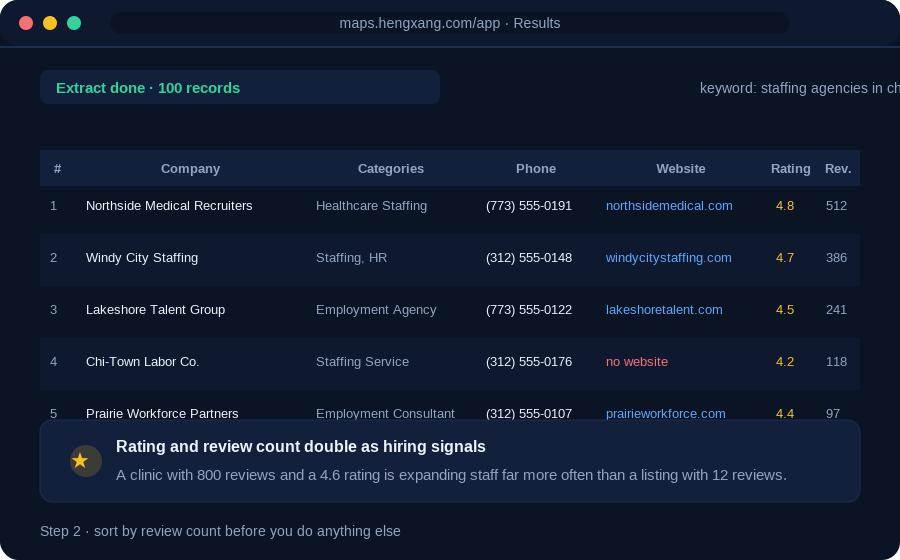
Open the Google Business Scraper and type an employer keyword, not a job title. Good patterns: "staffing agencies in chicago" (recruiting offices, useful for recruiters networking with peers), "manufacturing companies in houston" (hiring employers), "logistics companies in hamburg" (industry plus region). The "business type + city" pattern mirrors how real people search Maps, and it returns the hiring companies rather than the roles.
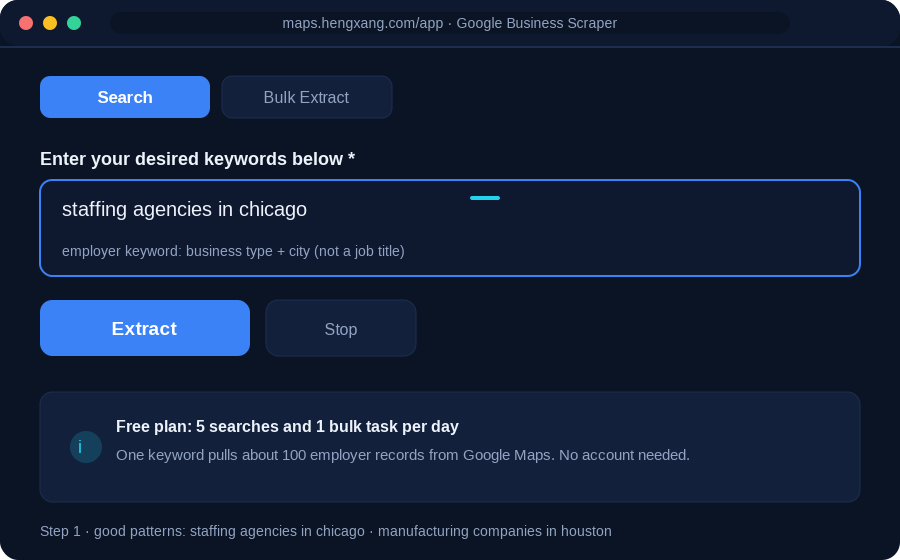
Step 2: Extract about 100 employer records
Press Extract and watch the table fill with roughly 100 business records per keyword: name, categories, phone, website, address, rating and review count. Those last two columns are your hiring signals. A clinic with 800 reviews and a 4.6 rating is expanding its staff far more often than a listing with 12 reviews and no website. Sort by review count before you do anything else.
Step 3: Enrich the list with emails and social profiles
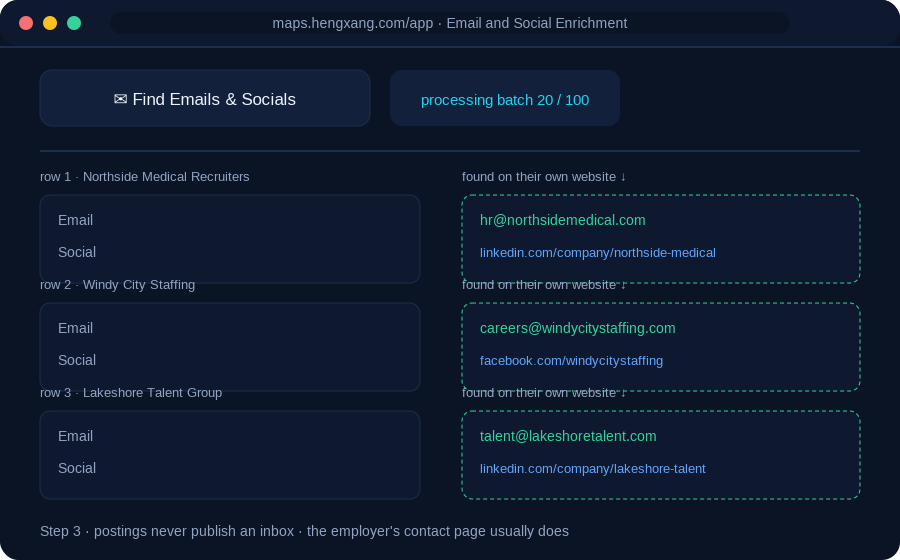
Click ✉ Find Emails & Socials. The tool visits each employer's website and pulls the public contact email plus social links, filling the Email and Social Medias columns in batches of 20. This is the step a jobs list can never do on its own: postings don't publish a human's inbox, but the company's own contact page usually does. Not every site will yield an address, so expect a healthy fraction, not 100 percent.
Step 4: Pick your columns and export
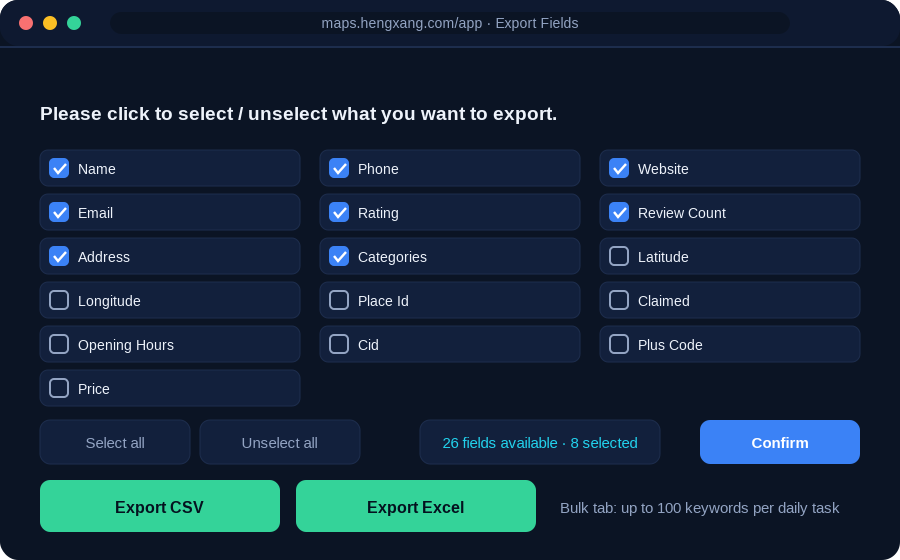
Click ⚙ Export Fields to choose from 26 columns (for employer outreach we keep Name, Phone, Website, Email, Rating, Review Count and Address), then hit Export CSV or Export Excel. The file opens in Excel, Google Sheets, or your CRM with no cleanup tricks. Need whole regions instead of one city? The Bulk Extract tab takes up to 100 keywords in one daily free task, so "staffing agencies in" + 40 city names becomes one queue.
Step 5: Match the two lists and work the short paths
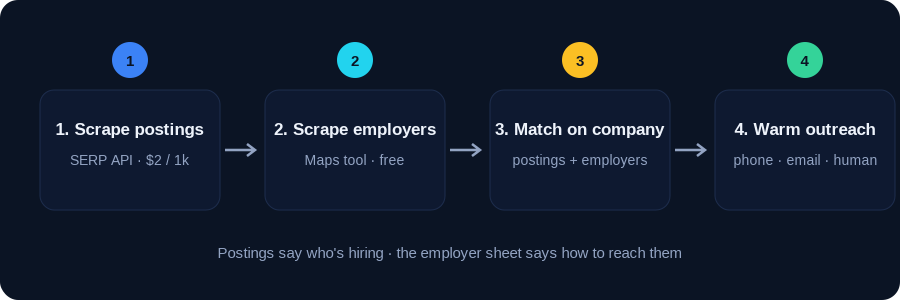
Now join your tables. Match the company names from your scraped job postings against the employer sheet (a spreadsheet VLOOKUP on a cleaned company name handles most rows). Every match becomes a warm target: you know they're hiring, and you now hold a phone number, an email and a rating profile for them. Recruiters call or email the hiring manager directly; candidates reach a human instead of only submitting through the ATS; sellers get a perfectly timed reason to start a conversation.
One compliance note before you hit send: employer emails are personal data in many jurisdictions, and the GDPR rules apply to how you store and message them in the EU. Keep every message relevant to the person's role, identify yourself honestly, and offer an easy opt-out. If you're evaluating tools for a bigger program, our buyer questions page covers how we handle inquiries and data.
Who Uses Scraped Google Jobs Data in the Real World?
Recruiters and staffing agencies use scraped postings to spot companies that hire in volume, then use employer data to reach hiring managers directly instead of waiting on inbound job orders. A staffing agency that calls a growing clinic the week its posting went up beats the agency that waits for the posting to come to them. The employer sheet, with phones and emails enriched, is the difference between monitoring the market and working it.
Job seekers use the same data defensively and offensively. Defensively: ratings and review counts tell you what employees and customers say before you sink weeks into an application (remember, most candidates already research employers this way, and Glassdoor's number says 83 percent check reviews). Offensively: a target list of 50 growing employers, contacted directly with a short human note, beats 500 ATS submissions statistically and psychologically.
B2B sellers to hiring companies (HR software, staffing services, training providers, equipment suppliers) treat a surge of job postings as a buying signal. And this is our own daily bread: we export fiber optic products to distributors in over 50 countries, and we build our outreach lists exactly the way this article describes, one metro and one keyword at a time. When we hire, our recruiters pull target-employer sheets the same way. If you'd rather talk to the people who run this workflow daily, get to know our team or contact us directly.
Five Mistakes People Make When They Scrape Google Jobs
Most failed Google Jobs scraping projects die from the same five mistakes.
- Not deciding which of the two data types you need. People scrape postings when they needed employer contacts, or the reverse, and discover the mismatch only after paying for data that can't answer their question. Decide the deliverable first.
- Scaling a DIY script before testing its survival rate. A parser that worked yesterday can return empty files today after a Google markup change. Test on small batches, log failures, and only then scale.
- Stopping at the apply link. A list of 500 postings with no employer contact data funnels into ATS filters, where most resumes die unseen. Always build the employer sheet alongside the postings list.
- Ignoring personal-data rules in outreach. Recruiter emails are personal data under GDPR in the EU, and cold email rules apply in the US. Relevance, honesty and opt-outs aren't just polite; they're legal requirements.
- Skipping dedupe and prioritization. Job boards and Google overlap heavily, so the same posting appears under several keywords. Deduplicate on company name plus title, sort by hiring signals (review count, rating, fresh posting date), and work the top rows first.
Scrape Smarter: Free Data First, Scale What Works
You now know how to scrape google jobs two ways that matter: postings through a SERP scraper at a few dollars per thousand results, and employers through a free no-code Maps tool. You know the legal lines (public data, no logins, respect personal data), the cost math, and the step most guides miss: matching the two lists so every posting comes with a human path into the company.
Start free and small: open the Google Business Scraper, enter one employer keyword for your market, and see your first 100 rows in minutes. When the workflow proves itself, use Bulk mode for whole regions and add a SERP API for the postings side. And when you want a partner who actually runs this playbook for real recruiting and real export sales, that's us: get to know our team or contact us directly.
Frequently Asked Questions
Is it legal to scrape Google Jobs?
Collecting publicly visible job postings is generally lawful in the United States under the hiQ Labs v. LinkedIn line of cases, reinforced by the 2024 Meta v. Bright Data ruling on logged-out scraping, but it conflicts with Google's terms of service, so the practical risk is blocked requests rather than lawsuits. Personal data such as recruiter emails falls under GDPR in the EU. Collect public data only, never behind logins, and outreach honestly.
How much does it cost to scrape Google Jobs?
Ready-made scrapers cost about $1.30 to $4 per 1,000 job results, so a 10,000-posting project runs roughly $13 to $40 in tool fees. DIY Python scripts look free but add proxy costs and maintenance time. The employer side can cost nothing: our Google Business Scraper runs on a free daily plan (5 searches and 1 bulk task) with no account required.
Can I scrape Google Jobs without knowing how to code?
Yes. Form-based scrapers like Outscraper and our Google Business Scraper take a keyword, run the extraction, and hand you a CSV or Excel file, all in a browser with no code. Coding only becomes necessary if you want a custom pipeline, tight scheduling, or fields the ready-made tools don't return.
What data fields do I get when I scrape Google Jobs?
From the postings side: job title, company name, location, posted date, sometimes salary estimates, and the apply link, which is what SERP APIs return. From the employer side, our tool returns 26 fields per business, including phone, website, address, rating, review count, claimed status, coordinates and place IDs, plus enriched emails and social profiles. The two lists are designed to be matched on company name.
How do I find the employer's contact details behind a job posting?
Job postings almost never include a human contact; apply links lead to form systems. The practical route is to extract the company name from the posting, look that company up on Google Maps, and scrape its profile for phone, website and address, then visit its site for the contact email. Our enrichment step automates exactly that, filling the Email and Social Medias columns from each employer's own website.
Interested in our products?
Get a Quote