How to Scrape Data from Google Maps: Step-by-Step Free Guide
By Peter Lin, HENGXANG Firm · Published on November 5, 2026
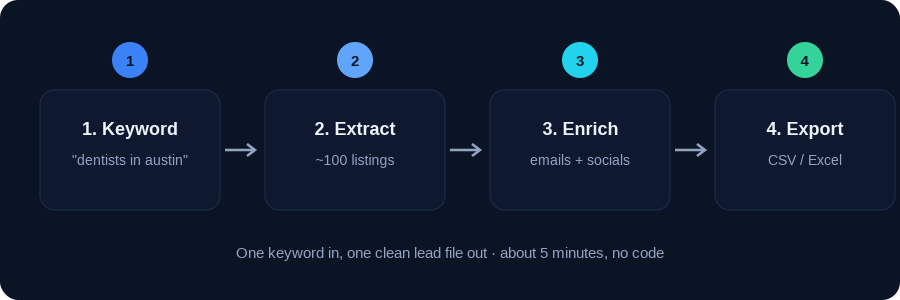
The fastest way to scrape data from google maps is to type a keyword like "restaurants in new york" into a no-code scraper, extract about 100 business records (names, phones, websites, ratings), enrich them with emails and social profiles, then export the list to CSV or Excel. That takes about five minutes, needs no coding, and costs nothing on a free tool. Below we walk you through exactly how to do that, step by step with pictures, using our free Google Business Scraper.
Quick answers to the three questions most searchers bring: it costs $0 to start, one keyword returns about 100 records, and collecting public business data is generally lawful in the US under court precedent, even though it breaks Google's terms of service. All three get covered in depth below, along with a side-by-side cost comparison of the four scraping methods.
A word on who we are: we run a fiber optic manufacturing business, and our sales team lives on scraped and enriched Maps data every day. We built this free tool for ourselves because the existing methods were either too slow or too expensive. Everything below is the workflow we use daily, not theory.
What Does It Mean to Scrape Data From Google Maps?
Google Maps holds one of the largest public business databases in the world. When a company signs up on Google, it shares its category, location, phone, website link, opening hours, photos and reviews. All of that sits on a public listing page that anyone can open in a browser.
When people talk about a "lead list", they mean a spreadsheet where each row is one potential customer. A scraped Maps listing gives you the who (name), the where (address), and the how-to-reach (phone, website, and sometimes email). Our tool extracts 26 structured data fields from every listing, including latitude and longitude, place IDs and social links, so the file works in any CRM without cleanup tricks.
One thing scraping is not: it's not hacking, and it's not taking private data. You're collecting what businesses publicly display to every visitor. That distinction matters for the legal question, which we cover next.
Is It Legal to Scrape Google Maps?
That's the honest, two-sided answer most tool pages won't give you in one place. Let's unpack it.
In the United States, the key case is the hiQ Labs v. LinkedIn ruling. Courts held that scraping public web pages doesn't violate the CFAA, the main anti-hacking law, because there's no "unauthorized access" to a system you didn't break into. Public Maps listings sit in that same category.
Google's contract says something different. The Google Maps Platform terms include a "No Scraping" clause: you may not extract Maps Content for use outside their services. Breaking a term of service is a contract dispute. In practice, the realistic risks are account bans and IP blocks, not lawsuits against small lead-gen exporters, though we're not lawyers and this isn't legal advice.
Three practical rules we follow:
- Collect public listing data only. Never data behind a login.
- Respect copyright: don't republish Google's reviews, photos or map tiles as your own content. Extract facts (name, phone, website) and move on.
- Treat owner names and emails as personal data. In the EU that means GDPR rules apply to how you do outreach, and cold email rules like CAN-SPAM (US) still apply everywhere.
If you want a completely ToS-clean route at scale, the official Places API exists, and we'll show you what it actually costs. Spoiler: for big lists, the bill surprises people, which is exactly why business owners on r/Entrepreneur call the API "really expensive to run".
Four Ways To Scrape Google Maps Data (And What Each One Really Costs)
Here's the comparison we wish someone had shown us before we lost a week to copy-pasting.
| Method | Speed | Skill needed | Real cost | Best for |
|---|---|---|---|---|
| Manual copy-paste | ~30-60 listings/hour | None | Your time | 10-20 listings, one-off |
| Official Places API | Fast | Developer | $5-$32 per 1,000 requests, plus setup | Apps and products, ToS-clean |
| Open-source Python | Fast | Comfortable with code | Server time + maintenance | Tech teams, custom fields |
| No-code tools (ours and others like Outscraper) | ~100 listings per keyword in minutes | None | Free tiers; paid plans | Sales teams building lead lists |
The official API deserves a closer look, because "just use the API" is common advice that hides real costs. Google's official pricing table tiers Places API calls from $5 per 1,000 requests (Essentials) up to $17 per 1,000 (Pro), and one 2026 Places API pricing breakdown shows Nearby Search Pro running $32 per 1,000 at some tiers. One independent analysis puts the worst case around 2.5 cents per place once you add detail fetches. Build a 10,000-business list through the API and you can land in the hundreds of dollars, plus developer time. There's also a practical tip repeated on Stack Overflow: store place IDs and re-fetch details officially rather than re-scraping.
Open-source scrapers like google-maps-scraper on GitHub work well if you can run a script, and they're free. You trade money for setup and maintenance: Google changes its markup, your script breaks, you fix it.
For most sales and marketing people, no-code tools win. That's why we built ours, and the next section is the full walkthrough.
How To Scrape Data From Google Maps, Step By Step
What you need: a browser and a keyword. No install, no account; the tool runs in your browser and your task history stays on your own device. Open the Google Business Scraper to follow along.
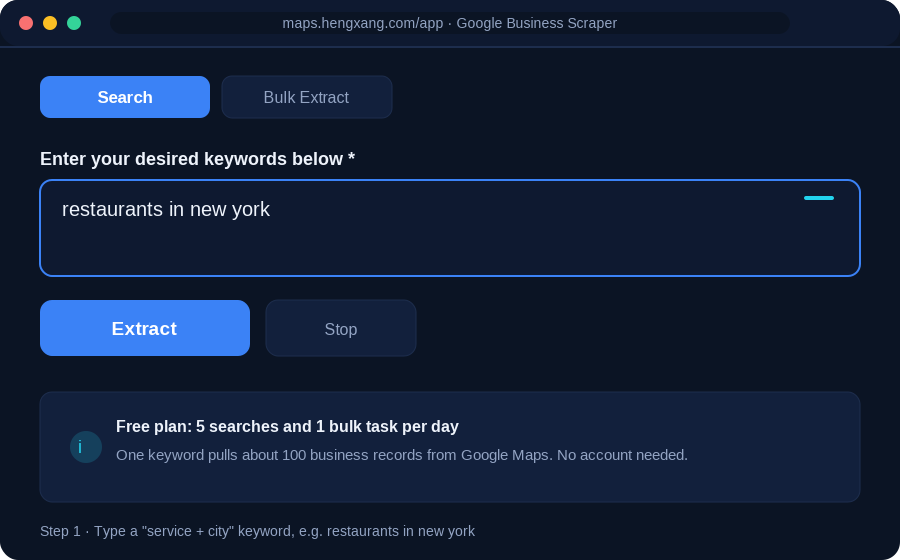
Free daily limits: 5 searches and 1 bulk task per IP per day. Limits reset daily. We'd rather tell you upfront than surprise you at the download button.
Step 1: Open the tool and enter one keyword
Open the Google Business Scraper. You'll see a Search tab with one input box. Type a keyword in the "service + city" pattern, for example "restaurants in new york" or "dental clinics in Austin".
Step 2: Click Extract and wait about a minute
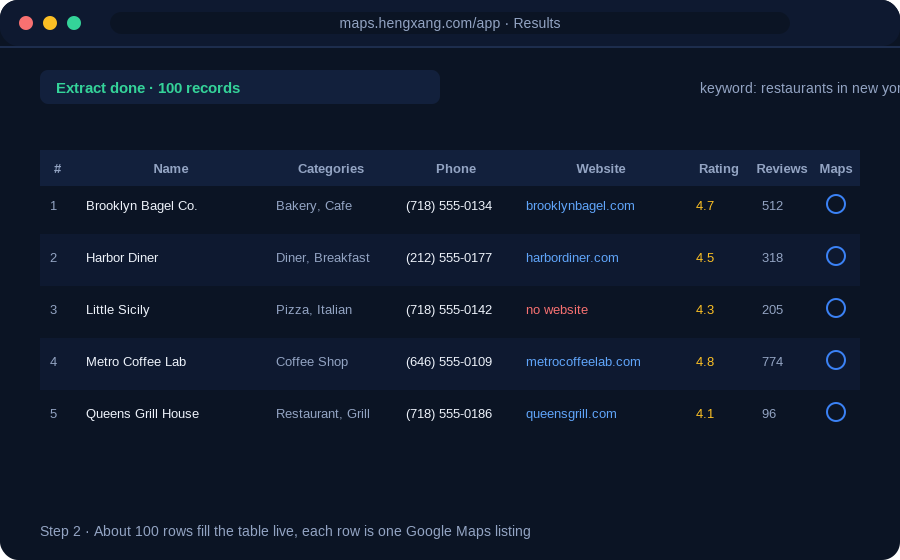
Press Extract. The tool queries the keyword and pulls roughly 100 business records, each with its data points attached. You'll watch rows fill the results table live.
Need different keywords? Just change the keyword and run again, or use Bulk mode in Step 6.
Step 3: Pick the columns you want to export
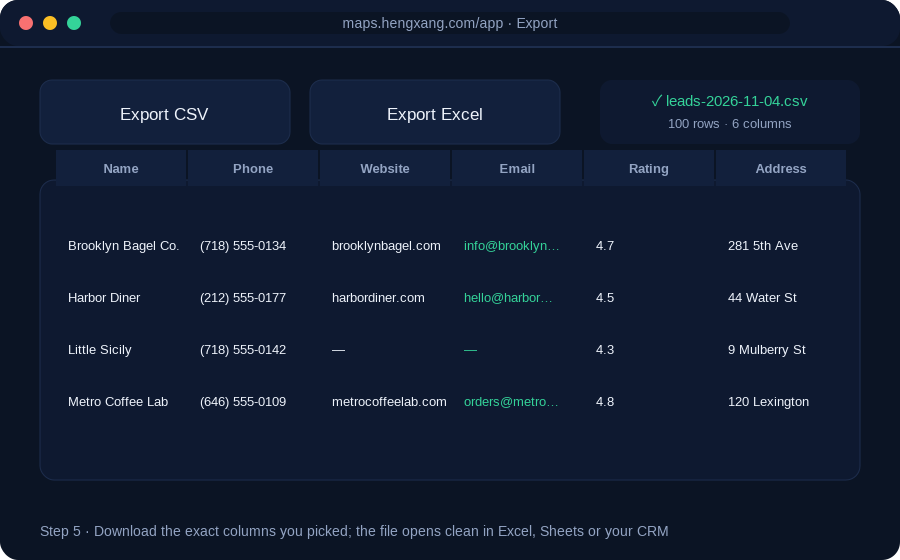
Click ⚙ Export Fields. A panel shows all 26 available columns, from basic contact details to place IDs and coordinates. Click to select or unselect; there are Select all and Unselect all buttons, then Confirm.
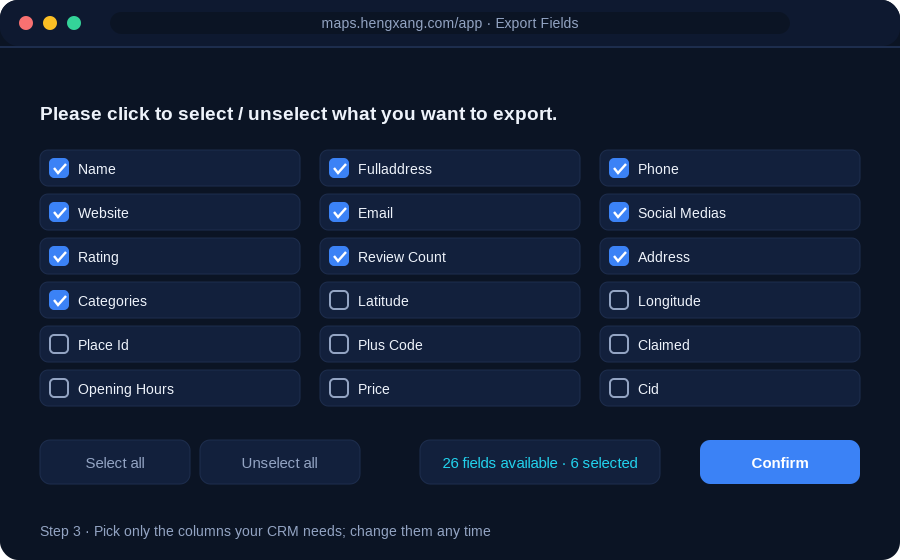
For a cold outreach sheet we keep Name, Phone, Website, Email, Rating and Address. For mapping or territory planning we add Latitude, Longitude and Plus Code.
Step 4: Enrich the list with emails and social profiles
Click ✉ Find Emails & Socials. The tool visits each business's website and pulls the contact email plus social links it finds, filling the Email and Social Medias columns in batches of 20.
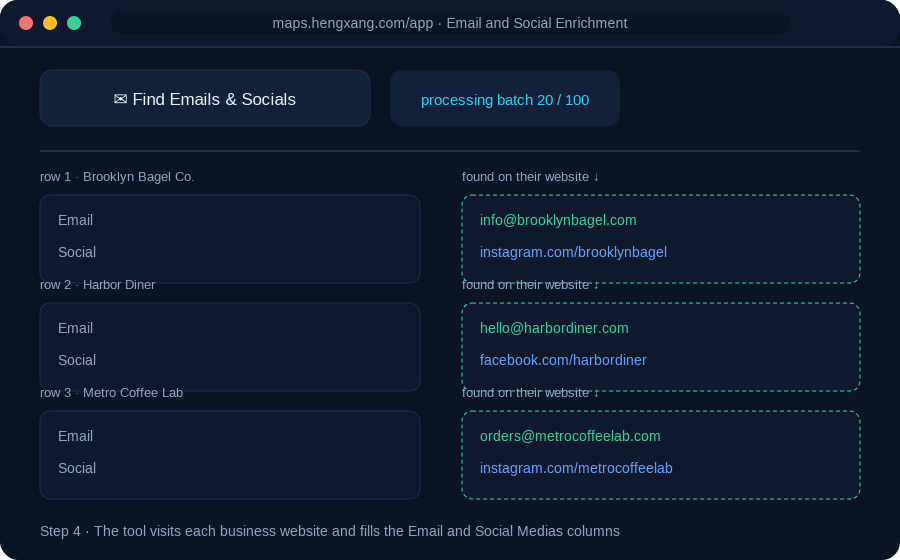
Public Maps listings rarely show emails; the businesses' own websites usually do. Not every site will yield an email, and you should only email businesses whose offers genuinely fit what you sell.
Step 5: Export to CSV or Excel
Click Export CSV or Export Excel. The file downloads with the columns you picked in Step 3. Open it in Excel, Google Sheets, or import it straight into your CRM.
Step 6: Scale up with Bulk Extract
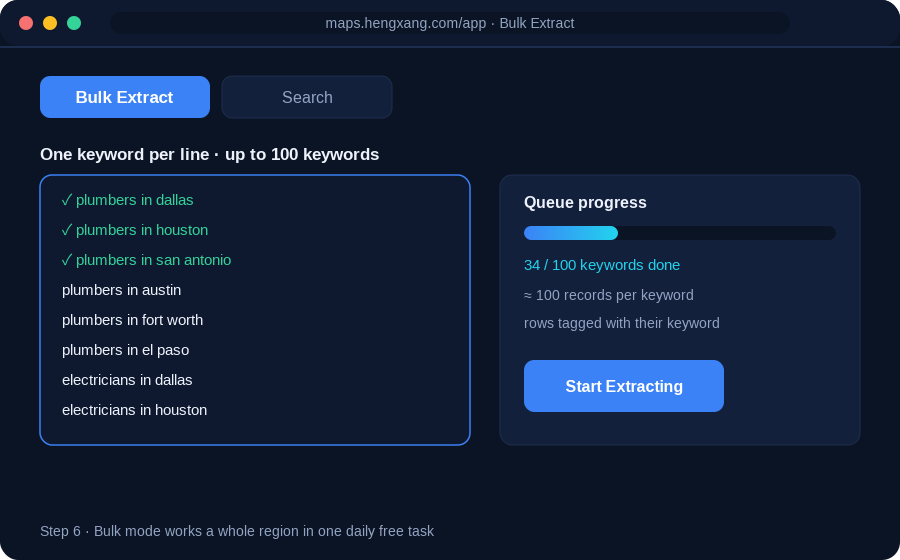
Switch to the Bulk Extract tab. Paste up to 100 keywords, one per line, like "plumbers in dallas", "plumbers in houston", "plumbers in san antonio". Press Start Extracting and the tool works through the whole queue, combining everything into one dataset.
Step 7: Reuse your task history
Every task saves to Task History on your device, up to 100 tasks. Click Load keywords to rerun an old keyword list, or Delete to remove one. Nothing sits on our servers; your lists live in your browser's storage.
How To Choose Keywords That Return Good Leads?
Good patterns that work for B2B prospecting:
- Service + city: "web design agencies in miami"
- Niche + neighborhood: "coffee roasters in brooklyn"
- Industry + region: "hotels in bali", "logistics companies in hamburg"
- Buyer-language keywords: "wholesale supplier" style phrasing finds sellers, not consumers
Two mistakes to avoid. First, keywords that are too broad ("restaurants") pull results from everywhere and waste your quota. Second, keywords that are too niche ("artisanal vegan cupcake bakeries") may return three businesses. Aim for the middle: tens to hundreds of results per keyword.
If you sell to businesses in one industry, build a Bulk list of your service keyword across every city you ship to. That's exactly how our export team builds distributor lists, one metro at a time.
Don't Just Collect Names: Turn Listings Into Sales Signals
Here's the part almost every guide skips. You now have 100 rows. Don't email them in file order. Sort and filter for intent:
- No website listed: they need one. If you sell web design, that's your hottest row.
- Unclaimed listing (the Claimed field says so): nobody is managing their Maps presence. Marketing agencies, this is your pitch.
- High review count, low rating: busy business with reputation problems. Reputation services, hello.
- Rating 4.5+ with 500+ reviews: they're successful and growing. Great fit for suppliers, wholesalers and B2B services. This is our own case: we export fiber optic products worldwide, and high-performing local installers and resellers are exactly who we want to meet.
- Opening hours missing or outdated: signs of low digital management; softer signals, lower priority.
We built a distributor outreach campaign this way: one keyword per city across twelve cities, filtered for resellers with good ratings but no official distributor page, then enriched for owner emails. The list went from 1,200 raw rows to 140 priority conversations. That's the difference between scraping and prospecting.
From Spreadsheet To Deals: Clean, Enrich, Load Your CRM
Teams put scraped Maps data to work in five main ways: B2B lead generation and cold outreach, local SEO prospecting (unclaimed listings are easy wins), market research and competitor mapping, franchise or territory planning, and recruiting local partners or distributors. Whatever your use case, the file needs three quick passes before it's ready: remove duplicates, sanity-check emails, and import into your CRM or outreach tool with clean column names.
Deduplicate first. Bulk exports across nearby cities can list the same business twice; your CRM should contain each business once. A spreadsheet "Remove duplicates" on the Phone or Website column handles it.
Check emails before you send. Enrichment pulls public emails from business websites, but some are stale. If your outreach tool has verification, run it; if not, keep your first email short and human.
Import with a plan. Map your columns (Name, Phone, Email, City, Rating) to your CRM fields, tag the batch with the keyword or city it came from, and set a follow-up rhythm. Three short touches over two weeks beats one long pitch.
One compliance note worth repeating: scraped business emails are still personal data in many jurisdictions. In the EU, the general data protection rules apply to how you store and email them. Keep your outreach relevant, identify yourself honestly, and offer an easy opt-out. If you're evaluating tools for a bigger program, our buyer questions page covers how we handle inquiries and data.
What Most Guides Miss: The Real Cost Per Lead
Let's put numbers on a 10,000-business project:
| Route | 10,000 records | Setup | Hidden cost |
|---|---|---|---|
| Official Places API | ~$50-$320 | Developer required | Maintenance and quota management |
| Open-source Python | ~$0 cash | Coding skills | You fix it when Google changes |
| Manual copy-paste | ~$3,750 (250 hours at $15/hour) | None | Errors, boredom, abandonment |
| No-code tool (free tier) | $0 over a couple of weeks | None | Daily limits (5 searches, 1 bulk task) |
Cost isn't only money; it's also time-to-first-lead. The API route needs code before your first row exists. The tool route gives you rows in minutes today. For most teams, starting free and scaling the workflow beats engineering a pipeline for data you haven't validated yet. And if your lists get truly huge, now you know exactly what the compliant API path would cost.
Five Mistakes People Make When They Scrape Google Maps
Most failed Maps scraping projects die from the same five mistakes.
- Scraping without a target customer. "Restaurants" returns everything from food trucks to chains. Decide who buys from you first, then choose keywords that only they would match.
- Stopping at names and addresses. A list without emails is a list you can't work. Always run enrichment, or plan a phone-first outreach.
- Cold-emailing scraped addresses carelessly. Relevance, honesty and opt-outs aren't just polite; they're legal requirements in many places, and spam complaints can burn your domain.
- Trusting the first export blindly. Deduplicate, spot-check 20 rows by hand against Maps, and fix your keyword if the match rate is poor.
- Treating every row the same. Use rating, review count and claimed status to prioritize, as shown above. Ten good conversations beat a hundred ignored emails.
Start Free, Learn Fast, Scale What Works
You now know how to scrape data from google maps four different ways, what each one costs per lead, and how to turn raw rows into prioritized, enriched conversations. The workflow we use daily is the one in the walkthrough above, and you can run it free, starting right now.
Open the Google Business Scraper, enter one keyword for your market, and see your first 100 rows in minutes. When you want a bigger list, use Bulk mode with your city queue. And when you want a supplier, distributor or manufacturing partner who actually practices this kind of data-driven outreach, that's us: get to know our team or contact us directly.
Frequently Asked Questions
Is it legal to scrape Google Maps?
Collecting public business data from Maps is generally lawful in the United States under the hiQ Labs v. LinkedIn precedent, but it conflicts with Google's Terms of Service, so the practical risks are account bans and blocked access. In the EU, personal data such as owner emails falls under GDPR. Collect public data only, respect copyright on reviews and photos, and outreach honestly.
How much does it cost to scrape Google Maps data?
Manual copy-paste costs your time, about 40 listings per hour. Google's official Places API costs $5 to $32 per 1,000 requests depending on the tier, which works out to roughly half a cent to three cents per business record. Open-source scrapers are free but need technical setup. No-code tools like our Google Business Scraper have free daily limits and paid plans on some competitors.
Can you get emails from Google Maps?
Maps listings themselves rarely show emails; they show phones and websites. Tools bridge the gap by visiting each business's website and extracting the public contact email and social links. Our enrichment step fills the Email and Social Medias columns automatically, in batches of 20 listings. Not every business site publishes an address, so expect a good fraction, not 100%.
How many businesses can I scrape from one keyword?
In our tool, one keyword returns about 100 business records, which matches a typical first page of deep Maps results. For bigger lists, use Bulk mode with up to 100 keywords, one per line, which can produce up to 10,000 rows in a single daily task. Narrow keywords return fewer but more relevant rows.
Do I need to know how to code to scrape Google Maps?
No. The whole workflow in this guide, keyword, extract, enrich, export, runs in your browser with no code and no installation. Coding only becomes useful if you want fully custom pipelines or need the official API's clean compliance story, and open-source projects on GitHub exist for that route.
Interested in our products?
Get a Quote