How to choose ethernet cable: know the difference between good and bad
By Peter Lin, HENGXANG Firm · Published on November 14, 2026 · Updated on November 21, 2026
If you are wondering how to choose ethernet cable, verify four things before you pay: solid bare copper conductors (23 or 24 AWG), a flame-rated jacket (CM, CMR, or CMP), a full 305-meter box with meter marks, and DC resistance near 9 ohms per 100 meters or less. That is the whole method, and it works on any category from Cat5e to Cat8. Everything else on the listing is decoration.
Why trust this method over a brand name? We have manufactured cables at our Jinhua factory since December 2000, and we test incoming conductor stock with the same multimeter routine this guide teaches. The failures that come back to us rarely involve the category; they involve copper-clad aluminum legs, short-metered boxes, and missing flame ratings.
The stakes are simple. Cable hides inside walls, above ceilings, and inside trays, and bad cable fails quietly: a PoE camera reboots every night at 2 a.m., an access point never reaches full speed, one office floor drops off the network on hot afternoons. A switch swap takes ten minutes; a wall-opening rework costs many times what the cheap box saved.
Most guides stop at "pick Cat6 and move on," which skips the real problem: the category printed on a jacket is a claim, not a proof. Below is the verification routine we teach our own distributors, so you can judge every box with your own hands.
What Actually Separates Good Ethernet Cable From Bad?
Good ethernet cable uses a solid pure copper conductor (23 or 24 AWG), a certified flame-rated jacket, a full 305-meter box, and DC resistance of about 9 ohms per 100 meters or less. Bad cable quietly removes one or more of those four things and hopes you never check.
Bad cable is not a cheap knockoff that looks worse. It is engineered to look identical to the real thing, because its whole business model depends on you not looking inside. The savings come from three hiding spots: the conductor, the jacket, and the box itself.
Put a suspect box next to a proper one and the gaps show up fast:
| What to check | Bad cable | Proper cable |
|---|---|---|
| Conductor | Copper-clad aluminum, copper-clad iron, recycled scrap | Solid bare copper |
| Conductor size | 0.35 to 0.48 mm, sometimes thinner | About 0.51 mm (24 AWG) for Cat5e, 0.57 mm (23 AWG) for Cat6 |
| Jacket | Recycled plastic that cracks early and burns with black smoke | Rated PVC or LSZH with a listed flame rating |
| Box length | 150 to 280 meters, short-metered | Full 305 meters (1,000 feet), meter-marked |
| Price logic | Sells below what the copper inside would cost | Priced above raw material cost, with test certificates |
| Long-term cost | Dropped packets, PoE reboots, wall-opening rework | Install once and forget it |
Two terms deserve a quick explanation. LSZH stands for "low smoke zero halogen," a jacket compound that releases little smoke and no toxic halogen gas when it burns, which matters in enclosed spaces. AWG is just the American wire gauge number for conductor thickness: a smaller number means a thicker wire.
One more distinction the thorough guides make: solid versus stranded. Solid conductors are one wire per leg, they terminate reliably, and they belong inside walls. Stranded conductors braid many thin strands, they flex thousands of times without breaking, and they belong in patch cords. The checks in this guide apply to both, but they matter most for the solid runs you will never see again once the drywall closes.
None of this shows up on a product photo, which is why the next sections are all about verification you can do yourself.
Why the "CAT6" Printed on the Box Is Often a Lie
Here is the sentence the cable industry does not like: the printing on the jacket is advertising, not certification. Anyone with a printing machine can put "CAT6", "pure copper", and a UL-looking logo on a jacket. Counterfeits exist precisely because buyers trust the print.
A real warning from the field: inspectors have pulled Cat6 cable off the market that carried counterfeit UL marks and no flame rating at all. That jacket burns the way cheap plastic burns, and it is the version most likely hiding in a marketplace deal. So trust the file number, not the logo.
The verification chain looks like this:
- The jacket should carry a flame rating: CM, CMR (riser), or CMP (plenum). No rating printed, no deal.
- A genuine UL mark is a specific design, with the UL letters and a small circled R. If the mark looks slightly off, treat the whole box as suspect.
- Better than any logo: find the manufacturer's file number and look it up in UL Product iQ, the official certification database. If the file number does not resolve, the listing does not exist.
- Serious makers also enroll in UL's LAN cable verification program, which checks finished cable against the ANSI/TIA performance standard, not just safety.
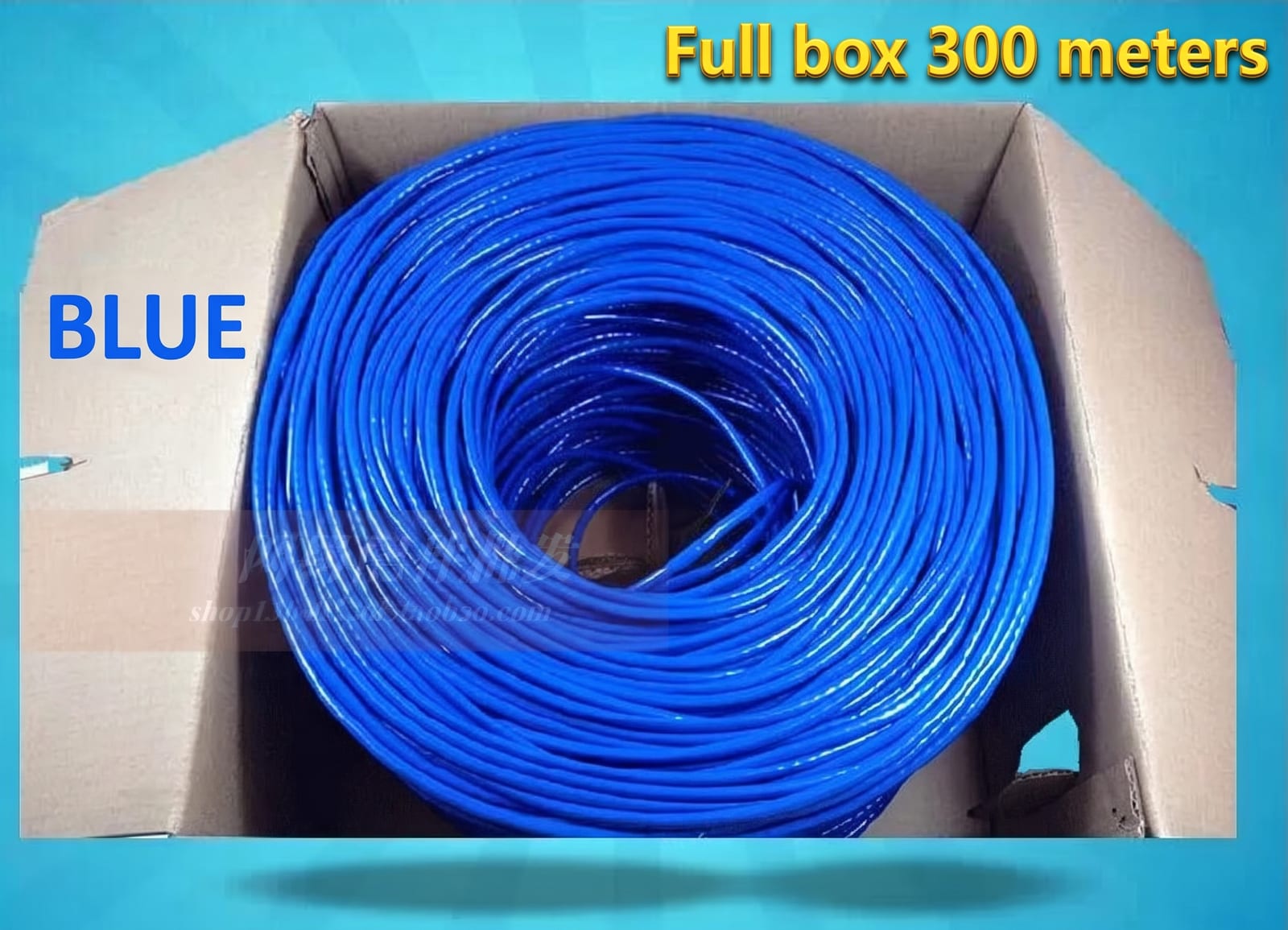
Length claims get the same treatment. A proper box says 305 meters (1,000 feet), and the jacket carries a meter mark every single meter so the installer can count what was used. When a box says "300 meters" or "280 meters", that is not a smaller package. That is a confession.
We keep the third-party certificates for our own cable lines on our website for the same reason: paperwork you can check beats a logo you must believe.
How Do You Test an Ethernet Cable Before You Trust It?
You can verify a suspect box in minutes without lab gear: check crisp color-coded pairs and a rip cord, tight twists of about one per centimeter, full-gauge conductors around 0.51 to 0.57 mm, a box weight near 10 kg for Cat5e or 13 kg for Cat6, and DC resistance of about 9 ohms per 100 meters or less on a multimeter. If the cable fails the resistance test, nothing else matters.
Work from the outside in. Each step takes one step closer to the truth, and step 5 is the one that ends arguments.
- Read the print on the box and the jacket. You want the category (CAT5E or CAT6), the length (305 meters / 1000 feet), and meter marks printed along the cable. Meter marks are your receipt: you can measure a few lengths and see whether the marks are one meter apart. Faded or irregular printing means a printing machine in a hurry.
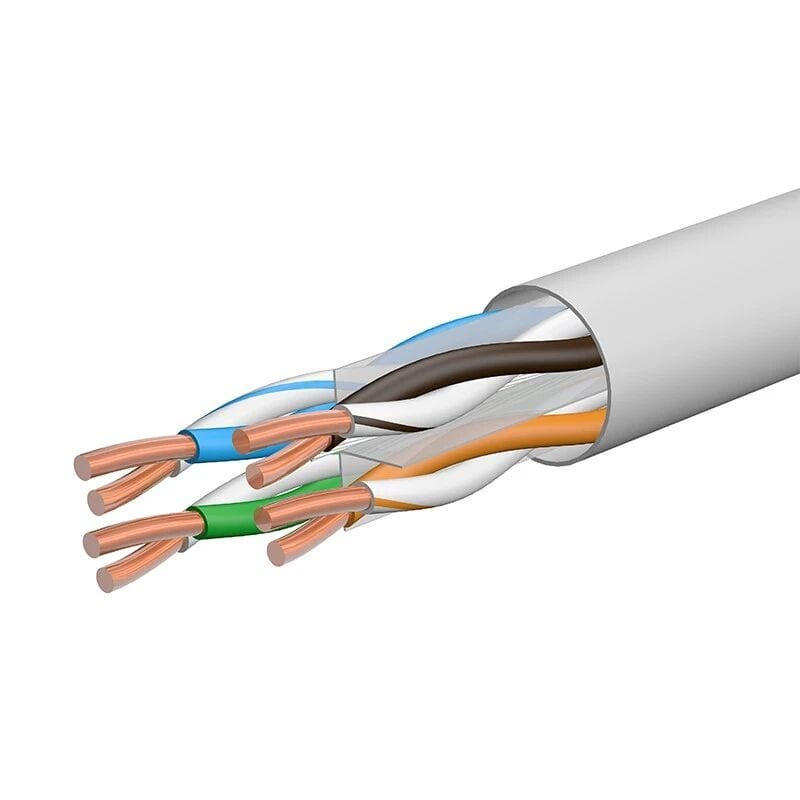
- Look at the pairs. Inside are four twisted pairs and a rip cord. The color code is fixed: white-orange, orange, white-green, green, white-blue, blue, white-brown, brown. On good cable the stripes are crisp and easy to tell apart. On bad cable the striped wires look washed-out gray or even plain white, because the maker skipped pigment and the material is not the same either.
- Check the twist density. Pairs are twisted so each pair cancels the other's interference. Good cable twists tightly and evenly, roughly one full twist per centimeter. Loose, uneven twists mean crosstalk goes up and speed drops, especially past 50 meters.
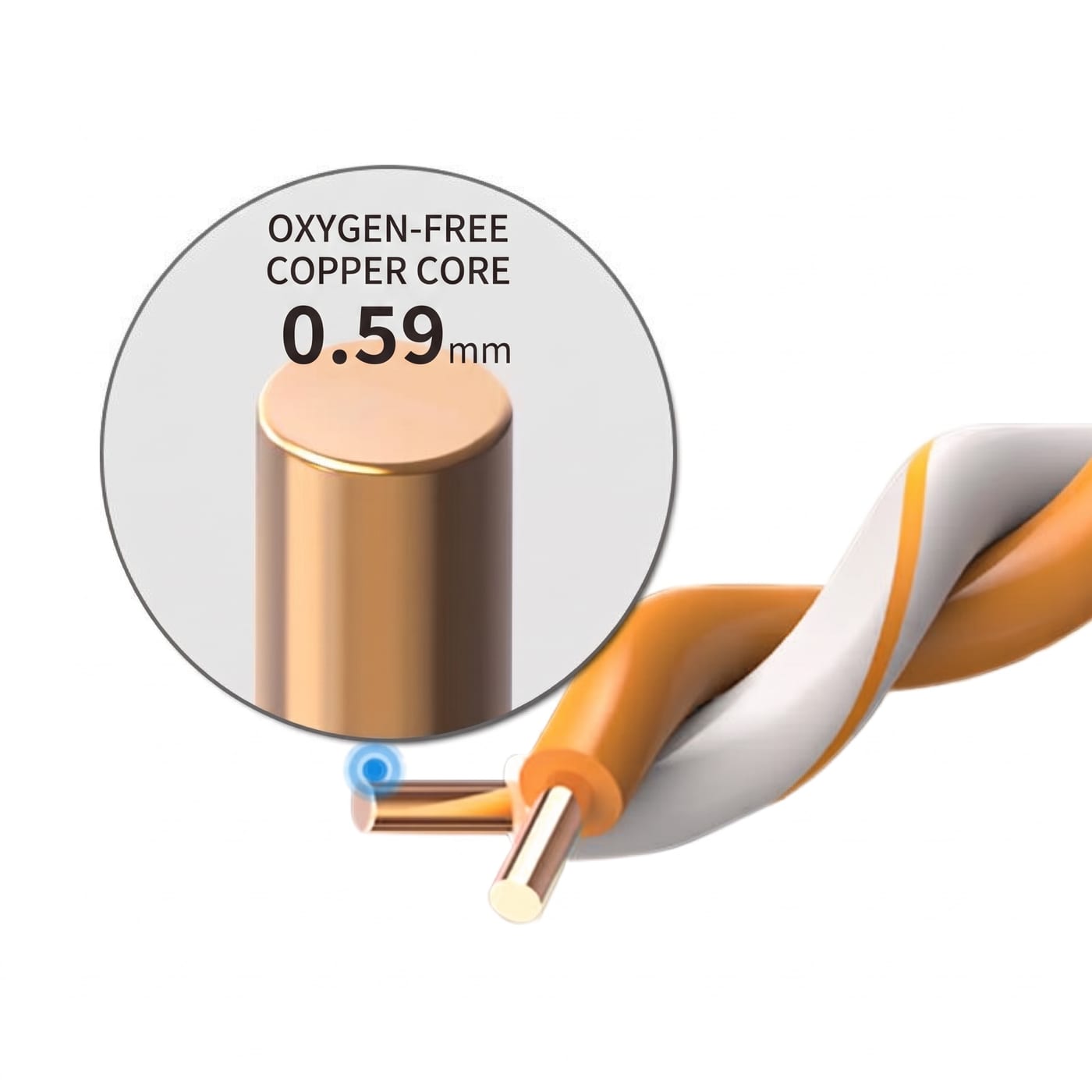
- Measure the conductor diameter. A $10 micrometer or caliper settles it: about 0.51 mm for Cat5e (24 AWG) and about 0.57 mm for Cat6 (23 AWG). Undersized conductors run hotter and lose more signal. One honest warning: diameter is a first screen only. A dishonest factory can make a fat core out of aluminum, which is why the next test is the one that matters.
- Run the multimeter resistance test. This is the hardest truth in the whole box. Cut a known length of one conductor, measure its DC resistance end to end, and scale it to 100 meters. Real copper Cat5e measures about 9 ohms per 100 meters, Cat6 about 7. Copper-clad aluminum measures 20 to 50 ohms or more. The higher the number, the more signal you lose and the more heat PoE power creates. Fluke Networks' application note on CCA cable recommends exactly this DC resistance check as the reliable test. The method takes five minutes: strip both ends of a cut piece, keep the two conductors you care about separated, touch the probes to the same conductor at each end, and read the ohms. A two-meter sample of real copper should read a fraction of an ohm, which most meters barely resolve, so cut a longer piece, say 20 meters, and scale up. Sample three or four conductors from different spots in the coil, because a mixed box can hide aluminum on some legs and copper on others (the infamous "four iron, four aluminum" build). Sample every batch you buy, and reject the batch, not just the box.
- Weigh the box. A full 305-meter box of Cat5e lands near 10 kg; Cat6 near 13 kg. Copper is heavy, aluminum is not. A box that feels suspiciously light is telling you what is inside before you strip a single conductor. Weigh it on a shipping scale, subtract a kilo for packaging, and compare against the spec sheet. If you cannot weigh it, the conductor test in step 5 still catches the same fraud from a different angle.
- Use the magnet, the knife, and the lighter. A magnet sticks to iron, so if a conductor is magnetic, it is copper-clad iron scrap: throw the box away. A knife scrape that shows silver metal under a copper skin means copper-clad aluminum, the same test Fluke's cabling technicians recommend. A careful burn test in a ventilated spot tells the last story: real copper oxidizes dark and wipes back to bright copper, while aluminum-core cable softens and deforms fast. The jacket gets the same treatment: rated PVC self-extinguishes when the flame moves away, recycled plastic keeps burning with black smoke. Mind the fumes and do this outdoors.
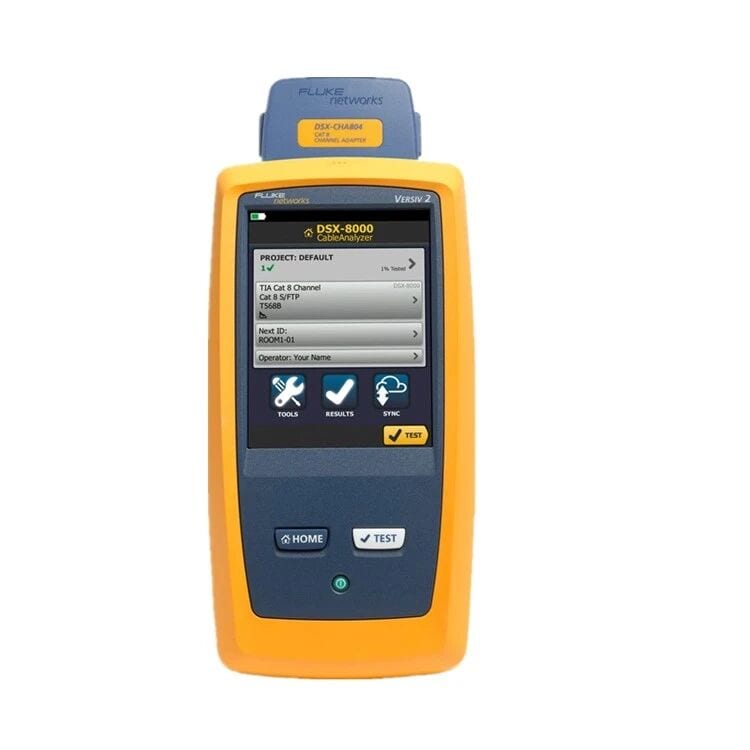
- Certify the link for anything that matters. A Fluke DSX-class tester measures length, insertion loss, crosstalk, and return loss, then prints a pass or fail report. It is the industry's referee, and more tenders now require per-point certification reports. For a big install, put the test requirement in the contract itself; it is the cheapest insurance in the whole project. A proper report names the test standard, the link model, and every margin, so an owner can see exactly how far each measurement sits from the pass or fail line. Guessing is free until it is not.
What Is Your Cable's Core Really Made Of?
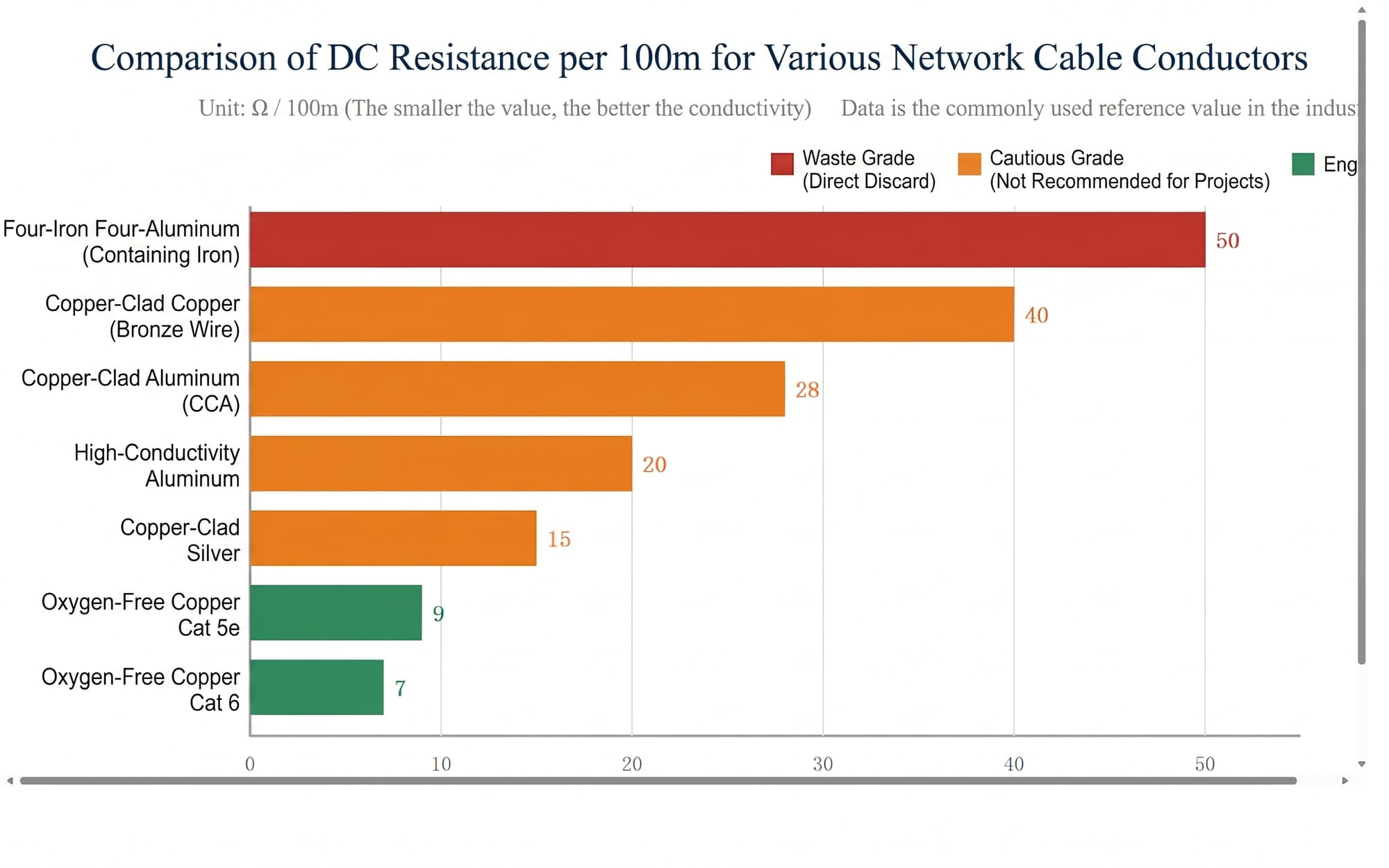
Cable cores range from iron-aluminum scrap to solid oxygen-free copper, and the DC resistance per 100 meters tells you exactly where a given box sits: scrap blends measure around 50 ohms, copper-clad aluminum around 28, and real copper 9 or less. Lower resistance means less signal loss, less PoE heat, and a longer working life.
The market sorts into six conductor types. Every one of them gets sold as "copper cable", so here is the honest cheat sheet:
| Conductor | Ohms / 100 m | What it really is | How to spot it | Our verdict |
|---|---|---|---|---|
| Copper-clad iron | ~50 | Steel and aluminum strands under copper | A magnet sticks to it | Scrap grade. Never |
| Copper-clad copper | ~40 | Recycled, re-melted copper with plating | Burn melts the plating fast | Avoid for permanent installs |
| Copper-clad aluminum (CCA) | ~28 | Aluminum core, thin copper skin | Scrape shows silver; burn softens it | Short, low-power patch cords only |
| High-conductivity aluminum | ~20 | Plated imported aluminum | Burn softens; oxidizes over years | Avoid in walls and ceilings |
| "Copper-clad silver" | ~15 | Aluminum with a thicker copper plating | No silver at all; turns dark after years | Legacy runs only; never in server rooms |
| Oxygen-free copper (OFC) | ~7-9 | Solid pure copper | Burn, then wipe: back to bright copper | The only core we recommend in walls |
That "copper-clad silver" name deserves a laugh: there is no silver in it. It is aluminum with a thicker copper plating, and marketing invented the noble name. Aluminum in any form oxidizes over the years, and oxidation raises contact resistance at every termination, so those cables quietly get worse around year four or five.
There is history inside that table too. Copper-clad silver cable filled offices, supermarkets, and warehouses in the era of ADSL broadband, back when 150-meter runs of modest speed were normal and nobody pushed PoE through the same jacket. ADSL has since been retired in most countries as fiber took over the outside plant, and the leftover stock keeps finding its way into marketplace listings at prices that sound nostalgic. The plating that made it "better" than plain CCA does not change the ending: oxidation wins, and a server room is the last place you want a conductor that degrades on a schedule.
About the "this cable transmits 150 meters" claims you will see in listings: distance is physics, not cable quality. The ethernet channel budget is 100 meters for every category on the market, and no conductor rescues you past it (the next-but-one section breaks down that budget). The 150-meter talk comes from old analog camera transmission tricks and plain marketing hope.
Does Cheap Cable Really Cost More?
Yes, and the math is not close. A copper-clad aluminum conductor carries roughly 60 percent more resistance than copper, so a high-power PoE run turns that extra resistance into heat inside your wall, and the rework bill for a failed run costs many times the box you saved. Cheap cable is the most expensive cable you can buy.
Start with what PoE actually does. Power over Ethernet sends electricity to cameras, access points, and door controllers through the same four pairs that carry data. The latest standard, IEEE 802.3bt, pushes up to about 90 watts per port. Ohm's law turns resistance into wasted watts: double the resistance, double the heat on the same current. Aluminum's resistance runs about 60 percent higher than copper's, so a CCA cable doing PoE work is a small heater wrapped in plastic, inside a bundle, above a ceiling.
You do not need an engineering degree to feel the scale of it. A 90-watt camera at 48 volts pulls roughly 1.9 amps, and that current flows out and back through thin copper legs. Every extra ohm of loop resistance eats voltage and produces heat around the clock. Copper-clad aluminum can add a dozen extra ohms on a 100-meter loop compared with copper, which is why the failure pattern is so predictable: equipment reboots under load, and terminations run warm to the touch.
The standards body saw this coming. TIA TSB-184-A guidance spells out bundle derating for high-power PoE and warns against CCA outright. Field math from one PoE bundle study puts it in plain numbers: keeping temperature rise under 15 degrees Celsius at 90 watts per cable allows about 52 Cat5e cables per bundle, 74 Cat6, or 100 Cat6A. The cables in the middle of an oversized bundle run hottest, and hot conductors mean signal loss long before anything catches fire.
History adds the scary part. When American homes were wired with aluminum branch circuits, research for the CPSC found those connections reached fire-hazard conditions 55 times more often than copper. That is household power wiring, not ethernet, but the physics at the connection point is the same physics that worries every installer who finds CCA behind a PoE camera.
Then there is the rework bill, which is the number facility managers actually feel. Cable is a hidden build: walls, ceilings, trays. A failed run means a technician, a ladder, drywall dust, and downtime, repeated for every bad point. In our support desk experience, the return trip costs an order of magnitude more than the box ever saved, usually at the worst possible hour. The support tickets always read the same: cameras dropping offline at night, when PoE load runs longest, and the cable that comes out of the wall measures 28 ohms per 100 meters.
The price floor closes the argument. Copper has a market price, and a legitimate 1,000-foot Cat5e box cannot sell below the cost of the metal it claims to contain. When a listing undercuts every honest vendor, the conductor is not copper. That is not cynicism; it is arithmetic, and it is why we tell every distributor the same thing: check resistance first, price second.
If you learn better by watching, this 9-minute walkthrough shows which cable a PoE install actually needs and where the cheap ones fail:

How to Choose Ethernet Cable by Category: Cat5e, Cat6, Cat6A or Cat8?
Match the category to the devices and the decade, not to the biggest number on the listing. Cat5e carries gigabit homes, Cat6 suits offices and camera runs, Cat6A delivers 10 gigabits for new installs, and Cat8 lives in data center racks within 30 meters. Paying for Cat8 at home buys speed no home port can use.
Eaton's own cable guide lays out the official capabilities, and this is the whole table:
| Category | Bandwidth | Top speed | Full-speed distance | Right for |
|---|---|---|---|---|
| Cat5e | 100 MHz | 1 Gbps | 100 m | Homes, short office runs |
| Cat6 | 250 MHz | 1 Gbps at 100 m, 10 Gbps to ~55 m | 100 m (1G) | Offices, camera and AP runs |
| Cat6A | 500 MHz | 10 Gbps | 100 m | New installs, Wi-Fi 7 readiness |
| Cat8 | 2,000 MHz | 25/40 Gbps | 30 m | Data center switch-to-server links |
Three picking rules fall out of that table. For a home, Cat5e pure copper is genuinely enough for gigabit internet, and Cat6 costs little more. For an office, cameras, or anything with PoE, Cat6 solid copper is the workhorse. For new construction or a renovation that should outlive your next three routers, Cat6A is the honest choice, and that matters more as Wi-Fi 7 access points push multi-gigabit links back to the switch.
If you asked our factory floor which single box we would ship to a mixed office-and-camera project, the answer is Cat6, solid copper, with a spline. It terminates nicely, it carries PoE with margin, it certifies reliably, and it leaves room to upgrade the switch without touching the wall. That last point is the one buyers forget: the cable outlives the electronics around it, so buy the cable for the network you will own in five years, not the one you own today.
Prefer to watch before deciding? This 12-minute breakdown walks through Cat5e, Cat6, Cat6a, and Cat7, ending with a real-world speed test that shows where category hype stops mattering:

Now the counter-consensus part: Cat8 for a house or a normal office is money burned. Its 30-meter limit exists for one scenario, short data center links to 25G/40G servers. Your laptop negotiates 1 or 2.5 gigabit, and no home run needs 2,000 MHz of headroom. Worse, chasing category while ignoring conductor quality buys you a fake Cat8 jacket over CCA legs, which is strictly worse than an honest Cat5e made of copper. Category is a ceiling; conductor quality decides whether you ever reach it.
When the copper run ends and the backbone begins, the other side of our catalog takes over: see our fiber optic cable range for the runs that copper was never meant to do.
Do You Really Need Shielded Cable?
Probably not. Unshielded twisted pairs already reject noise well in homes and offices. Shielded cable earns its price only near strong interference, and only when the shield is bonded and grounded as a complete system; an ungrounded shield acts as an antenna and makes your noise problem worse.
That antenna line is not a metaphor. As trueCABLE's bonding and grounding guide puts it, an ungrounded shielded cable is a big antenna that can actually attract interference instead of draining it away. Real-world testing shows the same failure from another direction: ground loops between buildings can push noise onto the shield and take a whole link down with packet loss.
So the honest decision tree is short. Homes and ordinary offices: buy quality unshielded (UTP) copper and spend the savings on the conductor. Industrial floors, near motors, welders, or long parallel runs with power lines: shielded (FTP/STP), installed as a system, meaning shielded jacks, shielded plugs, a shielded patch panel, and the shield grounded at one proper point, usually the telecom ground. Mixing shielded cable with unshielded hardware breaks the shield path, and the shield you paid for does nothing.
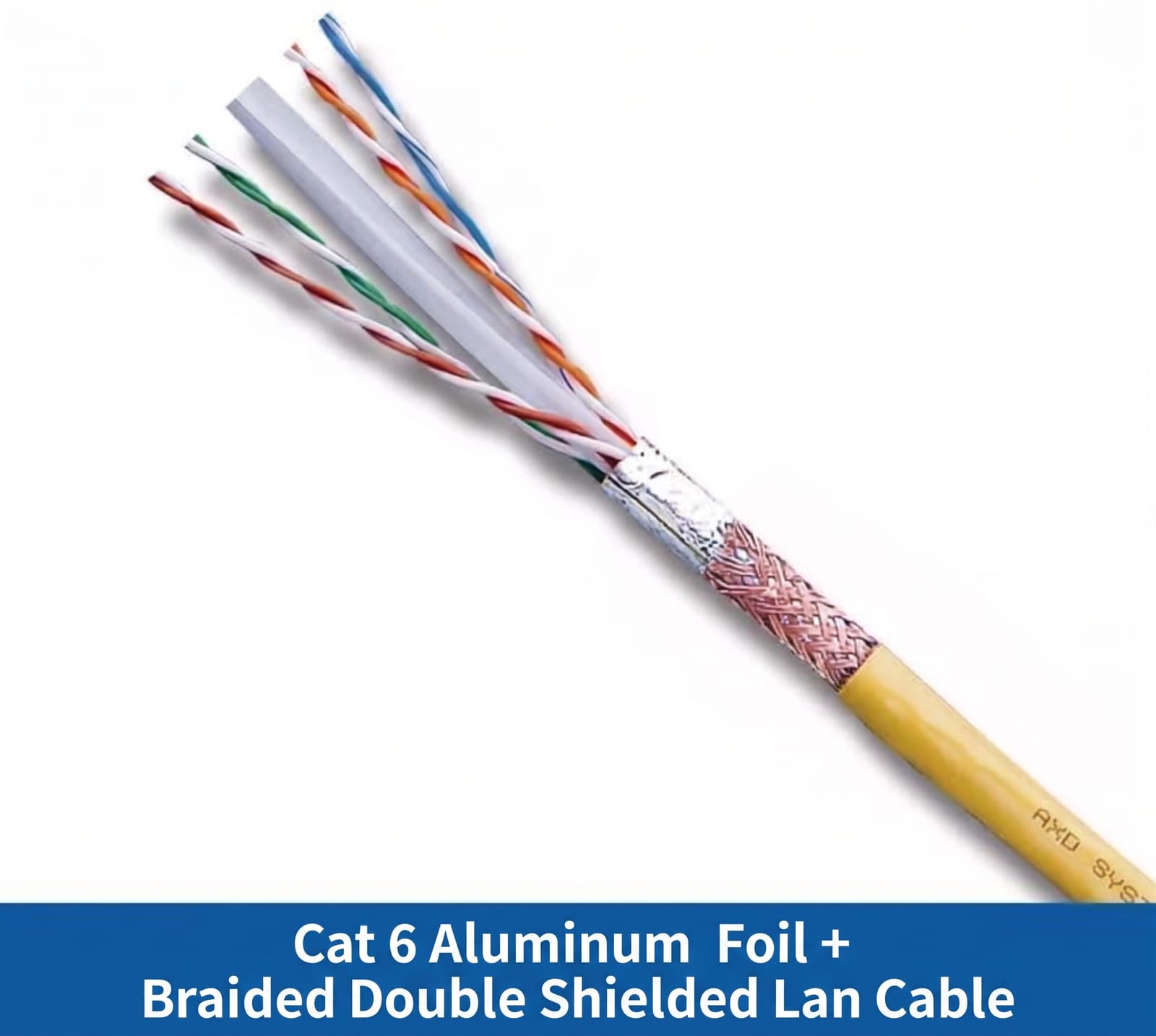
One more structure detail the guides skip: Cat6 and above usually carries an internal cross-shaped spline that separates the four pairs. It keeps pair geometry stable, which lowers crosstalk at high frequencies. If you are buying Cat6, prefer a spline design; it is a quiet sign the factory understood the standard it printed on the jacket.
The 100-Meter Rule Is a Budget, Not a Promise
The famous 100-meter ethernet limit is a channel budget, not a cable length: 90 meters of fixed in-wall cable plus up to 10 meters of patch cords combined. A better cable does not extend it, and past 100 meters the standard answer is a switch or fiber, never a longer copper box.
Fluke Networks explains the split plainly in its channel and permanent link guide: the fixed 90-meter permanent link plus patch and equipment cords must stay within a 100-meter channel for the performance guarantees to hold. Cameras and access points even get their own test model, MPTL, which certifies the link all the way to a plug at the device.
Now connect this to shopping. Those "transmits 150 meters" listings are selling either analog-camera leftovers or hope, and neither survives a certification test. The two honest ways past 100 meters are simple: put a switch where the distance splits, or move the backbone to fiber, which is exactly what it is for. For the backbone piece, our guide to what an optical distribution frame does shows where those fiber runs terminate in a building, and our SFP transceiver buying guide covers the modules that light them up. Copper owns the last meters to the desk; fiber owns everything longer. Good builds respect both. If your building already has network cabinets and racks planned, the same planning drawing decides where those 90-meter legs may start and stop.
How to Choose Ethernet Cable in Two Minutes: The Checklist
Four moves cover 95 percent of buying decisions: look, measure, test, verify. Run them in order, and no listing, no brand story, and no bargain can fool you for long.
Look. Jacket print with the right category, a flame rating (CM/CMR/CMP), 305 meters, and meter marks. Crisp pair colors, tight and even twists, a rip cord inside.
Measure. Conductor diameter around 0.51 mm (Cat5e) or 0.57 mm (Cat6) on a caliper. Box weight near 10 kg for Cat5e, 13 kg for Cat6.
Test. Multimeter DC resistance: about 9 ohms per 100 meters or less for Cat5e copper, 7 for Cat6. Magnet stays off the conductor, a knife scrape shows copper all the way through, and a jacket flame goes out on its own.
Verify. The UL file number resolves in UL Product iQ, certificates are available without asking twice, and any installation worth the name gets a Fluke certification report per point, written into the contract before work starts.
Do not let the small parts undo a good cable. Use rated plugs and jacks that match the category, wire to 568B, and keep bends gentle: a crushed corner or a jack that cost 20 cents less produces the "unexplainable" faults that eat a weekend. Keep cable away from parallel power runs where you can, and leave the service loop in the ceiling instead of stretching the run to the last centimeter, because a channel that certifies at exactly 100 meters today fails after a renovation adds one patch cord. The questions we get most before someone orders are collected on our buyer FAQ page.
Conclusion
Good ethernet cable is not a brand, a price, or a category. It is a solid copper conductor measuring about 9 ohms per 100 meters or less, in a certified jacket, inside a box that really holds 305 meters. Those four facts survive a magnet, a knife, a lighter, and a multimeter, which makes them impossible to fake in front of you.
Buy with your hands, not with your eyes. Check resistance before price, check the file number before the logo, and write certification testing into any job that lives inside a wall. The cable you approve today is the one you will never think about again, and that quiet is exactly what you are paying for.
If you want a second pair of factory eyes on a cabling plan, tell us your port speeds, run lengths, and PoE devices through the inquiry form below or browse the full product catalog. We are a cable factory, not a storefront, and we will happily verify a spec sheet line by line, for copper runs and for everything fiber beyond them.
Frequently Asked Questions
How can I tell if an ethernet cable is real copper or copper-clad aluminum?
Run three checks. A magnet that sticks means iron in the core, so reject it. A knife scrape showing silver metal under a copper skin means aluminum underneath, which is the CCA tell Fluke's technicians use. The final proof is a multimeter: real copper Cat5e measures about 9 ohms per 100 meters, while copper-clad aluminum measures 20 to 50 ohms or more.
Is Cat8 worth it for home use?
No, and the standard explains why. Cat8 delivers 25 or 40 gigabits only across 30 meters, a range built for data center racks, and no home port negotiates those speeds. Cat6A already carries 10 gigabits across the full 100-meter channel, so spend the difference on conductor quality instead of category hype.
Why do my PoE cameras keep dropping offline at night?
Nighttime is when infrared LEDs and heaters raise each camera's power draw, so voltage drop on a weak cable becomes worst at night. Copper-clad aluminum cable can measure 28 ohms per 100 meters or more, three times proper copper, and the PoE standard's 90-watt Type 4 power turns that resistance into heat and brownouts. Measure the DC resistance of one conductor: if it is far above about 9 ohms per 100 meters, the cable is the problem.
Can I run ethernet past 100 meters if I buy a better cable?
No. The 100-meter limit is a channel budget defined by the standards: 90 meters of fixed cable plus 10 meters of combined patch cords, regardless of category or conductor quality. Past that budget, add a switch at the split point or run fiber, which is what fiber backbones are for.
Do I need shielded ethernet cable in a home or small office?
Almost never. Twisted pairs handle ordinary home and office interference well, and an ungrounded shield acts as an antenna that attracts noise instead of draining it. Choose shielded cable only for real interference sources like motors or long power-parallel runs, and install it as a full shielded system with proper bonding at one grounded point.
Interested in our products?
Get a Quote